Running GPT-OSS with Codex CLI: A Complete Guide to Local Inference via Ollama, LM Studio, and MLX
Running GPT-OSS with Codex CLI: A Complete Guide to Local Inference via Ollama, LM Studio, and MLX
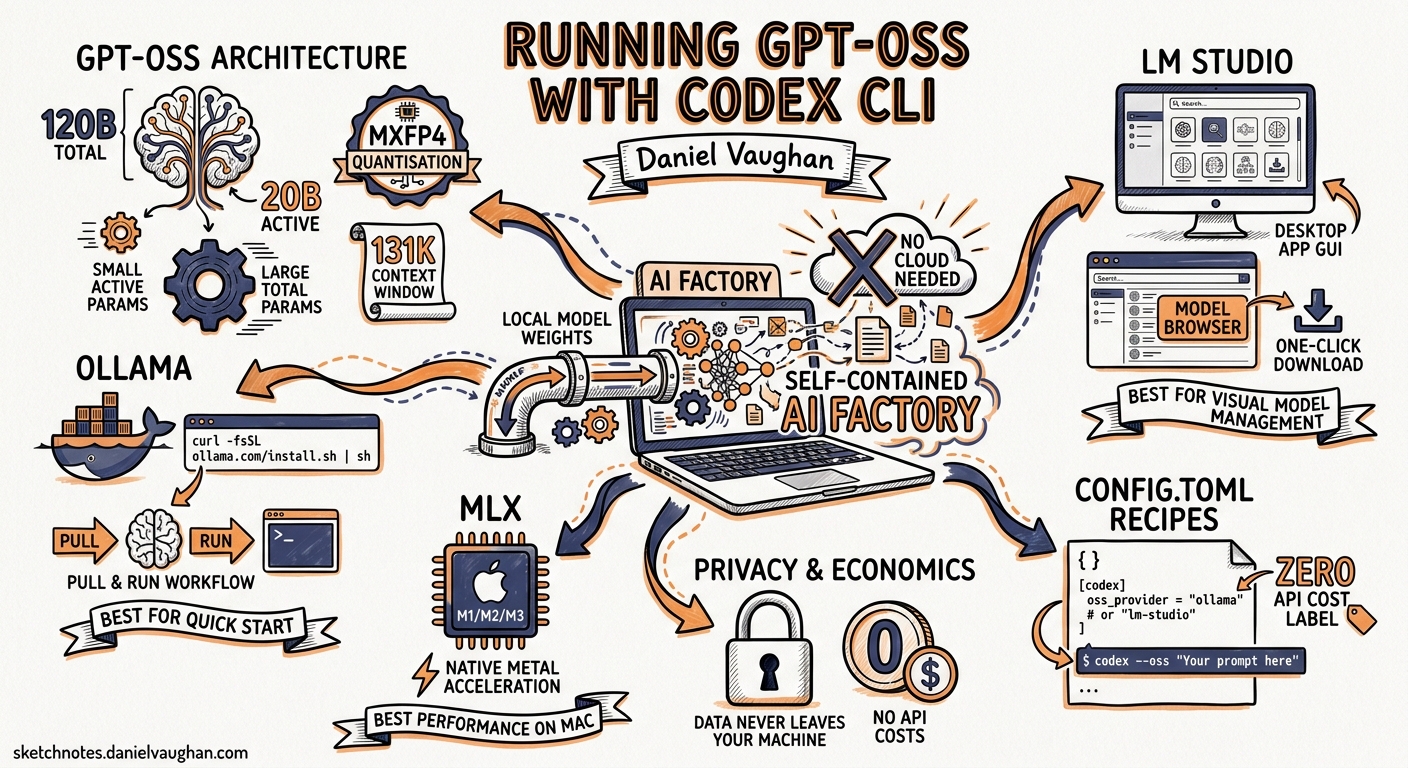
OpenAI’s release of GPT-OSS — two open-weight models under the Apache 2.0 licence — changed the economics of agentic coding overnight1. The 120-billion-parameter variant scores 62.4% on SWE-Bench Verified and 2,622 Elo on Codeforces (with tools), approaching o4-mini territory while running on a single 80 GB GPU2. The 20-billion-parameter variant fits in 16 GB of memory and still manages 60.7% on SWE-Bench Verified2. Codex CLI supports both models natively through its --oss flag and provider configuration, giving practitioners a zero-API-cost, privacy-preserving agentic coding workflow.
This article covers the architecture of both models, walks through three local inference backends — Ollama, LM Studio, and MLX — and provides production-ready config.toml recipes for daily use.
GPT-OSS Architecture at a Glance
Both models use a Mixture-of-Experts (MoE) Transformer architecture with MXFP4 quantisation on expert weights12. The efficiency gains come from activating only a fraction of total parameters per token.
| Specification | gpt-oss-120b | gpt-oss-20b |
|---|---|---|
| Total parameters | 116.8B | 20.9B |
| Active parameters per token | 5.1B | 3.6B |
| Transformer layers | 36 | 24 |
| Experts per MoE block | 128 (top-4 routing) | 32 |
| Checkpoint size | 60.8 GiB | 12.8 GiB |
| Minimum memory | 80 GB (single H100) | 16 GB |
| Context window | 131,072 tokens (YaRN) | 131,072 tokens (YaRN) |
The models use the o200k_harmony tokeniser and support configurable reasoning effort levels (low, medium, high) with full chain-of-thought access2. Both support function calling, structured outputs, and agentic tool use out of the box — the capabilities Codex CLI depends on.
How Codex CLI Discovers Local Models
When you pass --oss, Codex CLI reads the oss_provider key from ~/.codex/config.toml to determine which local backend to use3. If oss_provider is not set, the CLI prompts you to choose between the built-in ollama and lmstudio providers. The default model for --oss is gpt-oss:20b4.
flowchart LR
    A["codex --oss"] --> B{oss_provider set?}
    B -- Yes --> C["Use configured provider"]
    B -- No --> D["Prompt: Ollama or LM Studio"]
    C --> E["Connect to local endpoint"]
    D --> E
    E --> F["Start agent loop with local model"]
You can override the model on any invocation with -m:
codex --oss -m gpt-oss:120b
For anything more sophisticated — custom ports, multiple backends, or cloud-local switching — you need named profiles in config.toml.
Backend 1: Ollama
Ollama is the simplest path. It handles model downloads, quantisation, and serves an OpenAI-compatible API on port 114344.
Setup
# Install Ollama (macOS/Linux)
curl -fsSL https://ollama.com/install.sh | sh

# Pull the model
ollama pull gpt-oss:120b    # or gpt-oss:20b for smaller hardware

# Verify it is running
ollama list
Context Window Configuration
Codex requires a minimum of 64,000 tokens of context5. Ollama defaults to a smaller window, so you must increase it:
# Set context length for the current session
/set parameter num_ctx 65536
For persistent configuration, create a Modelfile:
FROM gpt-oss:120b
PARAMETER num_ctx 65536
Then build and use it:
ollama create gpt-oss-codex -f Modelfile
codex --oss -m gpt-oss-codex
Config.toml Profile
oss_provider = "ollama"

[profiles.local-120b]
model_provider = "ollama"
model = "gpt-oss:120b"
Launch with:
codex --profile local-120b
Alternatively, Ollama offers a one-command setup:
ollama launch codex
This pulls the default model, configures the context window, and starts Codex in one step5.
Backend 2: LM Studio
LM Studio provides a desktop GUI for model management and serves an OpenAI-compatible endpoint on port 12346.
Setup
# Load the model (from LM Studio CLI)
lms load gpt-oss-120b
lms server start
Ensure the context length is set to at least 65,536 tokens via the --context-length flag or the GUI settings.
Config.toml Profile
[model_providers.lms]
name = "LM Studio"
base_url = "http://localhost:1234/v1"

[profiles.lms-120b]
model_provider = "lms"
model = "gpt-oss:120b"

[profiles.lms-qwen]
model_provider = "lms"
model = "qwen/qwen3-coder-30b"
LM Studio’s advantage is switching between models without re-pulling — useful when comparing GPT-OSS against alternatives like Qwen3-Coder-30B6.
Backend 3: MLX on Apple Silicon
For Mac users, MLX provides native Apple Silicon inference without the overhead of an emulation layer6.
Setup
pip install mlx-lm
mlx_lm.server --model SuperagenticAI/gpt-oss-20b-8bit-mlx --port 8888
The 8-bit quantised gpt-oss-20b fits comfortably on a MacBook Pro with 32 GB of unified memory. The 120b variant requires substantially more — realistically an M2 Ultra or M4 Max with 192 GB6.
Config.toml Profile
[model_providers.mlx]
name = "MLX LM"
base_url = "http://localhost:8888/v1"

[profiles.mlx-20b]
model_provider = "mlx"
model = "SuperagenticAI/gpt-oss-20b-8bit-mlx"
A Multi-Profile Config.toml
In practice, you want profiles that let you switch between cloud and local with a flag. Here is a consolidated configuration:
# Default: cloud model for daily work
model = "gpt-5.5"
model_provider = "openai"

# Local fallback
oss_provider = "ollama"

# --- Profiles ---

[profiles.cloud]
model = "gpt-5.5"
model_provider = "openai"

[profiles.local]
model_provider = "ollama"
model = "gpt-oss:120b"

[profiles.local-small]
model_provider = "ollama"
model = "gpt-oss:20b"

[profiles.mlx]
model_provider = "mlx"
model = "SuperagenticAI/gpt-oss-20b-8bit-mlx"

# --- Providers ---

[model_providers.mlx]
name = "MLX LM"
base_url = "http://localhost:8888/v1"
Switch contexts without touching the file:
codex --profile cloud "explain this function"
codex --profile local "refactor the auth module"
codex --profile mlx "add unit tests for utils.ts"
Benchmark Reality Check
The headline benchmarks are impressive, but coding-agent performance in the real world depends heavily on tool-use reliability and context management. Here is how GPT-OSS stacks up on the benchmarks that matter for Codex CLI workflows:
| Benchmark | gpt-oss-120b | gpt-oss-20b | o4-mini (reference) |
|---|---|---|---|
| SWE-Bench Verified | 62.4% | 60.7% | ⚠️ ~65% (estimated) |
| Codeforces Elo (tools) | 2,622 | 2,516 | ⚠️ ~2,700 (estimated) |
| MMLU | 90.0% | 85.3% | — |
| GPQA Diamond | 80.1% | 71.5% | 81.4% |
| Tau-Bench Retail | 67.8% | 54.8% | — |
Scores from the GPT-OSS model card with high reasoning effort2. Direct o4-mini comparisons on identical benchmarks are limited; estimates marked with ⚠️.
The 120b model’s 62.4% on SWE-Bench Verified puts it ahead of every other open-weight model and within striking distance of o4-mini2. For Codex CLI, the critical capability is function calling — both models support it natively through the harmony response format1.
When to Use Local vs Cloud
flowchart TD
    A["New Codex task"] --> B{Privacy sensitive?}
    B -- Yes --> C["Local: gpt-oss"]
    B -- No --> D{Budget constrained?}
    D -- Yes --> C
    D -- No --> E{Complex multi-file refactor?}
    E -- Yes --> F["Cloud: gpt-5.5"]
    E -- No --> G{Offline or air-gapped?}
    G -- Yes --> C
    G -- No --> H["Cloud: gpt-5.5 or gpt-5.4"]
Choose local GPT-OSS when:
- Working with proprietary code that cannot leave your network
- Running in air-gapped or regulated environments
- Iterating on small-to-medium tasks where latency tolerance is higher
- Optimising cost on high-volume
codex execbatch jobs
Stick with cloud models when:
- Tackling complex multi-file refactors where the extra capability of GPT-5.5’s million-token context matters
- Using features that require server-side infrastructure (WebSocket mode, extended prompt cache retention)
- Running CI pipelines where consistent latency matters more than cost
Known Limitations and Sharp Edges
Context window mismatch. Ollama’s default context window is far below what Codex needs. If you see truncation errors or degraded output quality, the first thing to check is num_ctx5.
No WebSocket transport. Local providers serve HTTP only. You lose the ~40% latency reduction that WebSocket mode provides with the cloud Responses API7.
No prompt caching. The server-side prompt cache that reduces cloud API costs does not exist for local inference. Every turn pays full compute cost.
Reasoning effort calibration. The model_reasoning_effort setting in config.toml maps to the model’s reasoning levels, but local inference does not benefit from the same optimisation passes that the cloud API applies. Expect higher latency at high effort, particularly on the 120b model2.
Tool-use reliability. While both models support function calling, community reports suggest the 20b variant occasionally misformats tool calls on complex multi-step tasks. The 120b model is significantly more reliable here6. ⚠️ This observation is from community reports, not systematic benchmarking.
Verifying Your Setup
After configuring a local provider, run a quick diagnostic:
# Check the active configuration
codex --profile local /debug-config

# Run a simple task to verify tool use
codex --profile local "list the files in this directory and explain the project structure"

# Test non-interactive mode
codex exec --profile local "echo hello from local GPT-OSS"
If the agent loop stalls or produces empty responses, check that:
- The provider is running (
curl http://localhost:11434/v1/modelsfor Ollama) - The context window is large enough (64K+ tokens)
- The model supports function calling (GPT-OSS does; not all Ollama models do)
Citations
-
OpenAI, “Introducing gpt-oss”, openai.com, August 2025 ↩ ↩2 ↩3
-
OpenAI, “gpt-oss-120b & gpt-oss-20b Model Card”, arxiv.org, August 2025 ↩ ↩2 ↩3 ↩4 ↩5 ↩6 ↩7
-
OpenAI, “Advanced Configuration — Codex”, developers.openai.com, 2026 ↩
-
Shashi Jagtap, “Codex CLI: Running GPT-OSS and Local Coding Models with Ollama, LM Studio, and MLX”, dev.to, 2026 ↩ ↩2 ↩3 ↩4 ↩5
-
OpenAI, “Features — Codex CLI”, developers.openai.com, 2026 ↩