Running Multiple Codex Agent Instances: Parallel Orchestration Patterns
Running Multiple Codex Agent Instances: Parallel Orchestration Patterns
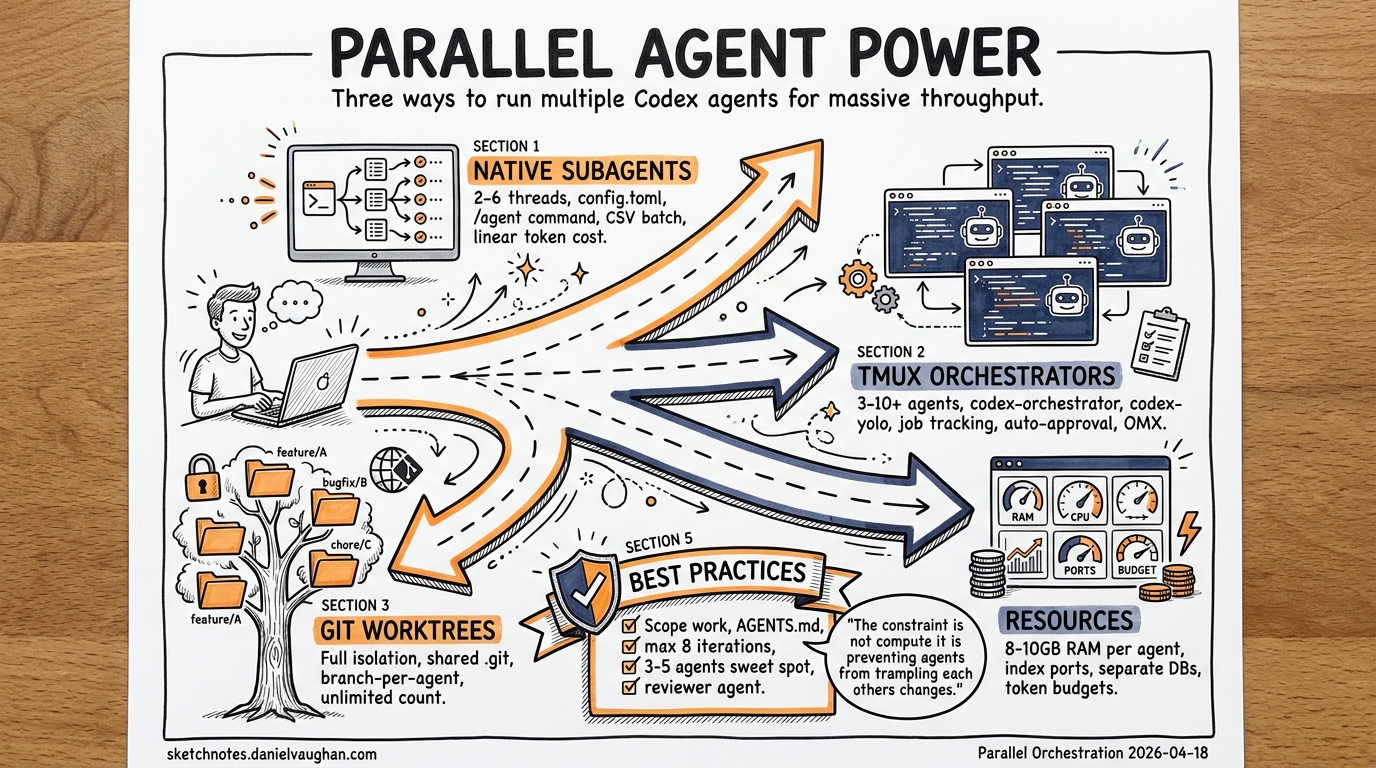
Running a single Codex CLI agent is powerful. Running several in parallel — each tackling an independent slice of your codebase — transforms your throughput entirely. This article covers the three main approaches to parallel Codex execution: native subagents, tmux-based orchestrators, and manual git worktree patterns.
Why Parallel Agents?
Modern codebases contain independent subsystems that can be modified concurrently. A frontend refactor, an API endpoint addition, and a test coverage gap can all be addressed simultaneously if each agent operates in isolation. The constraint is not compute — it is preventing agents from trampling each other’s changes1.
Three developments in late 2025 and early 2026 made this practical: CLI agents became reliable enough to work unsupervised, git worktrees solved the isolation problem, and orchestration tooling matured around tmux2.
Approach 1: Native Codex Subagents
Codex CLI has built-in support for spawning subagents — child agents that execute tasks in parallel threads within a single session3. This is the lightest-weight approach and requires no external tooling.
Triggering Subagents
Subagents spawn only when explicitly requested. Structure your prompt to decompose work:
Spawn one agent per module: fix the auth bug in src/auth/,
add validation to src/api/orders.ts, and update the tests
in tests/integration/. Wait for all, then summarise results.
Codex orchestrates the parallel execution, routes follow-up instructions to active threads, and returns a consolidated response once all agents complete3.
Configuration
Subagent behaviour is controlled in config.toml under the [agents] section3:
[agents]
max_threads = 6          # concurrent thread cap (default: 6)
max_depth = 1            # nesting depth — prevents recursive delegation
job_max_runtime_seconds = 300  # timeout per CSV batch worker
Managing Active Threads
The /agent command provides runtime thread management3:
- Switch between active threads
- Inspect progress on any running thread
- Steer, pause, or terminate individual agents
When an inactive thread raises an approval request during an interactive session, press o to open that thread before responding3.
Custom Agent Roles
Beyond the three built-in agents (default, worker, explorer), you can define custom agents as TOML files3:
# ~/.codex/agents/reviewer.toml
name = "reviewer"
description = "Code review specialist — reads but never writes"
developer_instructions = """
Review the provided files for bugs, security issues, and style violations.
Report findings but do not modify any files.
"""
sandbox_mode = "read-only"
Project-scoped agents live in .codex/agents/ and inherit the parent session’s sandbox policies and runtime overrides3.
CSV Batch Processing
For repetitive tasks across many targets, the experimental spawn_agents_on_csv tool processes rows in parallel3:
Process this CSV of API endpoints. For each row, generate
integration tests using the {method} and {path} columns.
Each worker calls report_agent_job_result exactly once, and Codex exports combined results to a CSV with metadata3.
Subagent Trade-offs
Subagents are convenient but carry costs. Token consumption scales linearly with thread count — each subagent runs its own model inference3. The default max_depth=1 prevents recursive delegation, which is sensible: nested subagents can rapidly exhaust context windows and budgets.
Approach 2: Tmux-Based Orchestrators
For heavier parallelism — five or more agents working independently on separate branches — external orchestrators provide better visibility and control than native subagents.
Codex-Orchestrator
Codex-orchestrator spawns Codex agents in separate tmux sessions, enabling background execution with immediate job tracking4:
# Install via Claude Code plugin
/plugin marketplace add kingbootoshi/codex-orchestrator
/plugin install codex-orchestrator

# Or manually
curl -fsSL https://raw.githubusercontent.com/kingbootoshi/codex-orchestrator/main/install.sh | bash
Key commands4:
# Launch an agent
codex-orchestrator start "refactor the auth module to use JWT"

# Monitor all running agents
codex-orchestrator jobs --json

# Send a follow-up instruction mid-task
codex-orchestrator send <job-id> "also add rate limiting"

# Capture recent output
codex-orchestrator capture <job-id> 100
Each job stores metadata, the original prompt, and a complete terminal transcript in ~/.codex-agent/jobs/4. The --map flag injects a CODEBASE_MAP.md into agent prompts for instant architectural context4.
Codex-YOLO
Codex-yolo optimises for speed by auto-approving permission prompts whilst preserving OS-level sandboxing (Landlock/seccomp on Linux, Seatbelt on macOS)5:
# Install
curl -fsSL https://raw.githubusercontent.com/codex-yolo/codex-yolo/refs/heads/main/install.sh | bash

# Run three agents in parallel
codex-yolo "fix the login bug" "add unit tests for auth" "update the README"

# Specify model and working directory
codex-yolo -m o4-mini -d /path/to/project "refactor the API layer"
The launcher spawns one tmux window per task. An approver daemon polls every 0.3 seconds, detecting permission prompts via two-tier signal matching and sending confirmations automatically5. A 2-second per-pane cooldown prevents duplicate approvals, with a full audit log at /tmp/codex-yolo-<session>.log5.
⚠️ Warning: Auto-approval tools reduce human oversight. Use them only in sandboxed environments with expendable branches — never on production code or shared mainlines.
Oh My Codex (OMX)
OMX adds session persistence, hooks, and structured workflows (autopilot, TDD, code review, planning) on top of Codex CLI6. It spawns parallel workers in isolated git worktrees, preventing write conflicts during simultaneous edits6.
Approach 3: Manual Git Worktree Patterns
If you prefer full control without third-party tooling, git worktrees plus tmux give you everything you need.
Setting Up Isolated Worktrees
# Create worktrees for each agent's task
git worktree add -b feature/auth-refactor ../agent-auth main
git worktree add -b feature/api-orders ../agent-api main
git worktree add -b fix/test-coverage ../agent-tests main

# Verify
git worktree list
Each worktree shares the .git object database but has its own working directory, HEAD, and staging area7. Agents cannot interfere with each other’s uncommitted changes.
Launching Agents in Tmux
# Create a tmux session with three panes
tmux new-session -d -s agents -c ../agent-auth
tmux send-keys -t agents "codex 'Refactor auth to use JWT tokens'" Enter

tmux split-window -h -t agents -c ../agent-api
tmux send-keys -t agents "codex 'Add order validation endpoint'" Enter

tmux split-window -v -t agents -c ../agent-tests
tmux send-keys -t agents "codex 'Increase test coverage to 80%'" Enter

tmux attach -t agents
Resource Considerations
Parallel agents consume significant resources. Key numbers to watch78:
| Resource | Concern | Mitigation |
|---|---|---|
| RAM | Each agent uses 8–10 GB | Limit to 3–5 concurrent agents |
| Disk | Worktrees duplicate build artefacts | Use pnpm for shared packages; clean build dirs |
| Ports | Dev servers collide on defaults | Index ports: BASE_PORT + (WORKTREE_INDEX * 10) |
| Tokens | Linear cost scaling per agent | Set per-agent budgets; pause at 85% threshold |
| Database | Shared local DBs create race conditions | Use separate DB instances or test databases per worktree |
Cleanup
# After merging, remove worktrees
git worktree remove ../agent-auth
git worktree remove ../agent-api
git worktree remove ../agent-tests

# Prune stale references
git worktree prune
Orchestration Architecture
The following diagram shows how the three approaches relate:
graph TD
    A[Developer Prompt] --> B{Parallelism<br/>Strategy}
    B -->|Lightweight<br/>2-6 threads| C[Native Subagents]
    B -->|Medium<br/>3-10 agents| D[Tmux Orchestrator]
    B -->|Full Control| E[Manual Worktrees]

    C --> F[Single Session<br/>Shared Context]
    D --> G[Separate Sessions<br/>Job Tracking]
    E --> H[Separate Worktrees<br/>Manual Management]

    F --> I[Consolidated<br/>Response]
    G --> J[Per-Job Logs<br/>& Capture]
    H --> K[Branch-per-Agent<br/>PR Review]

    style C fill:#e1f5fe
    style D fill:#fff3e0
    style E fill:#e8f5e9
Best Practices
Scope work clearly. Each agent should own a distinct set of files. Overlapping file ownership creates merge conflicts that consume more time than the parallelism saves1.
Use AGENTS.md for shared context. Document architectural decisions, style conventions, and gotchas so every agent follows the same rules. Critically, only humans should write this file — LLM-generated context files provide no measurable benefit9.
Set iteration limits. Enforce a maximum of 8 iterations per agent with forced reflection prompts before retries. This prevents agents from looping endlessly on identical failing approaches9.
Budget tokens aggressively. Set hard per-agent token budgets (e.g., 180k for frontend tasks, 280k for backend). Auto-kill agents stuck after 3+ iterations on the same error9.
Keep agent count manageable. 3–5 concurrent agents is the practical sweet spot for active development. Beyond that, the review burden exceeds the generation throughput — the bottleneck shifts from writing code to verifying it9.
Dedicate a reviewer agent. Spawn a permanent read-only agent that runs linting, tests, and security checks on every task completion. This creates an automated quality gate before human review9.
Choosing the Right Approach
| Factor | Native Subagents | Tmux Orchestrator | Manual Worktrees |
|---|---|---|---|
| Setup effort | None | Plugin install | Shell scripting |
| Agent count | 2–6 | 3–10+ | Unlimited |
| Isolation | Thread-level | Session-level | Full worktree |
| Visibility | /agent command |
jobs --json |
tmux panes |
| Best for | Quick decomposition | Sustained parallel work | Enterprise/custom pipelines |
Start with native subagents for ad-hoc parallelism. Graduate to an orchestrator when you regularly run more than three agents or need persistent job logs. Use manual worktrees when your workflow demands custom integration with CI/CD pipelines or enterprise tooling.
Citations
-
Simon Willison, “Embracing the parallel coding agent lifestyle,” October 2025. https://simonwillison.net/2025/Oct/5/parallel-coding-agents/ ↩ ↩2
-
Vibecoding.app, “Agentmaxxing: Run Multiple AI Agents in Parallel,” 2026. https://vibecoding.app/blog/agentmaxxing ↩
-
OpenAI, “Subagents – Codex,” OpenAI Developers Documentation, 2026. https://developers.openai.com/codex/subagents ↩ ↩2 ↩3 ↩4 ↩5 ↩6 ↩7 ↩8 ↩9 ↩10
-
kingbootoshi, “codex-orchestrator,” GitHub, 2026. https://github.com/kingbootoshi/codex-orchestrator ↩ ↩2 ↩3 ↩4
-
codex-yolo, “codex-yolo: Run parallel OpenAI Codex CLI agents in tmux,” GitHub, 2026. https://github.com/codex-yolo/codex-yolo ↩ ↩2 ↩3
-
scalarian, “oh-my-codex (OMX),” GitHub, 2026. https://github.com/staticpayload/oh-my-codex ↩ ↩2
-
Upsun, “Git worktrees for parallel AI coding agents,” Upsun Developer Documentation, 2026. https://developer.upsun.com/posts/2026/git-worktrees-for-parallel-ai-coding-agents ↩ ↩2
-
Patrick D’Appollonio, “How to run multiple Claude Code or Codex agents in parallel against a single codebase,” 2026. https://www.patrickdap.com/post/how-to-run-multiple-agents/ ↩
-
Addy Osmani, “The Code Agent Orchestra — what makes multi-agent coding work,” AddyOsmani.com, 2026. https://addyosmani.com/blog/code-agent-orchestra/ ↩ ↩2 ↩3 ↩4 ↩5