Codex CLI exec Recipes: Practical One-Liners and Shell Patterns for Daily Development
Codex CLI exec Recipes: Practical One-Liners and Shell Patterns for Daily Development
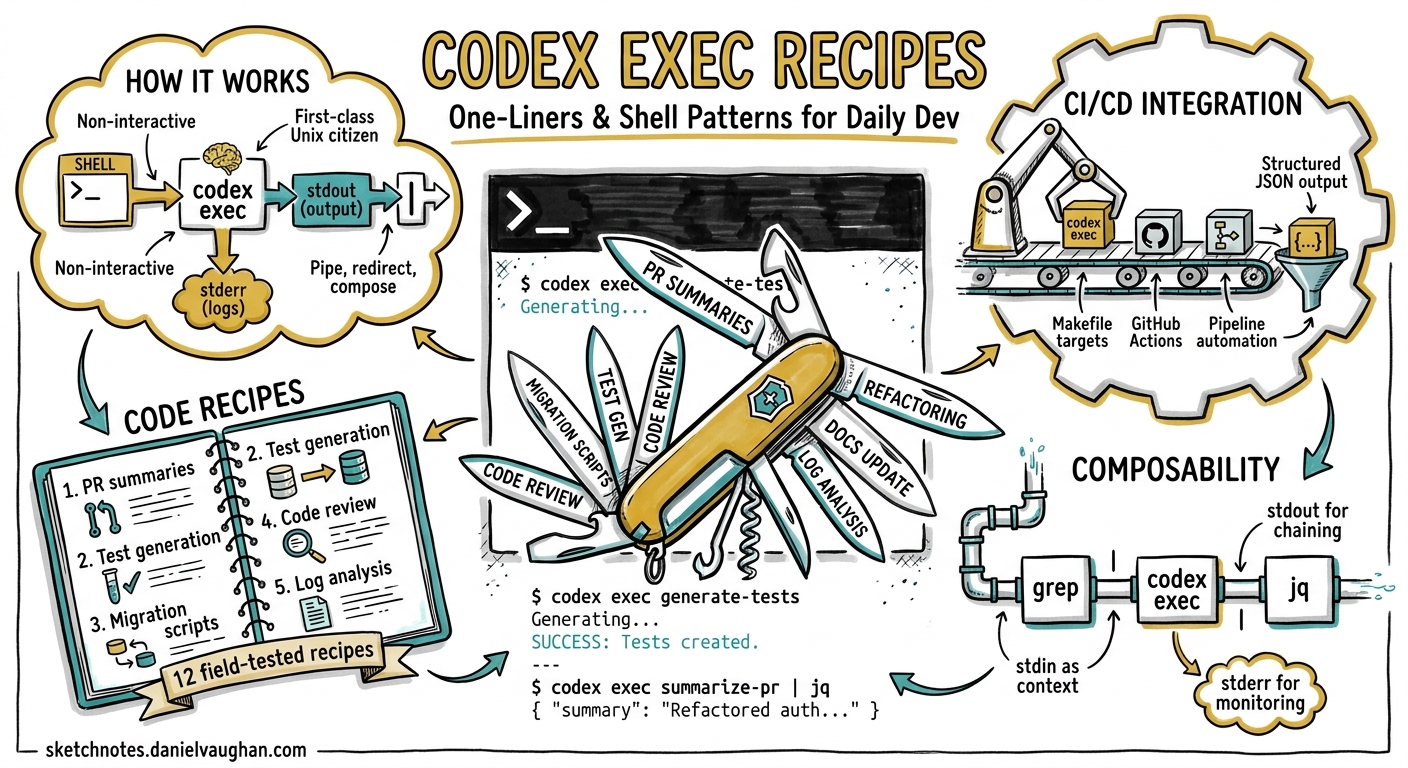
The interactive TUI gets most of the attention, but codex exec is where Codex CLI earns its keep in professional workflows. It runs Codex non-interactively, streams progress to stderr, and prints only the final agent message to stdout — making it a first-class Unix citizen you can pipe, redirect, and compose just like grep or jq1. This article collects twelve field-tested recipes that solve real daily development problems, each ready to paste into your terminal, Makefile, or CI pipeline.
How codex exec Works
Before the recipes, a quick refresher on the execution model. When you run codex exec "your prompt", Codex enters the agent loop: it reads your repository, calls the model, and executes any tool calls (file reads, shell commands) until the model decides it is done2. The final response goes to stdout. Everything else — progress indicators, tool call logs, reasoning traces — goes to stderr.
flowchart LR
    A[Shell / Script] -->|prompt + stdin| B[codex exec]
    B -->|stderr| C[Progress & Logs]
    B -->|stdout| D[Final Output]
    D -->|pipe| E[Next Command]
Key flags to know:
| Flag | Purpose |
|---|---|
--sandbox read-only |
Default — agent reads but cannot write3 |
--sandbox workspace-write |
Agent may edit files and run commands |
-m MODEL |
Override the default model for this invocation |
--json |
Emit JSON Lines events instead of plain text4 |
--output-schema schema.json |
Enforce a JSON Schema on the final response1 |
-o FILE |
Write the final message to a file |
--ephemeral |
Do not persist the session (no resume later)1 |
-p PROFILE |
Load a named profile from config.toml5 |
With that vocabulary in place, here are the recipes.
Recipe 1: Generate a Conventional Commit Message
git diff --cached | codex exec "Write a single conventional commit message \
(type(scope): description) for these staged changes. Output ONLY the \
message, no explanation." | git commit -F -
Pipe the staged diff to Codex, ask for a single commit message, and feed it straight into git commit. The --cached flag ensures you are describing exactly what will be committed. For more structured output, add --output-schema with a schema requiring type, scope, and description fields1.
Recipe 2: Summarise a PR Diff
gh pr diff 42 | codex exec "Summarise this pull request diff. \
List: (1) what changed, (2) why it likely changed, (3) any risks. \
Use bullet points."
This pairs the GitHub CLI’s gh pr diff with Codex to produce a human-readable summary. Useful for reviewing colleagues’ PRs before opening the full diff, or for generating PR description drafts. The output goes to stdout, so pipe it to gh pr comment 42 --body - to post it directly6.
Recipe 3: Explain an Unfamiliar File
codex exec "Explain what src/engine/scheduler.rs does. \
Cover the key data structures, the public API, and any \
non-obvious design decisions. Be concise."
No piping needed here — Codex reads the file from the workspace directly. This is faster than grepping through unfamiliar code when you have just joined a project or are reviewing a contribution to an area you do not own. Add -m gpt-5.5 if you want deeper reasoning on complex files7.
Recipe 4: Batch-Fix Lint Errors
npm run lint 2>&1 | codex exec \
  --sandbox workspace-write \
  "Fix every lint error reported in this output. \
   Do not change logic or behaviour — only fix lint violations. \
   Run the linter again after fixing to verify."
Pipe your linter’s output as context, grant write access with --sandbox workspace-write, and let Codex fix and verify in a loop. The agent will call npm run lint again after applying fixes to confirm the errors are resolved2. Works equally well with ruff check for Python, cargo clippy for Rust, or golangci-lint run for Go.
Recipe 5: Generate Test Stubs for Changed Files
git diff --name-only HEAD~1 | codex exec \
  --sandbox workspace-write \
  "For each file listed in stdin, generate a test file with stubs \
   covering the public API. Follow existing test conventions in the \
   repo. Do NOT implement assertions — just create the structure."
This uses the prompt-plus-stdin pattern8: the file list arrives via stdin, the instruction via the command-line prompt. Codex reads each file, infers the testing framework from existing tests, and creates stub files. Particularly useful after a feature branch introduces several new modules.
Recipe 6: Scan for Security Issues
codex exec "Perform a security review of this repository. \
Focus on: SQL injection, command injection, hardcoded secrets, \
insecure deserialization, and path traversal. \
Report findings as a markdown table with columns: \
File, Line, Severity, Description, Recommendation."
Codex reads the codebase, identifies patterns, and produces a structured report. For CI integration, add --output-schema to enforce a JSON array of findings and pipe the result into your issue tracker1. Note that this is not a substitute for dedicated SAST tools — it is a complement that catches logic-level issues scanners miss9.
Recipe 7: Generate Release Notes from Git Log
git log --oneline v2.3.0..HEAD | codex exec \
  "Generate release notes from these commits. \
   Group by: Features, Bug Fixes, Breaking Changes, Other. \
   Use markdown formatting. Include the commit hash in parentheses."
Feed a range of commits and get back grouped, formatted release notes. For public-facing changelogs, add a constraint like “Write for end users, not developers — omit internal refactoring details”6.
Recipe 8: Convert a Struct Between Languages
cat internal/models/user.go | codex exec \
  "Convert this Go struct to a TypeScript interface. \
   Preserve field names (convert to camelCase). \
   Map Go types to TypeScript equivalents. \
   Add JSDoc comments from Go comments."
A common task when maintaining polyglot codebases or generating API client types from server-side models. The prompt-plus-stdin pattern keeps the instruction separate from the data8.
Recipe 9: Explain a CI Failure
gh run view 12345 --log-failed | codex exec \
  "Analyse this CI failure log. Identify: \
   (1) the root cause, (2) the specific test or step that failed, \
   (3) a suggested fix. Be concise."
Pipe failed CI logs directly into Codex for rapid triage. On large log outputs, you may want to truncate with tail -200 before piping to keep within context limits. For automated pipelines, combine with --output-schema to produce structured JSON that a bot can post as a PR comment10.
Recipe 10: Extract and Consolidate TODOs
codex exec "Find all TODO, FIXME, HACK, and XXX comments in this \
repository. Output a markdown table with columns: \
File, Line, Type, Comment Text. Sort by type, then file."
Codex walks the workspace, reads files, and collates the results. Unlike grep -rn 'TODO', the agent understands context — it can distinguish a TODO in a code comment from the word appearing in a string literal or documentation.
Recipe 11: Produce a Structured JSON Report
codex exec \
  --output-schema ./schemas/repo-health.json \
  -o report.json \
  "Analyse this repository's health. Assess: \
   test coverage estimation, dependency freshness, \
   documentation completeness, and code style consistency."
The --output-schema flag constrains the model’s final response to match your JSON Schema1. Combined with -o to write to a file, this turns Codex into a report generator whose output is machine-parseable. Feed report.json into dashboards, Slack notifications, or quality gates.
Your schema might look like:
{
  "$schema": "https://json-schema.org/draft/2020-12/schema",
  "type": "object",
  "properties": {
    "test_coverage": { "type": "string" },
    "dependency_freshness": { "type": "string" },
    "documentation_score": { "type": "number", "minimum": 0, "maximum": 10 },
    "style_issues": {
      "type": "array",
      "items": { "type": "string" }
    }
  },
  "required": ["test_coverage", "dependency_freshness", "documentation_score"]
}
Recipe 12: Resume Yesterday’s Analysis with New Instructions
codex exec resume --last \
  "Now generate replacement stubs for everything you flagged yesterday."
The resume subcommand reloads the previous session’s transcript — plan history, tool outputs, approvals — and lets you continue with a follow-up prompt1. This is particularly useful for multi-phase workflows: audit on day one, remediate on day two, without re-reading the entire codebase.
Composing Recipes: A Makefile Pattern
Wrapping these one-liners in a Makefile gives your team a discoverable, standardised toolkit:
.PHONY: commit-msg pr-summary lint-fix security-scan release-notes

commit-msg:
 @git diff --cached | codex exec "Write a conventional commit \
   message for these staged changes. Output ONLY the message." \
   | git commit -F -

pr-summary:
 @gh pr diff $(PR) | codex exec "Summarise this PR diff in \
   bullet points: what changed, why, and risks." \
   | gh pr comment $(PR) --body -

lint-fix:
 @npm run lint 2>&1 | codex exec --sandbox workspace-write \
   "Fix every lint error. Re-run the linter to verify."

security-scan:
 @codex exec --output-schema ./schemas/security.json \
   -o security-report.json \
   "Security review: SQL injection, secrets, path traversal."

release-notes:
 @git log --oneline $(FROM)..HEAD | codex exec \
   "Generate release notes grouped by Features, Fixes, Breaking."
Run make commit-msg instead of typing the full command. New team members discover available recipes by reading the Makefile — no tribal knowledge required.
Performance and Cost Tips
A few practical considerations when using codex exec at scale:
-
Use profiles for cost control. Create a
fastprofile withmodel = "gpt-5.4-mini"and low reasoning effort for simple tasks like commit messages, and adeepprofile withmodel = "gpt-5.5"for security scans5. -
Keep stdin concise. Pipe only what the agent needs.
git diff --cachedis better thangit diffwhen you only care about staged changes. -
Use
--ephemeralfor throwaway runs. If you will not resume the session, skip the disk write1. -
Reasoning-token reporting. Since v0.125,
codex exec --jsonreports reasoning-token usage, so you can track what each recipe actually costs4.
codex exec --json "Summarise the repo" 2>/dev/null \
  | jq 'select(.type == "usage") | .usage'
- Prompt caching. The Responses API automatically caches prompt prefixes11. Recipes that share a common system prompt and AGENTS.md preamble benefit from higher cache-hit rates across sequential invocations.
When to Reach for codex exec vs. the TUI
The TUI remains the right choice for exploratory work — debugging a tricky issue, designing an architecture, or pairing with the agent on a complex refactor. Reach for codex exec when:
- The task is well-defined and does not need interactive clarification.
- The output feeds another command or script.
- You are running in CI/CD where no terminal is available.
- You want reproducible, scriptable invocations your team can share.
flowchart TD
    A[Development Task] --> B{Needs interactive\nexploration?}
    B -->|Yes| C[codex TUI]
    B -->|No| D{Output feeds\nanother tool?}
    D -->|Yes| E[codex exec + pipe]
    D -->|No| F{Running in CI?}
    F -->|Yes| G[codex exec + --json]
    F -->|No| H[codex exec + stdout]
Conclusion
codex exec turns Codex CLI from an interactive assistant into a composable Unix tool. Each recipe above solves a concrete daily problem with a single command. Start with the ones that match your most frequent friction points — commit messages, PR summaries, lint fixes — and expand from there. Wrap them in a Makefile, add --output-schema where you need machine-readable output, and you have a team-wide agentic toolkit that costs nothing to maintain.
Citations
-
OpenAI, “Non-interactive mode – Codex,” OpenAI Developers, 2026. https://developers.openai.com/codex/noninteractive ↩ ↩2 ↩3 ↩4 ↩5 ↩6 ↩7 ↩8
-
OpenAI, “Unrolling the Codex agent loop,” OpenAI Blog, 2026. https://openai.com/index/unrolling-the-codex-agent-loop/ ↩ ↩2
-
OpenAI, “Command line options – Codex CLI,” OpenAI Developers, 2026. https://developers.openai.com/codex/cli/reference ↩
-
OpenAI, “Changelog – Codex,” OpenAI Developers, April 2026. https://developers.openai.com/codex/changelog ↩ ↩2
-
OpenAI, “Advanced Configuration – Codex,” OpenAI Developers, 2026. https://developers.openai.com/codex/config-advanced ↩ ↩2
-
OpenAI, “Features – Codex CLI,” OpenAI Developers, 2026. https://developers.openai.com/codex/cli/features ↩ ↩2
-
OpenAI, “Models – Codex,” OpenAI Developers, 2026. https://developers.openai.com/codex/models ↩
-
OpenAI, “Codex exec stdin piping,” GitHub PR #15917, 2026. https://github.com/openai/codex/pull/15917/files ↩ ↩2
-
OpenAI, “Automating Code Quality and Security Fixes with Codex CLI on GitLab,” OpenAI Cookbook, 2026. https://developers.openai.com/cookbook/examples/codex/secure_quality_gitlab ↩
-
OpenAI, “Best practices – Codex,” OpenAI Developers, 2026. https://developers.openai.com/codex/learn/best-practices ↩
-
OpenAI, “Prompt Caching 201,” OpenAI Cookbook, 2026. https://developers.openai.com/cookbook/examples/prompt_caching_201 ↩