Codex Exec as a Unix Citizen: Stdin Piping, Structured Output, and Shell Composition
Codex Exec as a Unix Citizen: Stdin Piping, Structured Output, and Shell Composition
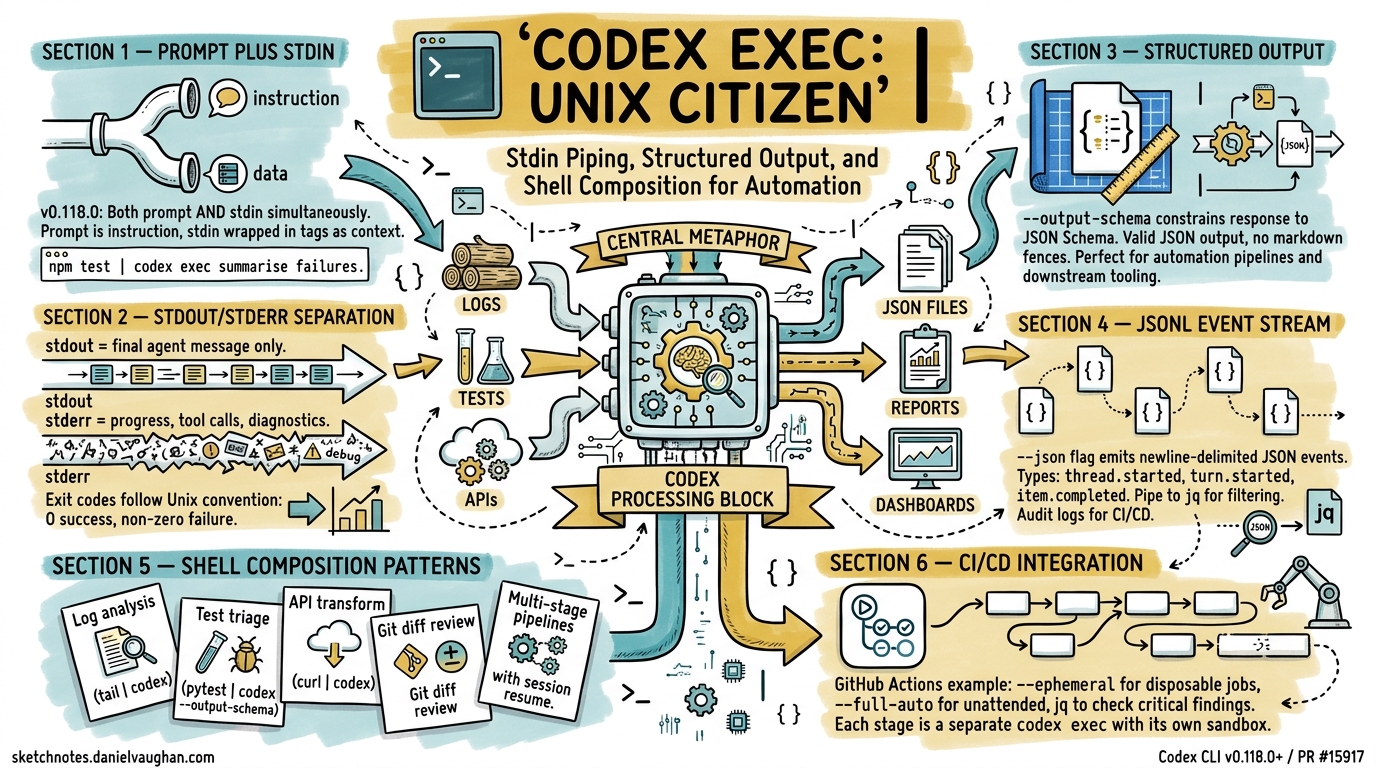
The Unix philosophy — small tools, text streams, composable pipelines — has shaped how developers think about automation for over fifty years. With the prompt-plus-stdin workflow landing in v0.118.0 (PR #15917, merged 28 March 2026)1, codex exec now fits cleanly into that tradition. This article covers the three capabilities that make it work: stdin piping, structured JSON output, and shell composition patterns that chain Codex into existing toolchains.
The Prompt-Plus-Stdin Model
Before PR #15917, codex exec accepted either a positional prompt argument or piped stdin — not both simultaneously1. That limitation forced awkward workarounds: writing prompts to temporary files, or concatenating instructions and data into a single stdin blob the model had to parse.
The fix is elegant. When codex exec receives both a positional prompt and piped stdin, the prompt becomes the instruction and stdin is wrapped in <stdin>...</stdin> tags as structured context2. Two invocation patterns now cover every use case:
Pattern 1: Prompt-Plus-Stdin
Pipe data while providing an explicit instruction:
npm test 2>&1 | codex exec "summarise the failing tests and propose the smallest likely fix"
The positional argument is the instruction; piped content is appended as context. This is the pattern you will reach for most often.
Pattern 2: Stdin-Only (Full Prompt from Pipe)
When the piped content is the prompt, use the - sentinel or omit the prompt argument entirely:
echo "Refactor the auth module to use dependency injection" | codex exec -
Backward compatibility is preserved: if no positional argument is supplied and stdin is a pipe, Codex treats stdin as the full prompt, exactly as it did before v0.118.01.
Stdout, Stderr, and Exit Codes
codex exec follows the Unix convention of separating data from diagnostics3. Understanding this separation is essential for shell composition:
flowchart LR
    A["codex exec"] -->|stdout| B["Final agent message"]
    A -->|stderr| C["Progress, tool calls, diagnostics"]
    A -->|exit code| D["0 = success, non-zero = failure"]
- stdout carries only the final agent message — the text you want to capture or pipe downstream3.
- stderr streams live progress: tool invocations, approval prompts, model reasoning. Visible in the terminal but invisible to downstream pipes.
- Exit codes map to pipeline semantics: zero for success, non-zero for failures including API errors, sandbox violations, and required-MCP-server initialisation failures3.
This means codex exec "summarise this repo" > summary.txt captures a clean summary file while progress streams to the terminal. No post-processing needed.
Structured Output with --output-schema
Free-text output works for human consumption but breaks automation. The --output-schema flag accepts a JSON Schema file and constrains the final response to conform to it4:
codex exec "find security issues in the codebase" \
  --output-schema ./analysis-schema.json \
  -o ./analysis.json
Where analysis-schema.json defines the shape:
{
  "type": "object",
  "properties": {
    "summary": { "type": "string" },
    "issues": {
      "type": "array",
      "items": {
        "type": "object",
        "properties": {
          "file": { "type": "string" },
          "severity": { "enum": ["critical", "high", "medium", "low"] },
          "description": { "type": "string" },
          "suggested_fix": { "type": "string" }
        },
        "required": ["file", "severity", "description"]
      }
    }
  },
  "required": ["summary", "issues"]
}
The -o flag writes the final message to a file, but you can equally pipe it to jq for further processing. The output is valid JSON — no markdown fences, no preamble4.
Current Limitation
--output-schema cannot yet be combined with codex exec resume (Issue #14343)5. If your pipeline resumes a session, you will need to validate the output shape yourself.
JSON Lines Event Stream
The --json flag replaces the human-readable progress display with a newline-delimited JSON (JSONL) event stream on stdout3. Each line is a self-contained JSON object with a type field:
codex exec --json "refactor the auth module" > events.jsonl
Key event types include:
| Event Type | Contents |
|---|---|
thread.started |
Session ID, model, configuration |
turn.started |
Turn index, prompt text |
item.started |
Tool call begin (name, arguments) |
item.completed |
Tool result or agent message |
turn.completed |
Turn summary, token counts |
Extract just the final agent message with jq:
codex exec --json "summarise the repo" \
  | jq -r 'select(.type=="item.completed" and .item.type=="agent_message") | .item.text'
This is particularly powerful in CI/CD where you need both the machine-readable event log for auditing and a human-readable summary for pull request comments6.
Shell Composition Patterns
With stdin piping, structured output, and clean stdout/stderr separation, codex exec composes naturally with standard Unix tools. Here are five production-tested patterns.
1. Log Analysis Pipeline
Pipe application logs through Codex for root-cause analysis:
tail -n 200 /var/log/app/error.log \
  | codex exec "identify the likely root cause, cite the most important errors, and suggest three debugging steps"
The 200-line tail keeps context within token limits while giving the model enough signal to reason about the failure2.
2. Test Failure Triage
Chain test output directly into Codex for automated triage:
pytest --tb=short 2>&1 \
  | codex exec --output-schema ./test-triage-schema.json \
    "classify each failing test as regression, flaky, or new-failure; suggest the most likely fix for regressions" \
  -o ./triage.json
Downstream tooling can parse triage.json to auto-label GitHub issues or post Slack summaries4.
3. API Response Transformation
Use Codex as an intelligent jq for complex transformations:
curl -s https://api.example.com/v2/inventory \
  | codex exec "extract all items with stock below 10, format as a CSV with columns: id, name, stock, reorder_url"
The output streams directly to stdout, ready for redirection to a file or further piping2.
4. Git Diff Analysis
Analyse staged changes before committing:
git diff --cached \
  | codex exec --output-schema ./review-schema.json \
    "review this diff for bugs, security issues, and style violations" \
  -o ./review.json
This slots into a pre-commit hook. If review.json contains critical findings, the hook exits non-zero to block the commit.
5. Multi-Stage Pipeline
Chain multiple Codex invocations for complex workflows:
# Stage 1: Extract requirements from a spec
cat SPEC.md \
  | codex exec "extract testable requirements as a numbered list" \
  > requirements.txt

# Stage 2: Generate test stubs from requirements
cat requirements.txt \
  | codex exec --full-auto --sandbox workspace-write \
    "generate pytest test stubs for each requirement in tests/test_spec.py"
Each stage is a separate codex exec invocation with its own sandbox policy — the first is read-only (default), the second writes to the workspace3.
Automation Flags Reference
The flags that matter most for pipeline integration:
# Equivalent config.toml settings for CI profiles
[profiles.ci]
model = "gpt-5.4-mini"
approval_mode = "full-auto"
sandbox = "workspace-write"
| Flag | Purpose | Pipeline Use |
|---|---|---|
--ephemeral |
Skip session persistence | Disposable CI jobs |
--full-auto |
No approval prompts | Unattended execution |
--sandbox <mode> |
Permission boundary | read-only for analysis, workspace-write for generation |
--json |
JSONL event stream | Audit logs, event processing |
--output-schema <path> |
Constrained JSON output | Downstream automation |
-o <path> |
Write final message to file | Artifact capture |
--skip-git-repo-check |
Run outside Git repos | Ad-hoc scripting |
-c key=value |
Inline config overrides | Per-job tuning |
CI/CD Integration: GitHub Actions Example
A practical GitHub Actions workflow that uses codex exec as a pipeline stage:
jobs:
  security-scan:
    runs-on: ubuntu-latest
    steps:
      - uses: actions/checkout@v4
      - name: Run Codex security analysis
        env:
          CODEX_API_KEY: ${{ secrets.CODEX_API_KEY }}
        run: |
          codex exec --full-auto --ephemeral \
            --output-schema .codex/security-schema.json \
            "scan for security vulnerabilities, focusing on injection risks and auth bypass" \
            -o security-report.json
      - name: Check for critical findings
        run: |
          CRITICAL=$(jq '[.issues[] | select(.severity=="critical")] | length' security-report.json)
          if [ "$CRITICAL" -gt 0 ]; then
            echo "::error::Found $CRITICAL critical security issues"
            exit 1
          fi
The --ephemeral flag avoids cluttering CI runners with session rollout files3. The CODEX_API_KEY environment variable handles authentication without interactive sign-in7.
Session Resume in Pipelines
For multi-stage pipelines where context must persist across steps, codex exec resume carries the full conversation forward3:
# Stage 1: Analyse
codex exec --json "analyse the codebase architecture" > stage1.jsonl
SESSION_ID=$(jq -r 'select(.type=="thread.started") | .session_id' stage1.jsonl)

# Stage 2: Act on the analysis
codex exec resume "$SESSION_ID" --full-auto \
  "based on your analysis, refactor the three highest-priority modules"
The resumed session retains the model’s understanding of the codebase from stage 1, avoiding redundant file reads and context rebuilding3.
Performance Considerations
When building pipelines around codex exec, keep these constraints in mind:
- Token budget: Piped stdin counts against the context window. For large inputs, truncate or summarise before piping — the
tail -n 200pattern is not arbitrary2. - Cold start: Each
codex execinvocation starts a fresh session (unless resuming). MCP server initialisation adds latency; use--ephemeraland avoid unnecessary MCP servers in CI profiles. - Model selection: Use
--model gpt-5.4-miniorgpt-5.3-codex-sparkfor high-throughput pipeline stages where speed matters more than reasoning depth8. Reservegpt-5.4for stages requiring complex analysis. - Cost: Each pipeline stage is a separate API call. Structured output schemas reduce wasted tokens on formatting but do not reduce reasoning tokens.
Comparison with Claude Code
Claude Code’s claude -p offers similar pipeline semantics — stdin piping, stdout capture, and --output-format json for structured output9. The key differences:
| Capability | codex exec |
claude -p |
|---|---|---|
| Stdin piping | v0.118.0+ (PR #15917) | Supported since launch |
| Structured output | --output-schema (JSON Schema file) |
--output-format json (model-directed) |
| Event stream | --json (JSONL) |
--verbose (streaming markdown) |
| Session resume | codex exec resume |
claude -p --continue |
| Sandbox modes | read-only / workspace-write / danger-full-access |
Permission-based approval |
Codex’s schema-file approach gives tighter control over output shape; Claude Code’s approach is more flexible but less predictable for automation9.
Citations
-
Support Codex CLI stdin piping for
codex exec— PR #15917, Joe Liccini, merged 28 March 2026. ↩ ↩2 ↩3 -
Non-interactive mode — Codex CLI Documentation, OpenAI, accessed April 2026. ↩ ↩2 ↩3 ↩4
-
Command line options — Codex CLI Reference, OpenAI, accessed April 2026. ↩ ↩2 ↩3 ↩4 ↩5 ↩6 ↩7 ↩8
-
Structured output with
--output-schema— Codex CLI Features, OpenAI, accessed April 2026. ↩ ↩2 ↩3 -
Add
--output-schemasupport tocodex exec resume— Issue #14343, openai/codex, open. ↩ -
Automating Code Quality and Security Fixes with Codex CLI on GitLab — OpenAI Cookbook, OpenAI, 2026. ↩
-
Authentication — Codex CLI Documentation, OpenAI, accessed April 2026. ↩
-
Model selection — Codex CLI Documentation, OpenAI, accessed April 2026. ↩
-
Claude Code CLI usage — Anthropic Documentation, Anthropic, accessed April 2026. ↩ ↩2