Agent Session Managers for Codex CLI: CCManager, Agent Deck, and the Emerging Orchestration Layer
Agent Session Managers for Codex CLI: CCManager, Agent Deck, and the Emerging Orchestration Layer
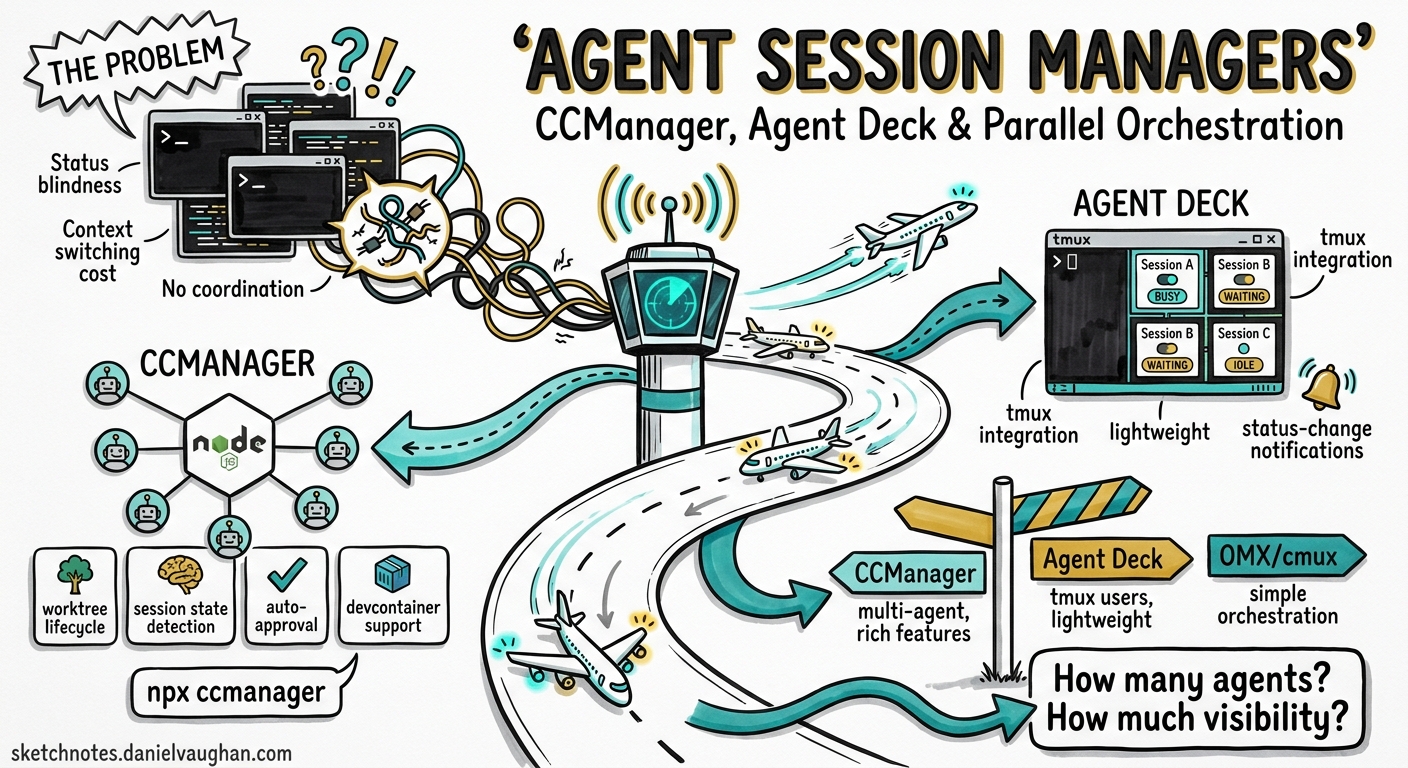
Running a single Codex CLI session is straightforward. Running six in parallel — each on a separate worktree, each targeting a different feature branch, with clear visibility into which sessions are idle, waiting for approval, or actively executing — is where the complexity lives. A new category of open-source tooling has emerged in early 2026 to solve precisely this problem: agent session managers.
This article examines the three leading session managers that support Codex CLI, explains their architectural differences, and offers practical guidance on choosing and configuring the right one for your workflow.
The Problem: Terminal Entropy at Scale
When you run multiple codex processes in separate terminal tabs, you quickly encounter:
- Status blindness — no single view showing which agents are busy, waiting, or idle
- Context switching cost — hunting through tmux panes or terminal tabs to find the session that needs input
- Worktree management overhead — manually creating, tracking, and cleaning up git worktrees
- No coordination — agents cannot be paused, resumed, or restarted from a central interface
Codex CLI’s native session persistence (~/.codex/sessions) handles thread continuation1, but it offers no multi-session orchestration layer. The session managers fill this gap.
The Contenders
CCManager
CCManager is a Node.js CLI application supporting eight coding agents including Codex CLI, Claude Code, Gemini CLI, Cursor Agent, Copilot CLI, Cline CLI, OpenCode, and Kimi CLI2. It takes a self-contained approach — no tmux dependency required.
Installation:
npm install -g ccmanager
# or run without installing:
npx ccmanager
Key capabilities:
- Worktree lifecycle management — create, merge, and delete git worktrees from within the TUI
- Session state detection — per-agent state machines identifying busy, waiting, and idle states
- Context preservation — copy session data (conversation history, project state) between worktrees2
- Status change hooks — execute custom commands when session states change
- Auto-approval (experimental) — AI-driven approval of safe prompts to reduce human intervention
- Devcontainer support — run sessions inside containers while managing from the host2
Codex CLI integration:
// .ccmanager.json (project root)
{
  "defaultAssistant": "codex",
  "worktree": {
    "autoDirectory": true,
    "copySessionData": false
  },
  "hooks": {
    "onStatusChange": "notify-send 'Codex session changed: ${status}'"
  }
}
CCManager detects Codex CLI sessions via tailored state detection, identifying the three states (running, waiting for input, idle) through terminal output parsing2.
Agent Deck
Agent Deck is a Go-based TUI that positions itself as “your AI agent command centre”3. It supports Claude Code, OpenCode, Codex CLI, and Gemini CLI with a focus on resource efficiency and advanced orchestration.
Distinguishing features:
- MCP Socket Pool — shares MCP server processes via Unix sockets across sessions, reducing memory usage by 85–90% compared to per-session MCP instances3
- Conductor sessions — persistent orchestrator agents that monitor child sessions, auto-respond when confident, and escalate to the human when they cannot3
- Cost tracking — real-time token usage and cost aggregation across all sessions with support for 13+ model pricing tiers3
- Telegram/Slack integration — remote monitoring and control from mobile devices3
- Docker sandbox isolation — containerised sessions with shared authentication volumes
Installation:
# Download from GitHub releases
curl -sSL https://github.com/asheshgoplani/agent-deck/releases/latest/download/install.sh | bash
Session polling architecture:
Agent Deck polls each session every 2 seconds, displaying status indicators:
| Symbol | State | Meaning |
|---|---|---|
| ● | Running | Agent actively executing |
| ◐ | Waiting | Awaiting human approval |
| ○ | Idle | Session open, no activity |
| ✕ | Error | Session crashed or timed out |
Agent of Empires (AoE)
Agent of Empires wraps tmux with agent-aware functionality, supporting Claude Code, Codex CLI, Gemini CLI, Mistral Vibe, Cursor CLI, Copilot CLI, Pi.dev, and Factory Droid4. Its distinguishing feature is a web dashboard with remote phone access.
Key differentiators:
- Persistent sessions — agents continue running after closing the TUI or disconnecting SSH4
- HTTPS web dashboard — QR code and passphrase authentication for mobile access
- Built-in diff viewer — review and edit changes without leaving the TUI4
- Automatic agent detection — discovers installed agents on system startup
# Start with web dashboard on port 8080
aoe --web --port 8080
Architecture Comparison
graph TD
    subgraph CCManager
        A[Node.js Process] --> B[Direct PTY Management]
        B --> C1[Codex Session]
        B --> C2[Claude Session]
        B --> C3[Gemini Session]
    end

    subgraph Agent Deck
        D[Go Binary] --> E[tmux Backend]
        E --> F1[Codex Session]
        E --> F2[Claude Session]
        D --> G[MCP Socket Pool]
        G --> F1
        G --> F2
        D --> H[Conductor Agent]
        H -.->|monitors| F1
        H -.->|monitors| F2
    end

    subgraph Agent of Empires
        I[Go Binary] --> J[tmux Backend]
        J --> K1[Codex Session]
        J --> K2[Claude Session]
        I --> L[Web Server]
        L --> M[Browser/Mobile]
    end
Feature Matrix
| Feature | CCManager | Agent Deck | Agent of Empires |
|---|---|---|---|
| Language | Node.js | Go | Go |
| tmux required | No | Yes | Yes |
| Codex CLI support | ✓ | ✓ | ✓ |
| Agents supported | 8 | 4+ | 10 |
| Worktree management | ✓ | ✓ | ✓ |
| MCP pooling | ✗ | ✓ (85–90% savings) | ✗ |
| Conductor/orchestrator | ✗ | ✓ | ✗ |
| Cost tracking | ✗ | ✓ | ✗ |
| Web dashboard | ✗ | ✗ | ✓ |
| Mobile access | ✗ | Telegram/Slack | HTTPS + QR |
| Devcontainer support | ✓ | Docker sandbox | Docker sandbox |
| Auto-approval | Experimental | Via conductor | ✗ |
| Session data copying | ✓ (Claude) | ✗ | ✗ |
| Licence | MIT | MIT | MIT |
Configuring Codex CLI for Session Managers
All three tools benefit from Codex CLI’s native configuration. Key settings that improve session manager integration:
# ~/.codex/config.toml

# Enable structured output for easier state parsing
[output]
format = "json"

# Permission profile that reduces approval interrupts
[permissions]
profile = "default"

# Ensure sessions are resumable
[session]
persist = true
For headless contexts where a session manager handles approval, Codex CLI’s --approval-mode flag controls whether the agent pauses for human input:
# Full autonomy (session manager handles oversight)
codex --approval-mode full-auto --model o4-mini "implement the auth module"

# Suggest mode (agent proposes, session manager shows diff)
codex --approval-mode suggest "refactor the database layer"
Workflow: Three-Agent Sprint with CCManager
A practical pattern for feature development using CCManager with Codex CLI:
sequenceDiagram
    participant Dev as Developer
    participant CM as CCManager TUI
    participant W1 as Codex (feature/auth)
    participant W2 as Codex (feature/api)
    participant W3 as Codex (feature/tests)

    Dev->>CM: Create 3 worktrees
    CM->>W1: Start session: "implement OAuth2 flow"
    CM->>W2: Start session: "build REST endpoints"
    CM->>W3: Start session: "write integration tests"

    loop Status polling
        CM-->>Dev: Show status board
    end

    W1-->>CM: Status: waiting (needs approval)
    CM-->>Dev: Highlight waiting session
    Dev->>CM: Switch to W1, approve
    W1->>W1: Continue execution

    W2-->>CM: Status: idle (complete)
    Dev->>CM: Review diff, merge worktree
When to Use What
Choose CCManager if:
- You want zero external dependencies (no tmux)
- You need session data copying between worktrees
- You work across many different CLI agents
- You prefer Node.js for extensibility
Choose Agent Deck if:
- You run many concurrent sessions and MCP memory usage matters
- You want conductor-based automated orchestration
- Cost visibility across sessions is important
- You need Telegram/Slack notifications
Choose Agent of Empires if:
- You need remote access from a phone or tablet
- You already use tmux and want agent-aware enhancements
- You work via SSH and need persistent sessions that survive disconnects
- You want a built-in diff viewer for quick reviews
The Convergence Pattern
These tools are converging on a common architecture: a session supervisor that wraps terminal processes, detects agent state through output parsing, manages git worktrees for isolation, and provides a unified status view. As Codex CLI’s own MultiAgentV2 system matures with explicit thread caps and subagent orchestration5, the boundary between external session managers and native multi-agent support will blur.
The most likely outcome by late 2026: session managers become the UX layer while Codex CLI’s native orchestration handles the coordination protocol. Today, they remain complementary — use the session manager for visibility and lifecycle control, and Codex CLI’s built-in subagents for task decomposition within a single session.
Citations
-
OpenAI, “Features – Codex CLI,” OpenAI Developers, 2026. https://developers.openai.com/codex/cli/features ↩
-
kbwo, “CCManager: Coding Agent Session Manager,” GitHub, 2026. https://github.com/kbwo/ccmanager ↩ ↩2 ↩3 ↩4
-
Ashesh Goplani, “Agent Deck: Terminal session manager for AI coding agents,” GitHub, 2026. https://github.com/asheshgoplani/agent-deck ↩ ↩2 ↩3 ↩4 ↩5
-
njbrake, “Agent of Empires: Manage multiple Claude Code, OpenCode agents from TUI or Web,” GitHub, 2026. https://github.com/njbrake/agent-of-empires ↩ ↩2 ↩3
-
OpenAI, “Changelog – Codex,” OpenAI Developers, 2026. https://developers.openai.com/codex/changelog ↩