Codex CLI TUI Mastery: Slash Commands, Keyboard Shortcuts, and Session Workflows for Power Users
Codex CLI TUI Mastery: Slash Commands, Keyboard Shortcuts, and Session Workflows for Power Users
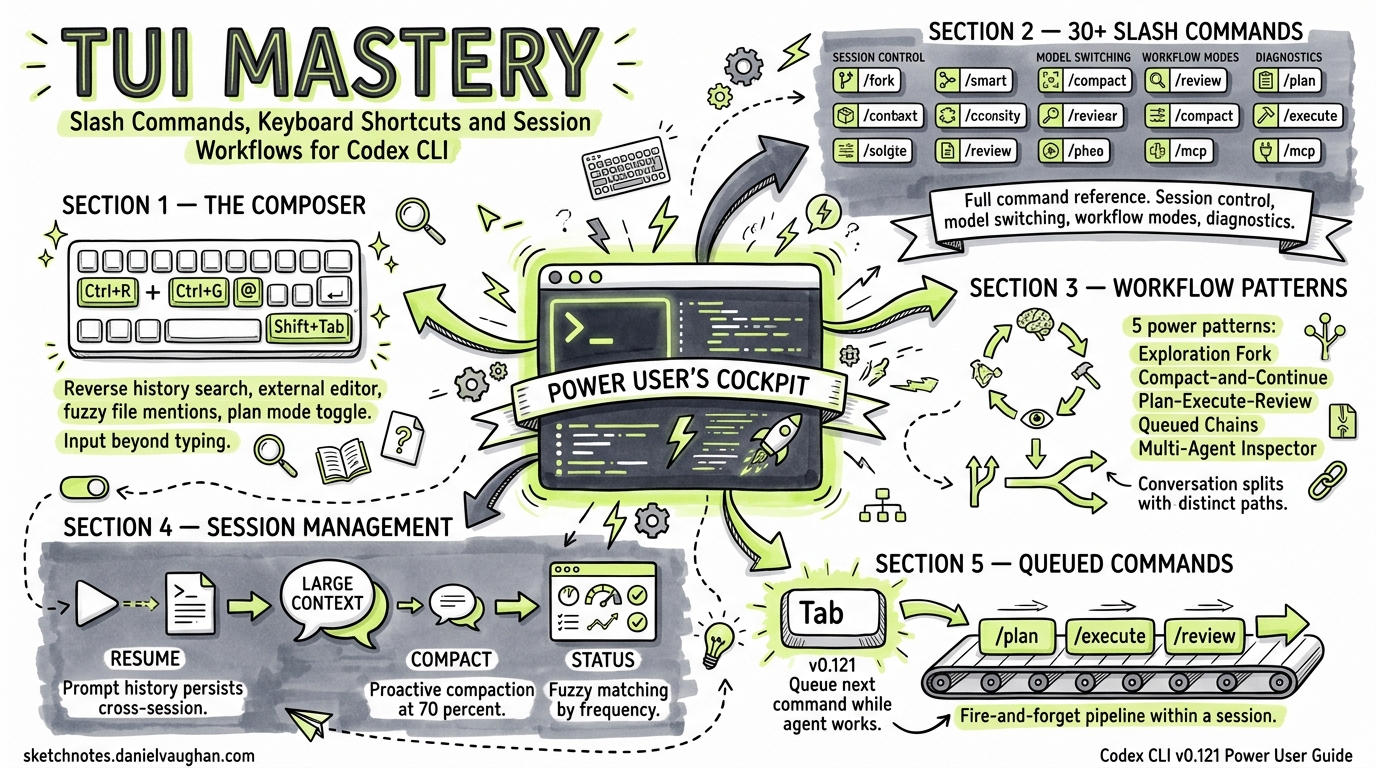
The Codex CLI terminal user interface has evolved from a simple prompt-and-response loop into a full-screen interactive workspace. With v0.121.0 shipping Ctrl+R reverse history search, prompt recall, and clipboard improvements1, plus thirty-plus slash commands accumulated across recent releases2, the TUI now rivals traditional IDE integrations for developer throughput — if you know what’s available. This guide maps every interaction surface in the current TUI, from keystroke-level shortcuts to session-scoped workflow patterns.
The Composer: Input Beyond Typing
The composer is where every Codex session begins, but most developers treat it as a plain text box. It supports considerably more.
Keyboard Shortcuts in the Composer
| Shortcut | Action |
|---|---|
Ctrl+R |
Reverse history search — fuzzy, case-insensitive subsequence matching across sessions1 |
Ctrl+G |
Open the prompt in your $VISUAL or $EDITOR for multi-line editing3 |
@ |
Fuzzy file search — insert workspace file paths as context mentions3 |
! |
Shell escape — prefix a line with ! to run a local command without leaving the TUI3 |
Shift+Tab |
Toggle Plan mode inline — switch between execution and planning without a slash command4 |
Tab |
Queue a slash command while the agent is still working (v0.121+ slash command queueing)5 |
↑ / ↓ |
Navigate prompt history within the current session |
Prompt History Architecture
The v0.121 prompt history system operates at two tiers1:
- In-session: Full fidelity — text, elements, and attachments are all recalled exactly as submitted.
- Cross-session: Text-only persistence — attachments and rich elements are stripped, but the prompt text survives across CLI restarts.
Matching uses fuzzy scoring as the primary sort key, with recency as a tie-breaker1. This means a prompt you used frequently three days ago will rank above one you used once yesterday, provided the fuzzy match quality is comparable.
# Practical example: you ran a complex review prompt last week
# Press Ctrl+R, type "review migration", and the full prompt appears
# Edit and re-submit without retyping
The Complete Slash Command Reference
As of v0.121.0, Codex CLI exposes over thirty slash commands2. Here they are grouped by function.
Session Control
| Command | Purpose |
|---|---|
/new |
Start a fresh conversation within the same CLI process |
/resume |
Reopen a previous session — supports picker, --last, or session ID6 |
/fork |
Clone the current conversation into a new thread, preserving the full transcript2 |
/clear |
Reset the terminal view and start fresh |
/compact |
Summarise the conversation to reclaim context window tokens7 |
/quit / /exit |
Exit the CLI |
Model and Reasoning
| Command | Purpose |
|---|---|
/model |
Switch the active model and reasoning effort mid-session2 |
/fast |
Toggle Fast mode for GPT-5.4 — optimised for speed over depth2 |
/personality |
Choose communication style: friendly, pragmatic, or none2 |
Workflow Modes
| Command | Purpose |
|---|---|
/plan |
Enter Plan mode — Codex gathers context and proposes a plan before executing4 |
/review |
Local code review against base branch, uncommitted changes, or specific commits8 |
/diff |
Display the current Git diff including untracked files2 |
Tooling and Integration
| Command | Purpose |
|---|---|
/mcp |
List configured MCP servers and their exposed tools2 |
/apps |
Browse available ChatGPT apps and insert as mentions2 |
/plugins |
Inspect installed and discoverable plugins2 |
/agent |
Switch between active agent threads for inspection2 |
/mention |
Attach specific files or folders to the conversation2 |
/init |
Scaffold an AGENTS.md in the current directory4 |
Configuration and Diagnostics
| Command | Purpose |
|---|---|
/permissions |
Adjust approval mode mid-session without restarting2 |
/experimental |
Toggle experimental features like Apps or Smart Approvals2 |
/status |
Display session state: model, token usage, active configuration2 |
/debug-config |
Print the full config layer stack and requirements diagnostics2 |
/statusline |
Configure the footer status-line fields interactively2 |
/title |
Configure terminal window or tab title fields2 |
/sandbox-add-read-dir |
Grant sandbox read access to additional directories (Windows only)2 |
Utility
| Command | Purpose |
|---|---|
/copy |
Copy the latest Codex output to the system clipboard2 |
/ps |
Show background terminals and their recent output2 |
/stop |
Cancel all background terminal work (alias: /clean)2 |
/feedback |
Submit logs and diagnostics to the Codex maintainers2 |
/logout |
Clear local credentials2 |
TUI Navigation Shortcuts
Beyond the composer, the full-screen TUI responds to navigation keys for moving through output, approvals, and draft history.
| Shortcut | Action |
|---|---|
Ctrl+C |
Cancel the current agent turn3 |
Ctrl+D |
Exit the session3 |
Ctrl+L |
Clear the screen without starting a new conversation3 |
Ctrl+O |
Copy the latest agent response to the clipboard — works over SSH and across platforms9 |
← / → |
Navigate through draft history when reviewing agent proposals |
y / n |
Approve or reject tool calls in approval mode |
Session Workflow Patterns
Understanding individual commands is necessary but insufficient. The real productivity gains come from composing them into workflow patterns.
Pattern 1: The Exploration Fork
When you are unsure whether an approach will work, fork the session before committing to it.
flowchart LR
    A[Main thread] -->|/fork| B[Exploration thread]
    B -->|Approach works| C[Continue in fork]
    B -->|Approach fails| D[Return to main thread]
    A -->|/resume| D
The /fork command preserves the full conversation transcript in the new thread2. If the exploration fails, you return to the original thread with /resume — no context is lost, and no cleanup is required.
Pattern 2: The Compact-and-Continue Loop
Long sessions accumulate context that degrades response quality once the window fills. The /compact command summarises the conversation into a condensed form, freeing tokens for fresh reasoning7.
# After a long debugging session, context is near capacity
/status          # Check token usage — "85% context used"
/compact         # Codex summarises the session so far
# Continue with a fresh context window but preserved intent
The best practice: run /compact proactively when /status shows context usage above 70%, rather than waiting for degradation symptoms4.
Pattern 3: The Plan-Execute-Review Cycle
For multi-step tasks, alternate between Plan mode and execution.
flowchart TD
    A["/plan Migrate auth module to OAuth2"] --> B[Codex proposes plan]
    B --> C{Approve?}
    C -->|Yes| D[Shift+Tab to exit Plan mode]
    D --> E[Codex executes steps]
    E --> F["/review --base main"]
    F --> G[Review diff]
    G -->|Issues found| H[Iterate]
    G -->|Clean| I[Commit]
Starting with /plan forces Codex to gather context and propose a structured approach before touching any files4. The Shift+Tab toggle switches back to execution mode without starting a new command. After execution, /review --base main provides a diff-based code review against the target branch8.
Pattern 4: Queued Command Chains
With v0.121’s slash command queueing, you can chain commands while the agent is still working5. Press Tab to queue a follow-up command that executes as soon as the current turn completes.
# While Codex is implementing a feature:
# Press Tab, then type:
/review
# The review runs automatically when implementation finishes
This eliminates the idle time between agent turns — you describe the next step before the current one completes, creating a fire-and-forget pipeline within a single session.
Pattern 5: The Multi-Agent Inspector
When running parallel agent workflows (subagents or explicit multi-agent sessions), use /agent to switch between threads and /ps to monitor background work.
/ps              # See all active background agents
/agent 2         # Switch to agent thread 2 for inspection
/status          # Check this agent's token usage and model
/agent 1         # Switch back to the primary agent
This pattern is essential for orchestrating subagent workflows where a primary agent delegates bounded tasks — testing, linting, or exploration — to specialist subagents10.
Configuration for TUI Productivity
Several config.toml settings directly affect TUI behaviour.
# ~/.codex/config.toml

# Set default model and reasoning effort
model = "gpt-5.4"
reasoning_effort = "medium"

# Enable web search for context gathering
web_search = "cached"

# Enable memories for cross-session context
[features]
memories = true

# Configure MCP servers that appear in /mcp
[mcp_servers.github]
type = "stdio"
command = "gh-mcp"
The reasoning_effort setting deserves particular attention. The official best practices recommend medium as the default for interactive TUI work — it balances intelligence with response speed4. Reserve high or xhigh for complex, multi-step tasks where you are willing to wait for deeper reasoning.
Statusline Customisation
The /statusline command configures the persistent footer that shows session metadata. Common configurations include:
- Model and effort: Always visible — confirms which model is active
- Token usage: Critical for knowing when to
/compact - Active profile: Useful when switching between project-specific configurations
The External Editor Workflow
For complex prompts that exceed a few lines, Ctrl+G opens your configured $VISUAL or $EDITOR3. This is particularly powerful when combined with prompt templates:
# Set your editor to VS Code for rich editing
export VISUAL="code --wait"

# In the TUI, press Ctrl+G
# VS Code opens with a temporary file
# Write a detailed, multi-paragraph prompt with code examples
# Save and close — the prompt is submitted to Codex
This workflow eliminates the awkwardness of composing long prompts in a single-line input field. For teams that standardise on prompt templates, the editor workflow lets developers paste from a shared template library and customise before submission.
Practical Tips
Use /status habitually. It is the single most informative diagnostic command — model, reasoning effort, token usage, active profile, and sandbox mode are all visible in one glance2.
Bind /review to your muscle memory. After every implementation task, running /review catches issues before they reach Git. The code_review.md file in your repo root can codify review standards that /review enforces automatically4.
Prefer /fork over /new. Starting a fresh session with /new discards all accumulated context. Forking preserves it, giving the new thread a head start2.
Queue liberally. With slash command queueing5, there is no penalty for planning ahead. Queue your next command as soon as you know what it should be.
Run /compact before it matters. Context degradation is gradual and hard to notice until responses become noticeably worse. Proactive compaction at 70% usage prevents quality cliffs47.
Citations
-
Codex v0.121.0 release notes — Ctrl+R reverse search and prompt history improvements. Codex Changelog, April 2026. ↩ ↩2 ↩3 ↩4
-
Codex CLI slash commands reference. OpenAI Developers — Slash Commands, accessed April 2026. ↩ ↩2 ↩3 ↩4 ↩5 ↩6 ↩7 ↩8 ↩9 ↩10 ↩11 ↩12 ↩13 ↩14 ↩15 ↩16 ↩17 ↩18 ↩19 ↩20 ↩21 ↩22 ↩23 ↩24 ↩25 ↩26 ↩27
-
Codex CLI features documentation — keyboard shortcuts, image input, and interactive mode. OpenAI Developers — CLI Features, accessed April 2026. ↩ ↩2 ↩3 ↩4 ↩5 ↩6 ↩7
-
Codex best practices — prompt structure, Plan mode, AGENTS.md, and session management. OpenAI Developers — Best Practices, accessed April 2026. ↩ ↩2 ↩3 ↩4 ↩5 ↩6 ↩7 ↩8
-
Slash command queueing — PR #18542 (etraut-openai). GitHub — openai/codex, April 19, 2026. ↩ ↩2 ↩3
-
Codex CLI conversation resumption — resume subcommand with session picker,
--last, and--alloptions. OpenAI Developers — CLI Features, accessed April 2026. ↩ -
Context window management and
/compactcommand. OpenAI Developers — CLI Features, accessed April 2026. ↩ ↩2 ↩3 -
Codex CLI
/reviewcommand — local code review workflows with base branch, uncommitted changes, and custom instructions. OpenAI Developers — CLI Features, accessed April 2026. ↩ ↩2 -
Codex v0.121.0 release — Ctrl+O clipboard copy with improved SSH and cross-platform behaviour. Codex Changelog, April 2026. ↩
-
Codex CLI subagent workflows and parallel agent orchestration. OpenAI Developers ��� CLI Features, accessed April 2026. ↩