Codex CLI in Zed 1.0: Parallel Agents, ACP Integration, and Multi-Agent IDE Workflows
Codex CLI in Zed 1.0: Parallel Agents, ACP Integration, and Multi-Agent IDE Workflows
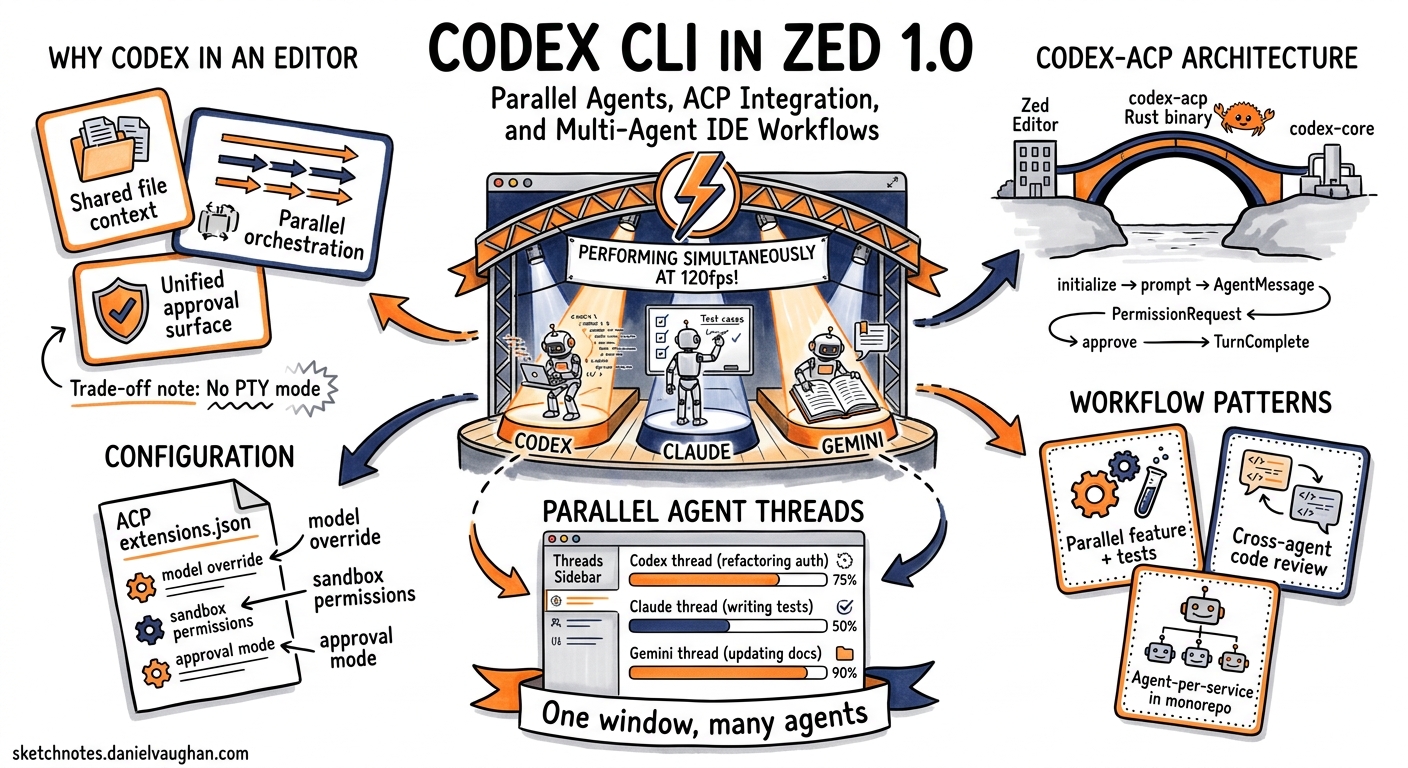
Zed 1.0 shipped on 29 April 2026 with parallel agents as its headline AI feature1. You can now run Codex CLI alongside Claude Agent, Gemini CLI, and any other ACP-compatible agent in the same window — each in its own thread, working concurrently on different parts of your codebase at 120 fps2. This article covers the practical setup, the architecture that makes it work, and workflow patterns for getting the most out of Codex CLI inside Zed.
Why Codex CLI in an Editor?
Codex CLI is a terminal-first tool. Running it inside Zed via the Agent Client Protocol gives you three things the raw terminal cannot:
- Shared file context — Zed forwards your project’s working directory, open files, and symbol references to Codex without manual
@-mention gymnastics. - Parallel orchestration — The Threads Sidebar lets you spin up multiple Codex threads alongside other agents, grouped by project, with real-time progress monitoring2.
- Unified approval surface — Tool executions (shell commands, file patches, network calls) surface as interactive approvals inside the editor rather than competing for a single terminal pane3.
The trade-off is reduced terminal interactivity: codex-acp runs in non-PTY mode to prevent agent deadlocks (for example, when git rebase waits for editor input)4.
Architecture: How codex-acp Bridges the Gap
The codex-acp adapter is a Rust binary distributed via NPM (@zed-industries/codex-acp) with platform-specific native binaries for macOS, Linux, and Windows5. It implements the ACP Agent trait and translates between two protocol worlds:
sequenceDiagram
    participant Zed as Zed Editor
    participant ACP as codex-acp (Rust)
    participant Core as codex-core

    Zed->>ACP: initialize() — capability negotiation
    ACP->>Core: Create CodexThread
    Zed->>ACP: prompt("Refactor the auth module")
    ACP->>Core: expand_prompt() + submit
    Core-->>ACP: AgentMessage / ToolCall events
    ACP-->>Zed: SessionUpdate notifications (streamed)
    ACP->>Zed: PermissionRequest (shell command)
    Zed->>ACP: submit_approval(approved: true)
    ACP->>Core: Execute tool
    Core-->>ACP: TurnComplete
    ACP-->>Zed: SessionUpdate (final)
Key architectural decisions5:
- LocalSet-based async runtime — single-threaded agent logic without
Sendbounds, with blocking file I/O offloaded viatokio::spawn_blocking(). - Session HashMap — each thread maps a
SessionIdto anRc<Thread>wrapping aCodexThreadfrom codex-core. - Sandboxed filesystem —
AcpFsrestricts operations to the project root, delegating through client-provided capabilities. - Deterministic serialisation —
serde_jsonwithpreserve_orderfor reproducible JSON-RPC payloads.
Setup
Prerequisites
- Zed ≥ 1.0 (build 0.208+)6
- An OpenAI API key or active ChatGPT subscription
- Codex CLI config at
~/.codex/config.toml(optional but recommended)
First Launch
Open the agent panel with Cmd+? (macOS) or Ctrl+? (Linux/Windows), click +, and select Codex. Zed installs codex-acp automatically on first use — this managed installation takes precedence over any global codex binary6.
Authenticate using one of three methods:
| Method | When to use |
|---|---|
| ChatGPT Login | Subscription-based access; limited in remote projects |
CODEX_API_KEY |
Dedicated Codex API key via environment |
OPENAI_API_KEY |
Standard OpenAI platform key |
To switch later, run /logout inside the thread and re-authenticate.
Configuration via settings.json
Pass environment variables and defaults through Zed’s settings.json:
{
  "agent_servers": {
    "codex-acp": {
      "type": "registry",
      "env": {
        "CODEX_API_KEY": "${env:CODEX_API_KEY}",
        "CODEX_MODEL": "gpt-5.5"
      },
      "default_model": "gpt-5.5",
      "default_mode": "code"
    }
  }
}
Codex also reads ~/.codex/config.toml directly — model selection, MCP servers, permission profiles, and AGENTS.md all apply as normal7. MCP servers configured in both Zed’s context_servers and Codex’s native config are available within threads.
Custom Keybinding
Bind Codex thread creation for rapid access:
[
  {
    "bindings": {
      "cmd-alt-c": [
        "agent::NewExternalAgentThread",
        { "agent": { "custom": { "name": "codex-acp" } } }
      ]
    }
  }
]
Parallel Agent Workflows
The Threads Sidebar (Option+Cmd+J on macOS) is the control surface for concurrent agents2. Threads are grouped by project and support stop, archive, and real-time progress monitoring.
Pattern 1: Codex + Claude Code Side-by-Side
Run a Codex thread for implementation and a Claude Agent thread for review simultaneously:
graph LR
    subgraph "Zed Threads Sidebar"
        T1["Thread 1: Codex CLI\n(Implementing feature)"]
        T2["Thread 2: Claude Agent\n(Reviewing changes)"]
        T3["Thread 3: Codex CLI\n(Writing tests)"]
    end
    T1 -->|"files modified"| T2
    T1 -->|"implementation done"| T3
Each thread operates independently. Codex threads inherit your config.toml profiles, so you can use different reasoning effort levels per thread by switching models with /model or the ACP set_session_model() method mid-conversation5.
Pattern 2: Multi-Service Monorepo Sprint
For polyglot monorepos, dedicate one thread per service boundary:
- Thread 1 — Codex on
services/auth/with Go-specific AGENTS.md - Thread 2 — Codex on
services/billing/with TypeScript conventions - Thread 3 — Claude Agent reviewing the integration contract between them
Zed forwards the correct working directory per thread, so each agent sees only its relevant context.
Pattern 3: Exploration Then Execution
Use the Codex explorer built-in role for read-only codebase analysis, then spawn a separate worker thread for implementation:
- Open a thread, ask: “Map the dependency graph of the payment module — which files would change if we swap Stripe for Adyen?”
- Review the analysis in the Threads Sidebar
- Open a new Codex thread with
/mode autoand paste the implementation plan
Supported ACP Methods
codex-acp exposes the following capabilities5:
| Method | Purpose |
|---|---|
initialize() |
Capability negotiation; advertises auth methods |
authenticate() |
ChatGPT OAuth, CODEX_API_KEY, OPENAI_API_KEY |
new_session() |
Creates conversation with MCP server config |
prompt() |
Submits input, streams event responses |
cancel() |
Aborts ongoing operations |
set_session_mode() |
Switches approval mode (auto/manual) |
set_session_model() |
Changes LLM model mid-session |
Slash Commands
Codex advertises its slash commands to Zed via ACP’s AvailableCommands mechanism5:
/review— Code review with change suggestions/review-branch,/review-commit— VCS-aware analysis/init— Repository initialisation/compact— Conversation history compression/logout— Clear stored credentials
Custom prompts defined in your Codex configuration also appear as available commands.
What Zed Forwards (and What It Doesn’t)
Understanding the boundary is critical for correct configuration:
| Forwarded | Not forwarded |
|---|---|
| Model selection | Zed Profiles (first-party only) |
| Mode selection | Tool permissions (handled by Codex) |
Environment variables from agent_servers |
Rules files |
MCP servers from context_servers |
|
| Working directory (project root) |
This means your Codex config.toml remains the source of truth for permission profiles, deny-read policies, and sandbox mode7. Zed’s agent_servers.env block supplements rather than replaces Codex’s native configuration.
Debugging
When things go wrong, open the Command Palette and run dev: open acp logs to inspect the JSON-RPC messages exchanged between Zed and codex-acp6. Common issues:
- Authentication failures — Ensure
CODEX_API_KEYis set in your shell environment or inagent_servers.env - MCP servers not loading — Remote OAuth-based MCP servers have known issues via ACP; prefer stdio-based servers6
- Stale codex-acp version — Zed manages its own installation; restart Zed to pick up updates
Limitations
- No PTY mode — Terminal output loses colour and interactive prompts are suppressed to prevent deadlocks4
- No thread history resumption — Unlike native Zed threads, external agent threads cannot be resumed from history6
- No past message editing — ACP external agents do not support editing previously sent messages6
- No checkpointing — The rollback/checkpoint workflow available in Zed’s first-party agent is absent for external agents
Decision Framework
| Scenario | Recommendation |
|---|---|
| Deep terminal interaction needed (git rebase, interactive debuggers) | Use Codex CLI directly in terminal |
| Multi-file refactoring with editor context | Codex via Zed ACP |
| Parallel agent orchestration across services | Zed Parallel Agents with mixed Codex + Claude threads |
| CI/CD automation | codex exec headless — ACP adds no value |
| Code review alongside implementation | Two parallel threads (Codex implement, Claude review) |
What to Watch
- Thread history persistence — Zed Discussion #48304 tracks multi-agent conversation history for external agents8
- Per-project agent servers — Discussion #54499 proposes per-project
agent_serversconfiguration, enabling project-specific Codex profiles9 - JetBrains ACP — JetBrains is implementing ACP support, which will bring the same codex-acp adapter to IntelliJ-family IDEs10
Citations
-
Zed 1.0 Release — Zed Industries, 29 April 2026 ↩
-
Introducing Parallel Agents in Zed — Zed Blog, 22 April 2026 ↩ ↩2 ↩3
-
codex-acp Architecture — DeepWiki — Accessed May 2026 ↩
-
Codex is Live in Zed — Zed Blog, 16 October 2025 ↩ ↩2
-
zed-industries/codex-acp GitHub Repository — Zed Industries ↩ ↩2 ↩3 ↩4 ↩5
-
Zed External Agents Documentation — Zed Docs ↩ ↩2 ↩3 ↩4 ↩5 ↩6
-
Codex CLI Configuration Reference — OpenAI Developers ↩ ↩2
-
ACP Agents - Multi Agent Conversations and History — Discussion #48304 — Zed GitHub ↩
-
Allow per-project agent servers — Discussion #54499 — Zed GitHub ↩
-
Agent Client Protocol — Zed Industries ↩