Codex CLI for Incident Postmortem Automation: From Alert to Structured Root Cause Report in One Agent Loop
Codex CLI for Incident Postmortem Automation: From Alert to Structured Root Cause Report in One Agent Loop
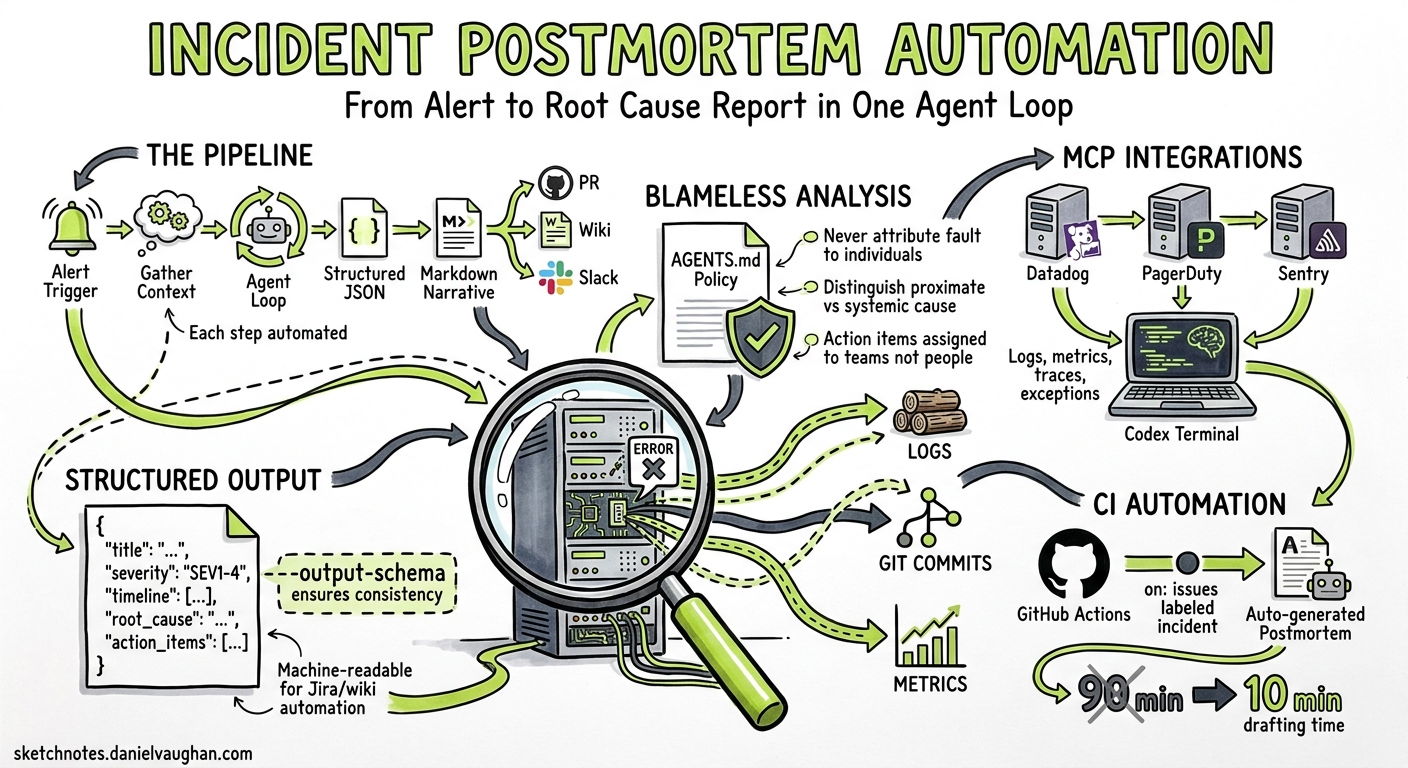
Writing incident postmortems is universally loathed. Engineers spend 60–90 minutes assembling timelines from scattered logs, correlating deploys with alert spikes, and drafting blameless narratives — all while the next sprint beckons1. AI-assisted postmortem tools like incident.io and Rootly have shown that AI can draft a postmortem in 10–15 minutes from captured timeline data2, but they require buy-in to a specific platform. Codex CLI offers a lighter, composable alternative: pipe your existing observability data through an agent loop, apply a structured output schema, and produce a reviewable postmortem document without leaving your terminal.
This article builds a complete incident postmortem pipeline using Codex CLI v0.130, MCP integrations for monitoring platforms, codex exec with --output-schema, and AGENTS.md policies for consistent blameless analysis.
Architecture
The pipeline takes four inputs — alert payload, recent git history, application logs, and metrics — and produces a structured JSON postmortem plus a Markdown narrative.
flowchart TD
    A[Alert Trigger] --> B[Gather Context]
    B --> C[Git History Window]
    B --> D[Application Logs via MCP]
    B --> E[Metrics/Traces via MCP]
    C --> F[Codex Exec Agent Loop]
    D --> F
    E --> F
    F --> G[Structured JSON Postmortem]
    G --> H[Markdown Narrative]
    H --> I[PR / Wiki / Slack]
Prerequisites
You need Codex CLI 0.128.0 or later (0.130+ recommended for remote-control and richer MCP support)3, an MCP server for your monitoring platform, and a Git repository containing the affected service.
MCP Server Configuration
Configure your monitoring MCP server in the project’s .codex/config.toml:
[[mcp_servers]]
name = "datadog"
transport = "stdio"
command = "npx"
args = ["-y", "@anthropic-ai/mcp-server-datadog"]
env = { DD_API_KEY = "${DD_API_KEY}", DD_APP_KEY = "${DD_APP_KEY}" }

[[mcp_servers]]
name = "pagerduty"
transport = "stdio"
command = "npx"
args = ["-y", "@pagerduty/mcp-server"]
env = { PD_API_TOKEN = "${PD_API_TOKEN}" }
For organisations using Grafana, Sentry, or New Relic, substitute the appropriate MCP server package4. The pattern is identical — Codex discovers available tools at session start via the MCP tools/list handshake.
The Output Schema
Define what your postmortem must contain. Save this as postmortem-schema.json in your repository:
{
  "$schema": "https://json-schema.org/draft/2020-12/schema",
  "type": "object",
  "required": ["title", "severity", "timeline", "root_cause", "contributing_factors", "impact", "remediation", "action_items"],
  "properties": {
    "title": { "type": "string" },
    "severity": { "enum": ["SEV1", "SEV2", "SEV3", "SEV4"] },
    "timeline": {
      "type": "array",
      "items": {
        "type": "object",
        "required": ["timestamp", "event", "source"],
        "properties": {
          "timestamp": { "type": "string", "format": "date-time" },
          "event": { "type": "string" },
          "source": { "type": "string" }
        }
      }
    },
    "root_cause": { "type": "string" },
    "contributing_factors": { "type": "array", "items": { "type": "string" } },
    "impact": {
      "type": "object",
      "properties": {
        "duration_minutes": { "type": "number" },
        "users_affected": { "type": "number" },
        "revenue_impact": { "type": "string" }
      }
    },
    "remediation": { "type": "string" },
    "action_items": {
      "type": "array",
      "items": {
        "type": "object",
        "required": ["description", "owner", "priority"],
        "properties": {
          "description": { "type": "string" },
          "owner": { "type": "string" },
          "priority": { "enum": ["P0", "P1", "P2"] }
        }
      }
    }
  }
}
The --output-schema flag ensures Codex’s final response conforms to this structure5, making downstream automation (Jira ticket creation, wiki publishing) trivial.
AGENTS.md Postmortem Policy
Create an AGENTS.md file (or append to your existing one) that encodes your organisation’s postmortem principles:
# Incident Postmortem Policy

## Principles
- All analysis MUST be blameless. Never attribute fault to individuals.
- Timelines must include timestamps with sources (log line, commit SHA, alert ID).
- Root cause must distinguish between proximate cause and systemic contributing factors.
- Action items must be specific, measurable, and assigned to a team (not a person).

## Evidence Requirements
- Correlate deploy timestamps (from git log) with metric anomalies.
- Include specific log excerpts that demonstrate the failure mode.
- Note any gaps in observability that hindered diagnosis.

## Severity Classification
- SEV1: >1000 users affected OR revenue loss >£10k/hour
- SEV2: >100 users affected OR degraded SLA
- SEV3: Internal tooling outage OR <100 users
- SEV4: Near-miss, no user impact
Codex loads AGENTS.md automatically at session start, ensuring every postmortem follows the same structure regardless of which engineer triggers the pipeline6.
The Execution Pipeline
Single-Command Postmortem
codex exec \
  --sandbox workspace-write \
  --output-schema ./postmortem-schema.json \
  -o ./postmortems/$(date +%Y-%m-%d)-incident.json \
  "Investigate the production incident that triggered PagerDuty alert PD-12345. \
   Use the datadog MCP to pull error logs and metrics for service 'payment-api' \
   from the last 2 hours. Cross-reference with git log --since='3 hours ago' \
   to identify recent deploys. Produce a structured postmortem following \
   AGENTS.md policy."
This single invocation triggers a multi-step agent loop:
sequenceDiagram
    participant Engineer
    participant Codex
    participant Datadog MCP
    participant Git

    Engineer->>Codex: codex exec (postmortem prompt)
    Codex->>Git: git log --since="3 hours ago" --oneline
    Git-->>Codex: Recent commits
    Codex->>Datadog MCP: search_logs(service:payment-api, status:error)
    Datadog MCP-->>Codex: Error log entries
    Codex->>Datadog MCP: get_metrics(avg:system.cpu.user, service:payment-api)
    Datadog MCP-->>Codex: CPU spike data
    Codex->>Codex: Correlate deploy SHA with metric anomaly
    Codex-->>Engineer: Structured JSON postmortem
Converting to Markdown Narrative
Chain a second codex exec call to produce the human-readable document:
codex exec \
  --ephemeral \
  "Convert the JSON postmortem at ./postmortems/2026-05-09-incident.json \
   into a Markdown narrative suitable for the engineering wiki. \
   Use headers, a timeline table, and a numbered action items list." \
  -o ./postmortems/2026-05-09-incident.md
CI Integration for Automatic Postmortem Drafts
Add a GitHub Action that triggers on incident labels:
name: Draft Postmortem
on:
  issues:
    types: [labeled]
jobs:
  postmortem:
    if: github.event.label.name == 'incident'
    runs-on: ubuntu-latest
    steps:
      - uses: actions/checkout@v4
      - uses: openai/codex-action@v1
        with:
          codex-args: |
            exec --sandbox workspace-write \
              --output-schema ./postmortem-schema.json \
              -o ./postmortems/${{ github.event.issue.number }}.json \
              "Investigate issue #${{ github.event.issue.number }}. \
               Pull logs from the last 4 hours for the affected service. \
               Correlate with recent deploys. Produce structured postmortem."
        env:
          CODEX_API_KEY: ${{ secrets.CODEX_API_KEY }}
          DD_API_KEY: ${{ secrets.DD_API_KEY }}
          DD_APP_KEY: ${{ secrets.DD_APP_KEY }}
The action uses the official codex-action GitHub Action7, which handles binary installation and authentication.
Security Considerations
Postmortem pipelines inevitably touch sensitive production data. Apply defence-in-depth:
[permissions]
profile = "read-only"

[network]
allow_domains = ["api.datadoghq.com", "api.pagerduty.com"]
- Use read-only permissions — the agent should never modify production systems during analysis8.
- Restrict network access to your monitoring APIs via
allow_domains. - Set
shell_environment_policy = "ignore"in CI to prevent credential leakage through environment introspection9. - Consider running postmortem generation in
--ephemeralmode to avoid persisting sensitive log data in session transcripts.
Extending the Pipeline
Multi-Service Correlation
For incidents spanning multiple services, use --add-dir to give Codex visibility across repositories:
codex exec \
  --add-dir ../auth-service \
  --add-dir ../gateway-service \
  --output-schema ./postmortem-schema.json \
  "Investigate the cascading failure across payment-api, auth-service, \
   and gateway-service. Identify the originating failure point."
Sentry Integration for Error Context
Add the Sentry MCP server for richer exception context10:
[[mcp_servers]]
name = "sentry"
transport = "stdio"
command = "npx"
args = ["-y", "@sentry/mcp-server"]
env = { SENTRY_AUTH_TOKEN = "${SENTRY_AUTH_TOKEN}" }
The agent can then pull specific exception stack traces, affected releases, and user impact counts directly from Sentry’s issue stream.
PostToolUse Hook for PII Redaction
Production logs often contain personally identifiable information. Add a hook that scans agent output before it reaches the postmortem:
[hooks.PostToolUse]
command = "python scripts/redact_pii.py"
description = "Redact emails, IPs, and user IDs from postmortem output"
Measuring Quality
Track postmortem quality over time by adding metrics to your codex exec --json pipeline:
codex exec --json \
  --output-schema ./postmortem-schema.json \
  "Generate postmortem for incident INC-456" \
  | jq 'select(.type == "turn.completed") | .usage'
The turn.completed event now includes reasoning_output_tokens alongside input_tokens and output_tokens11, letting you track how much reasoning the model invested in root cause analysis versus simple log summarisation.
Limitations and Caveats
- Correlation is not causation. Codex can identify temporal correlations between deploys and failures, but the root cause determination is a hypothesis requiring human validation.
- Log volume constraints. MCP tools have output token limits. For high-volume services, pre-filter logs before passing to Codex or use the monitoring platform’s query language to narrow the window.
- Model hallucination risk. Always verify specific log timestamps and commit SHAs cited in the postmortem against source data. The structured output schema helps by forcing explicit source attribution in timeline entries.
- Sensitive data handling. Ensure your organisation’s data classification policies permit sending production log excerpts to the OpenAI API. Consider self-hosted model providers via Codex’s custom provider configuration for regulated environments.
Conclusion
Incident postmortems are high-value, low-frequency documents that benefit enormously from automation. By combining Codex CLI’s exec mode with MCP integrations for monitoring platforms, structured output schemas for consistent formatting, and AGENTS.md policies for blameless analysis, teams can reduce postmortem drafting time from 90 minutes to under 10 — while improving consistency and evidence quality. The human reviewer’s job shifts from assembling facts to validating conclusions and assigning ownership.
Citations
-
incident.io, “Best incident postmortem software: Complete guide for 2026,” https://incident.io/blog/best-incident-postmortem-software-2026-guide — reports 60–90 minute average postmortem writing time without automation. ↩
-
incident.io, “Best incident postmortem software: Complete guide for 2026,” https://incident.io/blog/best-incident-postmortem-software-2026-guide — AI drafts postmortems in 10–15 minutes from captured timeline data. ↩
-
OpenAI, “Changelog – Codex,” https://developers.openai.com/codex/changelog — v0.128.0 added persisted /goal workflows; v0.130.0 added remote-control and built-in MCPs as first-class runtime servers. ↩
-
OpenAI, “Model Context Protocol – Codex,” https://developers.openai.com/codex/mcp — MCP configuration supports both STDIO and HTTP transports for connecting external tools. ↩
-
OpenAI, “Non-interactive mode – Codex,” https://developers.openai.com/codex/noninteractive —
--output-schemarequests a final response conforming to a JSON Schema, useful for automated workflows needing stable fields. ↩ -
OpenAI, “Custom instructions with AGENTS.md – Codex,” https://developers.openai.com/codex/guides/agents-md — AGENTS.md loads into context automatically and encodes how a team wants Codex to work in a repository. ↩
-
OpenAI, “GitHub Action – Codex,” https://developers.openai.com/codex/github-action — official action for running Codex in CI pipelines. ↩
-
OpenAI, “Running Codex safely at OpenAI,” https://openai.com/index/running-codex-safely/ — recommends read-only permission profiles for analysis-only workflows. ↩
-
OpenAI, “Configuration Reference – Codex,” https://developers.openai.com/codex/config-reference —
shell_environment_policycontrols whether the agent can read environment variables. ↩ -
Sentry, “Sentry MCP Server,” https://docs.sentry.io/organization/integrations/mcp/ — MCP server providing 22 tools for issue investigation, including stack traces and release correlation. ↩
-
GitHub, “Surface reasoning tokens in exec JSON usage,” https://github.com/openai/codex/pull/19308 — PR adding
reasoning_output_tokensto the exec JSON usage payload for programmatic consumers. ↩