Codex CLI Live Configuration: Hot-Reload, /debug-config, and Runtime Configuration Management
Codex CLI Live Configuration: Hot-Reload, /debug-config, and Runtime Configuration Management
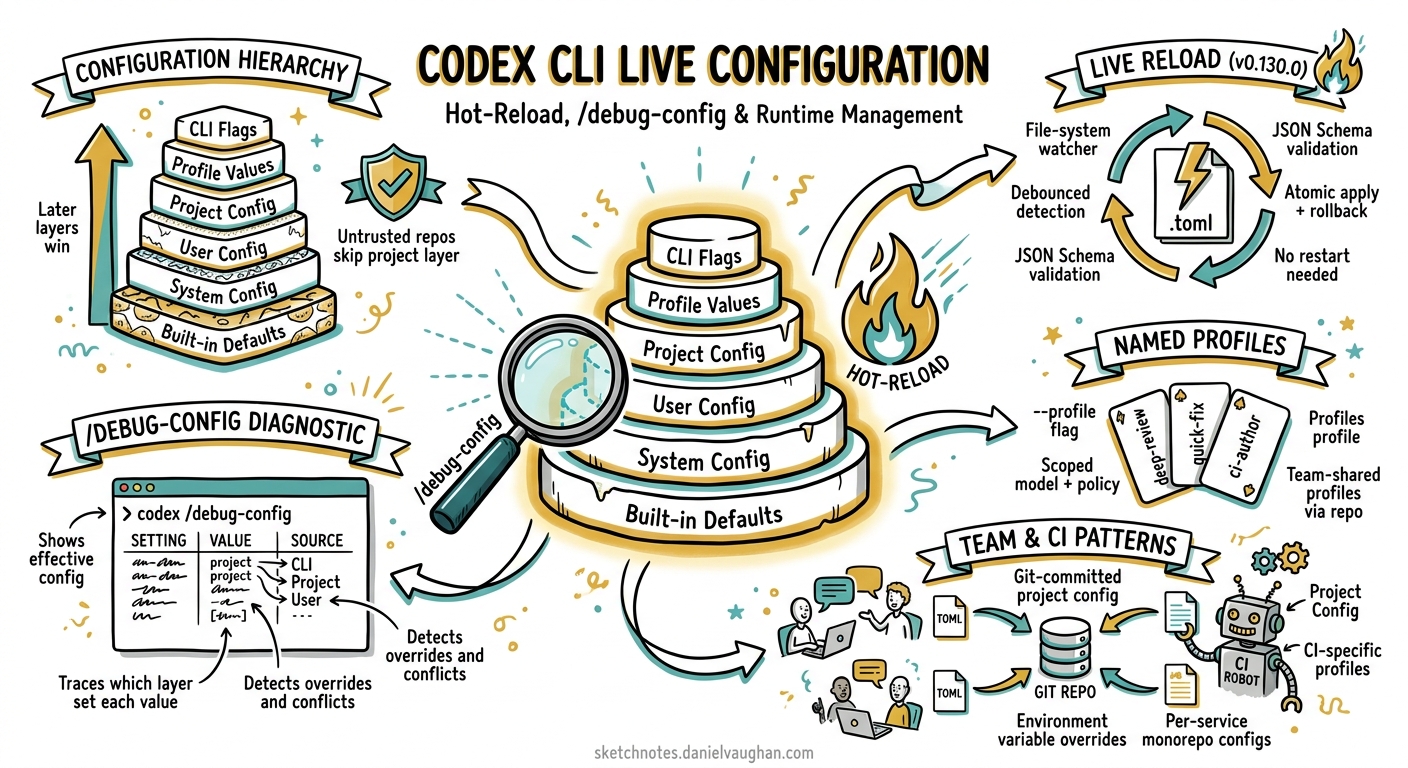
Configuration in Codex CLI has quietly matured from a static file you edit once into a layered, hot-reloadable system that adapts mid-session. Since v0.130.0, running app-server threads pick up config.toml changes without a restart 1. Combined with the /debug-config diagnostic, named profiles, and the -c override flag, practitioners now have fine-grained runtime control over every aspect of agent behaviour. This article maps the full configuration surface, explains the live-reload mechanism, and provides patterns for managing config across teams and CI environments.
The Configuration Hierarchy
Codex resolves settings through six layers, each overriding the one below it 23:
graph TD
    A["Built-in Defaults"] --> B["System Config<br/>/etc/codex/config.toml"]
    B --> C["User Config<br/>~/.codex/config.toml"]
    C --> D["Project Config<br/>.codex/config.toml"]
    D --> E["Profile Values<br/>--profile deep-review"]
    E --> F["CLI Flags / -c Overrides"]
The precedence rule is simple: later layers win. A project-level model = "gpt-5.4-mini" overrides your user-level model = "gpt-5.5", and a CLI flag -c model='"gpt-5-pro"' overrides both 3.
Project Root Detection
Codex walks up the directory tree looking for project root markers 3. By default, any directory containing .git is treated as a project root:
# ~/.codex/config.toml
project_root_markers = [".git", ".hg", ".sl"]
The nearest .codex/config.toml relative to your working directory loads as the project layer. For monorepos with nested services, place a .codex/config.toml in each service directory to scope model and permission choices appropriately.
Trust Boundaries
Project-scoped configuration only loads for trusted projects 2. If you open an untrusted repository (one you have not previously approved), Codex skips the project config, hooks, and rules entirely — your user and system layers still apply. This prevents supply-chain attacks via malicious .codex/config.toml files in cloned repositories.
Live Configuration Refresh (v0.130.0)
Prior to v0.130, editing config.toml mid-session required restarting Codex for changes to take effect. The v0.130.0 release shipped a Config Manager with a cross-platform file-system watcher (debounced), format detection, JSON Schema validation, atomic apply, and rollback 14. Running app-server threads now detect changes and refresh their configuration snapshot automatically.
How It Works
The live-reload mechanism follows this sequence:
sequenceDiagram
    participant Editor as Text Editor
    participant FS as File Watcher
    participant CM as Config Manager
    participant Thread as Active Thread

    Editor->>FS: Save config.toml
    FS->>CM: Debounced change event
    CM->>CM: Parse & validate (JSON Schema)
    alt Valid config
        CM->>Thread: Broadcast reload via IPC
        Thread->>Thread: Apply new snapshot
    else Invalid config
        CM->>CM: Log warning, retain previous config
    end
If your edit introduces a syntax error or violates a constraint from requirements.toml, Codex retains the previous valid configuration and logs a warning — your session continues uninterrupted 4.
What Reloads and What Doesn’t
Not all settings can change mid-session. The sandbox mode (read-only, workspace-write, danger-full-access) is locked at process startup and cannot be escalated without restarting Codex 5. Everything else — model, reasoning effort, approval policy, TUI theme, feature flags, hooks — applies on the next turn after reload.
| Category | Live-Reloadable | Requires Restart |
|---|---|---|
model |
✓ | |
model_reasoning_effort |
✓ | |
approval_policy |
✓ | |
tui.theme |
✓ | |
features.* flags |
✓ | |
otel.* settings |
✓ | |
sandbox_mode |
✓ | |
shell_environment_policy |
✓ | |
project_root_markers |
✓ |
The /debug-config Diagnostic
When your effective configuration diverges from what you expected, /debug-config is the first tool to reach for 6. Type it at the Codex prompt and it outputs:
- Config layer order — lowest precedence first, showing which files loaded
- On/off state — for each feature flag
- Policy sources — including
allowed_approval_policies,allowed_sandbox_modes,mcp_servers,rules, andenforce_residency - Experimental network constraints — when configured via
requirements.toml
This is invaluable for enterprise deployments where requirements.toml constrains what developers can override. If your team’s managed machine enforces allowed_approval_policies = ["untrusted"], /debug-config shows exactly where that constraint originates.
Complementary Diagnostics
The /status command provides a lighter-weight view showing the active model, approval policy, writable roots, and token usage 6. Use /status for quick confirmation; use /debug-config for root-cause analysis when settings feel wrong.
Named Profiles
Profiles let you define reusable configuration presets in your user-level config.toml 3:
# ~/.codex/config.toml
model = "gpt-5.5"
model_reasoning_effort = "medium"

[profiles.deep-review]
model = "gpt-5-pro"
model_reasoning_effort = "xhigh"
service_tier = "fast"

[profiles.ci]
model = "gpt-5.4-mini"
model_reasoning_effort = "low"
service_tier = "flex"
approval_policy = "never"

[profiles.exploration]
model = "gpt-5.5"
model_reasoning_effort = "high"
web_search = "live"
Activate a profile at launch:
codex --profile deep-review
codex --profile ci
Profiles merge on top of your base configuration — only the keys explicitly set in the profile override; everything else inherits normally 3.
Profile Selection in CI
For codex exec pipelines, profiles eliminate the need for long chains of -c flags:
# In GitHub Actions
codex exec --profile ci "Analyse test failures and suggest fixes" \
  --output-schema ./schema.json \
  -o ./result.json < ./test-report.txt
One-Off Overrides with -c
The -c/--config flag accepts arbitrary TOML key-value pairs with dot notation for nested keys 3:
# Override a single key
codex -c model='"gpt-5-pro"'

# Set a nested value
codex -c sandbox_workspace_write.network_access=true

# Set an array value
codex -c 'shell_environment_policy.include_only=["PATH","HOME","GOPATH"]'

# Combine with profile
codex --profile ci -c model_reasoning_effort='"high"'
Note the TOML quoting requirement: string values need inner quotes ('"value"') because the outer quotes are consumed by the shell 3.
Practical Patterns
Pattern 1: Team-Wide Defaults via .codex/config.toml
Commit a project-level configuration to enforce team conventions:
# .codex/config.toml (checked into repository)
model = "gpt-5.5"
model_reasoning_effort = "medium"
default_permissions = ":workspace"

[features]
memories = true
shell_snapshot = true
Individual developers override in their user-level ~/.codex/config.toml without touching the repository.
Pattern 2: Live-Tuning Reasoning Effort
During a complex debugging session, open ~/.codex/config.toml in a separate editor and increase reasoning effort:
model_reasoning_effort = "xhigh"
Save the file. Codex picks up the change on your next prompt — no restart, no context loss, no re-reading the codebase 1.
Pattern 3: Enterprise Constraints with requirements.toml
Managed machines can enforce policy floors via requirements.toml 2:
# /etc/codex/requirements.toml (admin-managed)
allowed_approval_policies = ["untrusted", "on-request"]
allowed_sandbox_modes = ["read-only", "workspace-write"]
enforce_residency = "eu-west-1"
Developers cannot override these constraints — /debug-config shows them as enforced system policies. This is the mechanism for enterprise governance without restricting individual productivity on permitted settings.
Pattern 4: Observability Profile for Production Debugging
[profiles.observe]
model = "gpt-5.5"
model_reasoning_effort = "high"
hide_agent_reasoning = false

[profiles.observe.otel]
exporter = "otlp-http"
trace_exporter = "otlp-http"
log_user_prompt = true
environment = "production-debug"
Activate with codex --profile observe when you need full telemetry export during incident triage, then switch back to your default profile for everyday work.
Mid-Session Slash Commands vs Configuration
Codex provides slash commands that modify behaviour without touching config.toml 56:
| Slash Command | Effect | Persists? |
|---|---|---|
/model gpt-5-pro |
Switch model for remainder of session | Session only |
/permissions |
Toggle approval preset | Session only |
/statusline |
Reconfigure TUI footer | Saves to config.toml |
/theme |
Change syntax highlighting | Saves to config.toml |
/keymap debug |
Inspect terminal key events | Session only |
The distinction matters: /model applies immediately but does not survive a restart, whereas editing config.toml persists and now live-reloads into running sessions 1.
Troubleshooting Configuration Issues
When configuration behaves unexpectedly:
- Run
/debug-config— confirms which files loaded and which constraints are enforced - Check trust status — untrusted projects skip
.codex/config.tomlentirely - Validate TOML syntax — a parse error in any layer causes that layer to be skipped silently
- Verify profile name — a typo in
--profilefalls back to base config without warning - Check live-reload logs — if a config edit was rejected, Codex logs the validation error to
~/.codex/logs/
For CI pipelines, add codex status (non-interactive) or /status (interactive) as the first step to confirm the active configuration before the agent begins work.
Citations
-
OpenAI. “Codex CLI v0.130.0 Changelog.” OpenAI Developers, 8 May 2026. https://developers.openai.com/codex/changelog ↩ ↩2 ↩3 ↩4
-
OpenAI. “Config basics – Codex.” OpenAI Developers, 2026. https://developers.openai.com/codex/config-basic ↩ ↩2 ↩3
-
OpenAI. “Advanced Configuration – Codex.” OpenAI Developers, 2026. https://developers.openai.com/codex/config-advanced ↩ ↩2 ↩3 ↩4 ↩5 ↩6 ↩7
-
GitHub Issue #3860. “Dynamic profile switching + hot-reload for Codex CLI/IDE.” openai/codex, 2026. https://github.com/openai/codex/issues/3860 ↩ ↩2
-
OpenAI. “Dynamic Session Control in Codex CLI.” Codex Blog, 13 April 2026. https://codex.danielvaughan.com/2026/04/13/codex-cli-dynamic-session-control-mid-session-switching/ ↩ ↩2
-
OpenAI. “Slash commands in Codex CLI.” OpenAI Developers, 2026. https://developers.openai.com/codex/cli/slash-commands ↩ ↩2 ↩3