Building ChatGPT Apps with Codex CLI: Scaffolding MCP Servers, Widgets, and the Apps SDK Workflow
Building ChatGPT Apps with Codex CLI: Scaffolding MCP Servers, Widgets, and the Apps SDK Workflow
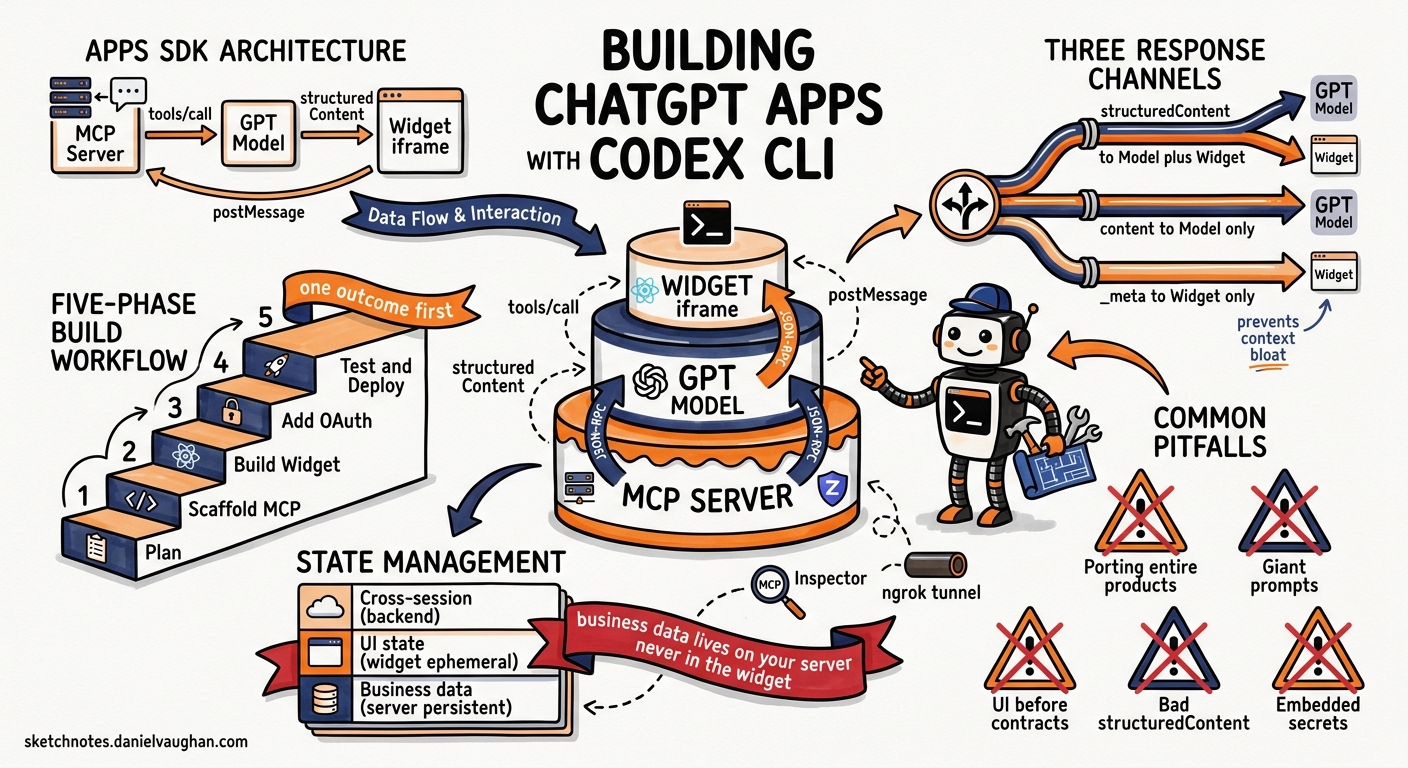
OpenAI’s Apps SDK turns ChatGPT into a platform. Rather than building standalone web applications that happen to call the API, developers now build inside ChatGPT — defining MCP tools that the model invokes on the user’s behalf and optional widget UIs that render in ChatGPT’s iframe1. The official Codex use case “Bring your app to ChatGPT” documents a phased workflow for this, and Codex CLI is the natural tool for executing it2. This article walks through the architecture, the agent-assisted scaffolding workflow, and the practical patterns that make the difference between a demo and a shippable app.
The Apps SDK Architecture
A ChatGPT app comprises three components that communicate through the MCP Apps standard13:
sequenceDiagram
    participant User as ChatGPT User
    participant Model as GPT Model
    participant MCP as Your MCP Server
    participant Widget as Widget (iframe)

    User->>Model: Natural language request
    Model->>MCP: tools/call (JSON-RPC)
    MCP->>MCP: Execute handler, fetch data
    MCP-->>Model: structuredContent + content + _meta
    Model-->>Widget: Render via ui/notifications/tool-result
    Widget->>MCP: tools/call (user action)
    MCP-->>Widget: Updated structuredContent
The MCP server defines tools, enforces authentication, returns data, and references UI bundles. Each tool has a Zod-typed input/output schema, tool annotations describing side-effects, and optional _meta linking to a widget resource URI3.
The widget is an HTML/JS/React bundle registered as an MCP resource with MIME type text/html;profile=mcp-app. It renders inside ChatGPT’s iframe and communicates bidirectionally via JSON-RPC 2.0 over postMessage4.
The model decides when to invoke tools based on tool metadata — names, descriptions, and annotations you provide. It never sees _meta payloads, only structuredContent and content3.
Three Response Channels
Every tool response carries three parallel payloads, and understanding the separation is critical3:
| Channel | Consumer | Purpose |
|---|---|---|
structuredContent |
Model + Widget | Concise JSON the model reasons over and the widget renders |
content |
Model only | Optional Markdown narration for the conversational response |
_meta |
Widget only | Large or sensitive data (full records, tokens, timestamps) that must not reach the model |
This three-channel design prevents context bloat. A kanban board tool, for instance, returns five tasks per column in structuredContent for the model to summarise, but ships the full task objects with metadata in _meta for the widget to render3.
The Codex-Assisted Build Workflow
The official “Bring your app to ChatGPT” use case prescribes five phases2. Here is how each maps to Codex CLI patterns:
Phase 1: Plan Before Scaffolding
Start with a planning prompt rather than jumping to code:
codex "I'm building a ChatGPT app for [domain]. Plan the MCP server: \
  define one core user outcome, propose 3-5 tools with names, descriptions, \
  input/output schemas, and annotations. Decide whether v1 needs a widget \
  or can remain data-only. Write the plan to PLAN.md."
The key constraint from the official guidance: define a single core user outcome first2. Porting an entire product into ChatGPT is the most common failure mode. A Jira integration, for example, should start with “show my assigned tickets” — not “replicate the full Jira experience.”
Phase 2: Scaffold the MCP Server
With the plan in hand, use Codex to generate the server skeleton. Install the official ChatGPT Apps skill first2:
codex "Read PLAN.md. Scaffold a TypeScript MCP server using \
  @modelcontextprotocol/sdk and @modelcontextprotocol/ext-apps. \
  Register tools with Zod schemas matching the plan. Add tool annotations \
  (readOnlyHint, openWorldHint, destructiveHint) for each tool. \
  Expose the /mcp HTTP endpoint with CORS support."
The SDK provides registerAppTool and registerAppResource helpers that handle JSON-RPC plumbing3. A minimal tool registration looks like this:
import { registerAppTool } from "@modelcontextprotocol/ext-apps/server";
import { z } from "zod";

registerAppTool(
  server,
  "list-tickets",
  {
    title: "List assigned tickets",
    inputSchema: { project: z.string().optional() },
    outputSchema: {
      tickets: z.array(z.object({
        id: z.string(),
        title: z.string(),
        status: z.enum(["todo", "in-progress", "done"]),
      })),
    },
    annotations: {
      readOnlyHint: true,
      openWorldHint: false,
      destructiveHint: false,
    },
    _meta: {
      ui: { resourceUri: "ui://widget/ticket-board.html" },
      "openai/toolInvocation/invoking": "Fetching your tickets…",
    },
  },
  async ({ project }) => {
    const tickets = await fetchTickets(project);
    return {
      structuredContent: { tickets: tickets.slice(0, 10) },
      content: [{ type: "text", text: `Found ${tickets.length} tickets.` }],
      _meta: { fullTickets: tickets },
    };
  }
);
Phase 3: Build the Widget
For apps that need visual output, scaffold the widget bundle:
codex "Create a React widget in web/ that listens for \
  ui/notifications/tool-result via postMessage, renders the \
  ticket board from structuredContent, and calls tools/call \
  for user actions like status updates. Bundle with esbuild \
  and register as an MCP resource in the server."
The widget lifecycle follows a predictable pattern4:
stateDiagram-v2
    [*] --> Mounted: iframe loaded
    Mounted --> Initialised: ui/initialize received
    Initialised --> Rendering: tool-result notification
    Rendering --> UserAction: click/submit
    UserAction --> ToolCall: tools/call via postMessage
    ToolCall --> Rendering: new tool-result
    Rendering --> Closed: requestClose() or navigate away
The bridge communication uses window.parent.postMessage with JSON-RPC 2.0 format. Widgets receive data through ui/notifications/tool-result and trigger actions through tools/call4. ChatGPT-specific extensions like window.openai.uploadFile(), requestDisplayMode(), and requestCheckout() are available but should be used sparingly to maintain MCP Apps portability4.
Phase 4: Add Authentication
The official guidance is clear: implement OAuth only after validating the core tool flow works2. ChatGPT manages the OAuth 2.1 token lifecycle — your server receives a Bearer token header with each MCP request5.
codex "Add OAuth 2.1 authentication to the MCP server. \
  Keep read-only tools anonymous. Require auth only for \
  write-action tools. Follow the ChatGPT OAuth flow where \
  ChatGPT manages tokens and sends Authorization: Bearer headers."
Phase 5: Test and Deploy
Test locally using the MCP Inspector before connecting to ChatGPT1:
npx @modelcontextprotocol/inspector@latest \
  --server-url http://localhost:8787/mcp
Then expose via HTTPS tunnel for ChatGPT developer mode testing:
ngrok http 8787
Enable developer mode in ChatGPT Settings → Apps & Connectors, create a connector with the ngrok HTTPS URL, and test the full flow1.
For production deployment, Codex can generate infrastructure configuration targeting Vercel, Cloudflare Workers, or Fly.io:
codex exec "Generate a Vercel deployment config for the MCP server \
  in server/. Ensure the /mcp endpoint is exposed with streaming \
  support and the widget assets are served with correct CSP headers." \
  --sandbox workspace-write
State Management: The Three-Layer Model
ChatGPT apps manage three distinct state categories, and mixing them is a common source of bugs6:
| Layer | Owner | Lifetime | Example |
|---|---|---|---|
| Business data | MCP server/backend | Persistent | Tasks, orders, documents |
| UI state | Widget instance | Current widget | Selected row, expanded panel |
| Cross-session | Your backend | Across conversations | Saved filters, preferences |
The cardinal rule: business data lives on your server, never in the widget6. After every mutation, return the updated authoritative state in structuredContent so both the model and widget stay consistent.
For optional widget state persistence, the window.openai.widgetState and window.openai.setWidgetState() APIs allow ephemeral UI state to survive minor widget remounts6.
Content Security Policy
Widget CSP configuration is declared in the resource _meta and controls what the iframe can access3:
_meta: {
  ui: {
    domain: "https://myapp.example.com",
    csp: {
      connectDomains: ["https://api.myapp.example.com"],
      resourceDomains: ["https://*.oaistatic.com"],
      // frameDomains: [] — avoid unless absolutely necessary
    },
  },
}
Declaring frameDomains triggers heightened review scrutiny. Avoid sub-iframes unless they are core to the experience3.
Tool Annotations Matter
Tool annotations directly affect how ChatGPT presents confirmation prompts and manages user trust3:
annotations: {
  readOnlyHint: false,    // This tool writes data
  openWorldHint: false,   // Bounded to known targets
  destructiveHint: true,  // Irreversible operation
}
Mark retrieval-only tools as readOnlyHint: true so ChatGPT can invoke them without user confirmation. Write operations with destructiveHint: true trigger explicit confirmation UIs.
Common Pitfalls
The official use case documentation highlights several failure modes worth internalising2:
- Porting entire products instead of solving one outcome. Start with a single read flow.
- Giant implementation prompts. Split into plan → scaffold → auth → deploy phases.
- Building UI before tool contracts. Wire the MCP tools first, verify with the Inspector, then add widgets.
- Ignoring
structuredContentdesign. If the model cannot reason over your tool output, it cannot invoke tools effectively. - Embedding secrets in responses. Never place API keys, tokens, or credentials in
structuredContent,content, or_meta3.
Practical Recommendations
- Use the ChatGPT Apps skill in your Codex CLI session for up-to-date SDK guidance2
- Start data-only. Many useful apps (weather, analytics, search) need no widget at all
- Version your resource URIs when deploying breaking widget changes — ChatGPT caches aggressively3
- Make handlers idempotent. The model may retry tool calls3
- Target sub-second latency for tool responses. ChatGPT users expect conversational speed6
- Use
codex execwith--output-schemato generate typed tool schemas from your data models, then paste into the MCP server definition
What Comes Next
The Apps SDK is evolving rapidly. The MCP Apps UI standard means widgets built today will run in any compatible host, not just ChatGPT4. Instant Checkout via requestCheckout() hints at a commerce platform layer4. And with Codex CLI’s iterative repair loops, the build-test-refine cycle for ChatGPT apps can be compressed from days to hours.
The interesting strategic point: Codex CLI is now being used to build extensions for the platform that hosts Codex itself. This recursive relationship — where the agent builds the tools the agent will later use — is precisely the kind of compounding leverage that makes the Apps SDK worth investing in now.
Citations
-
OpenAI, “Apps SDK Quickstart,” OpenAI Developers, 2026. https://developers.openai.com/apps-sdk/quickstart ↩ ↩2 ↩3 ↩4
-
OpenAI, “Bring your app to ChatGPT — Codex Use Cases,” OpenAI Developers, 2026. https://developers.openai.com/codex/use-cases/chatgpt-apps ↩ ↩2 ↩3 ↩4 ↩5 ↩6 ↩7
-
OpenAI, “Build your MCP server — Apps SDK,” OpenAI Developers, 2026. https://developers.openai.com/apps-sdk/build/mcp-server ↩ ↩2 ↩3 ↩4 ↩5 ↩6 ↩7 ↩8 ↩9 ↩10 ↩11 ↩12
-
OpenAI, “Build your ChatGPT UI — Apps SDK,” OpenAI Developers, 2026. https://developers.openai.com/apps-sdk/build/chatgpt-ui ↩ ↩2 ↩3 ↩4 ↩5 ↩6
-
OpenAI, “MCP Apps compatibility in ChatGPT — Apps SDK,” OpenAI Developers, 2026. https://developers.openai.com/apps-sdk/mcp-apps-in-chatgpt ↩
-
OpenAI, “Managing State — Apps SDK,” OpenAI Developers, 2026. https://developers.openai.com/apps-sdk/build/state-management ↩ ↩2 ↩3 ↩4