codex mcp: Managing MCP Servers Entirely from the Terminal
codex mcp: Managing MCP Servers Entirely from the Terminal
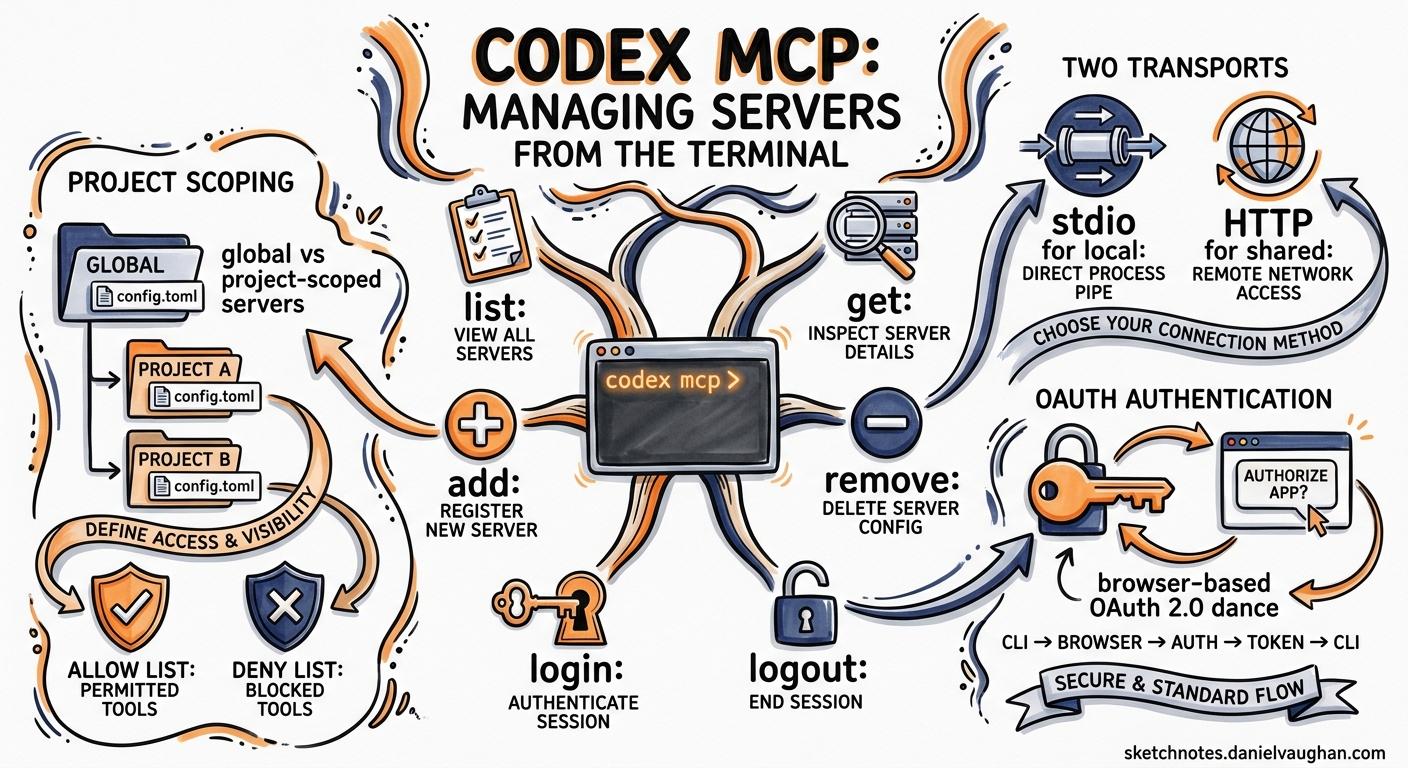
The Model Context Protocol gives Codex CLI access to third-party tools — GitHub operations, database queries, documentation lookups, browser automation — but wiring those servers into your configuration has historically meant hand-editing TOML. The codex mcp subcommand replaces that manual plumbing with a proper CLI workflow: add, remove, list, inspect, authenticate, and scope servers without ever opening config.toml yourself.
This article walks through every codex mcp sub-subcommand, explains the two transport models it supports, covers OAuth authentication for remote servers, and shows how to combine it all with project-scoped configuration and tool allow/deny lists.
The Six Subcommands at a Glance
graph LR
    A[codex mcp] --> B[list]
    A --> C[get]
    A --> D[add]
    A --> E[remove]
    A --> F[login]
    A --> G[logout]
    B --> H[--json]
    C --> I[--json]
    D --> J[--url / -- cmd]
    D --> K[--env KEY=VAL]
    D --> L[--bearer-token-env-var]
    F --> M[--scopes]
| Subcommand | Purpose |
|---|---|
list |
Show all configured servers, with auth status |
get <name> |
Inspect a single server’s config |
add <name> |
Register a new stdio or HTTP server |
remove <name> |
Delete a server entry |
login <name> |
Start OAuth 2.0 authentication |
logout <name> |
Remove stored OAuth credentials |
All write operations target ~/.codex/config.toml (or $CODEX_HOME/config.toml) by default 1. The underlying implementation uses a ConfigEditsBuilder abstraction to ensure atomic updates — no half-written TOML tables if the process is interrupted 2.
Adding Servers
Stdio Transport
Stdio servers are local processes that Codex launches and communicates with via standard input/output. The trailing -- separates the server name from the launch command:
# Register a Context7 documentation server
codex mcp add context7 -- npx -y @upstash/context7-mcp

# Register with environment variables
codex mcp add postgres -- node pg-mcp-server.js \
  --env DATABASE_URL=postgresql://localhost:5432/mydb

# Multiple --env flags are repeatable
codex mcp add sentry -- python -m sentry_mcp \
  --env SENTRY_DSN=https://key@sentry.io/123 \
  --env SENTRY_ORG=my-org
The generated TOML entry looks like this 1:
[mcp_servers.context7]
command = "npx"
args = ["-y", "@upstash/context7-mcp"]
Streamable HTTP Transport
Remote servers use --url instead of a trailing command:
# GitHub's hosted MCP server
codex mcp add github --url https://api.githubcopilot.com/mcp/ \
  --bearer-token-env-var GITHUB_PAT_TOKEN

# A custom internal server
codex mcp add internal-docs --url https://mcp.internal.example.com/v1
The --bearer-token-env-var flag tells Codex which environment variable holds the bearer token — the token itself is never written to disk 3. The generated config:
[mcp_servers.github]
url = "https://api.githubcopilot.com/mcp/"
bearer_token_env_var = "GITHUB_PAT_TOKEN"
When adding a streamable HTTP server, the CLI automatically probes the endpoint for OAuth support. If detected, it may prompt you to authenticate immediately via perform_oauth_login_retry_without_scopes() 2.
Listing and Inspecting Servers
# Human-readable table with auth status
codex mcp list

# Machine-readable JSON for scripting
codex mcp list --json

# Inspect a single server
codex mcp get github
codex mcp get github --json
Both list and get call compute_auth_statuses() internally, which checks three things for each server 2:
- Whether a
bearer_token_env_varis configured and the variable is set - Whether stored OAuth tokens exist in the local credential store
- Whether the HTTP endpoint advertises OAuth discovery metadata
This means the output tells you not just what is configured, but whether authentication is actually live — useful when debugging why a server’s tools are not appearing in your session.
OAuth Authentication
OAuth is only supported for streamable HTTP servers 1. The flow works like any browser-based OAuth consent screen:
# Authenticate with default scopes advertised by the server
codex mcp login github

# Request specific scopes
codex mcp login linear --scopes "read,write,issues"

# Remove stored credentials
codex mcp logout github
How Credentials Are Stored
Codex offers three credential storage backends, controlled by the mcp_oauth_credentials_store key in config.toml 4:
| Value | Behaviour |
|---|---|
auto |
Use system keyring if available, fall back to file |
keyring |
macOS Keychain, Windows Credential Manager, or Linux Secret Service |
file |
Encrypted file in $CODEX_HOME |
OAuth Callback Configuration
By default, Codex binds an ephemeral port for the OAuth callback. Two config keys let you override this 4:
# Fix the callback port (useful behind firewalls)
mcp_oauth_callback_port = 8976

# Override the full callback URL (useful in devboxes or remote environments)
mcp_oauth_callback_url = "https://my-devbox.example.com/oauth/callback"
When mcp_oauth_callback_url is set, Codex binds to 0.0.0.0 rather than 127.0.0.1, allowing the remote ingress to reach the local listener 4.
Removing Servers
codex mcp remove context7
This deletes the [mcp_servers.context7] table from config.toml. It does not remove any stored OAuth credentials — run codex mcp logout first if the server used OAuth 2.
Beyond the CLI: Configuration You Still Need TOML For
The codex mcp add command covers the basics — transport, environment variables, and bearer tokens. Several advanced settings currently require direct TOML editing 1 4:
[mcp_servers.chrome_devtools]
url = "http://localhost:3000/mcp"

# Only expose these two tools to the model
enabled_tools = ["open", "screenshot"]

# Block destructive tools
disabled_tools = ["delete_all"]

# Fail startup if this server is unreachable
required = true

# Extend timeouts for slow-starting servers
startup_timeout_sec = 20
tool_timeout_sec = 120

# Temporarily disable without removing
enabled = false
Tool Allow/Deny Lists
The enabled_tools allowlist runs first; disabled_tools is then applied as a denylist on the result 4. This two-pass approach means you can broadly allowlist a category and then carve out exceptions:
[mcp_servers.github]
url = "https://api.githubcopilot.com/mcp/"
bearer_token_env_var = "GITHUB_PAT_TOKEN"
enabled_tools = ["list_repos", "get_issue", "create_issue", "list_prs", "get_pr"]
disabled_tools = ["delete_repo"]
Remote Environment Variables
For servers running on remote executors (such as Codex’s own remote sandbox), you can forward variables with a source = "remote" annotation 5:
[mcp_servers.deploy]
command = "deploy-server"
env_vars = [
  "LOCAL_TOKEN",
  { name = "REMOTE_TOKEN", source = "remote" }
]
Project-Scoped vs User-Scoped Servers
Servers added via codex mcp add go into ~/.codex/config.toml (user scope). For project-scoped servers, create .codex/config.toml in your repository root 1:
# .codex/config.toml — checked into version control
[mcp_servers.project_docs]
command = "node"
args = ["./tools/docs-mcp-server.js"]
Project-scoped servers are only loaded when Codex is launched from within that directory tree. This is ideal for team-shared tooling — commit the config alongside the codebase so every developer gets the same MCP servers automatically.
flowchart TD
    A[Session starts] --> B{Project .codex/config.toml exists?}
    B -->|Yes| C[Merge project servers with user servers]
    B -->|No| D[Use user servers only]
    C --> E[Launch all enabled servers]
    D --> E
    E --> F{Server required = true?}
    F -->|Yes, fails| G[Abort session startup]
    F -->|No, fails| H[Log warning, continue]
    F -->|Succeeds| I[Expose tools to model]
Verifying Your Setup
Once servers are configured, verify they are live within an interactive session:
- Launch Codex and wait for the session to initialise
- Type
/mcpin the TUI to list connected servers and their available tools 6 - Test a tool with a natural-language prompt: “List my GitHub repositories” or “Show the docs for React useState”
If a server does not appear, check:
codex mcp listshows the server and its auth status is valid- The server process starts successfully (for stdio, try running the command manually)
startup_timeout_secis long enough for servers that need to download dependencies (e.g.,npx -y)- For OAuth servers,
codex mcp login <name>completes without errors
Practical Recipes
Recipe 1: GitHub + Linear + Sentry Stack
codex mcp add github --url https://api.githubcopilot.com/mcp/ \
  --bearer-token-env-var GITHUB_PAT_TOKEN
codex mcp add linear --url https://mcp.linear.app/sse
codex mcp login linear --scopes "read,write"
codex mcp add sentry -- npx -y @sentry/mcp-server \
  --env SENTRY_AUTH_TOKEN="$(op read 'op://Dev/Sentry/token')"
Recipe 2: CI-Only Server Registration
In a GitHub Actions workflow, register servers ephemerally before running codex exec:
codex mcp add gh-review --url https://api.githubcopilot.com/mcp/ \
  --bearer-token-env-var GITHUB_TOKEN
codex exec "Review this PR and suggest improvements" \
  --sandbox read-only
Recipe 3: Auditing Server Configuration in Scripts
# List all servers as JSON, pipe to jq for analysis
codex mcp list --json | jq '.[].name'

# Check a specific server's auth status
codex mcp get github --json | jq '.auth_status'
Current Limitations
- No project-scope flag on
add: The CLI always writes to user-scopeconfig.toml. For project-scoped servers, you must edit.codex/config.tomlmanually 1. - No
enable/disablesubcommand: Issue #16439 tracks addingcodex mcp enable|disable <server>as dedicated subcommands 7. For now, toggleenabled = falsein TOML. - OAuth credential cleanup on
remove: Removing a server does not automatically revoke or delete stored OAuth tokens 2. Runlogoutbeforeremoveto clean up fully. - No tool filtering on
add: Theenabled_toolsanddisabled_toolsarrays must be set via direct TOML editing 4.
Citations
-
[Model Context Protocol — Codex OpenAI Developers](https://developers.openai.com/codex/mcp) -
[MCP CLI Commands openai/codex DeepWiki](https://deepwiki.com/openai/codex/6.3-mcp-cli-commands) -
[Configuration Reference — Codex OpenAI Developers](https://developers.openai.com/codex/config-reference) -
[Sample Configuration — Codex OpenAI Developers](https://developers.openai.com/codex/config-sample) -
[Features — Codex CLI OpenAI Developers](https://developers.openai.com/codex/cli/features) -
Add
codex mcp enable|disable <server>CLI subcommands — Issue #16439 — openai/codex ↩