The Official OpenAI Skills Catalogue: System, Curated, and Experimental Skills for Codex CLI
The Official OpenAI Skills Catalogue: System, Curated, and Experimental Skills for Codex CLI
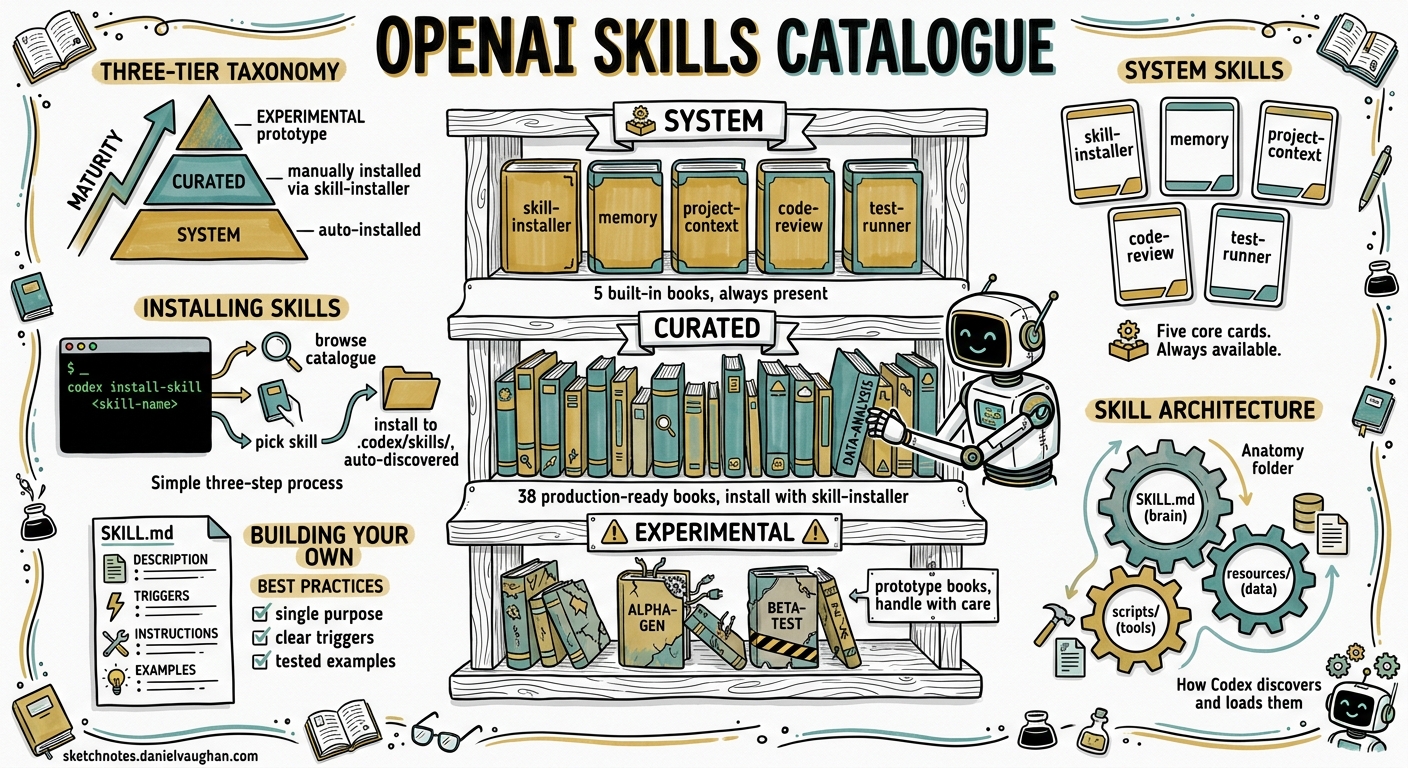
OpenAI maintains a public skills catalogue at openai/skills — a repository of packaged agent instructions, scripts, and resources that extend Codex CLI with task-specific capabilities 1. With 19,000+ stars and 38 curated skills at the time of writing, it has become the canonical source for production-ready agent workflows. Yet many Codex CLI users remain unaware it exists, or how the three-tier taxonomy — system, curated, and experimental — maps onto their daily work.
This article examines the catalogue’s architecture, walks through installing and using its most practical skills, and covers the patterns worth adopting when building your own.
The Three-Tier Taxonomy
The repository organises skills into three directories, each representing a maturity level 2:
graph TD
    A[openai/skills Repository] --> B[".system"]
    A --> C[".curated"]
    A --> D[".experimental"]
    B --> B1["Auto-installed with Codex"]
    B --> B2["5 core infrastructure skills"]
    C --> C1["Manually installed via skill-installer"]
    C --> C2["38 production-ready skills"]
    D --> D1["Prototype skills for feedback"]
    D --> D2["Installed by path or URL"]
System Skills (.system)
These ship bundled with Codex and require no installation. As of v0.130.0, five system skills exist 3:
| Skill | Purpose |
|---|---|
skill-installer |
Installs curated and external skills from GitHub |
skill-creator |
Guides agents through building well-structured SKILL.md files |
plugin-creator |
Converts skills into distributable plugins |
openai-docs |
Structured access to OpenAI documentation |
imagegen |
Image generation via the OpenAI Images API |
The skill-installer is the gateway to everything else — invoke it with $skill-installer inside any Codex session to browse and install catalogue skills.
Curated Skills (.curated)
These are production-ready workflows that have passed OpenAI’s review. They require explicit installation but are stable enough for daily use. The 38 curated skills span several categories 1:
GitHub Integration:
gh-fix-ci— inspects failing GitHub Actions checks, fetches logs, summarises root causes, drafts a fix plan, and implements only after approval 4gh-address-comments— resolves PR review comments systematically
Deployment:
cloudflare-deploy— deploys to Cloudflare Workers and Pagesvercel-deploy— deploys to Vercelnetlify-deploy— deploys to Netlifyrender-deploy— deploys to Render
Design-to-Code (Figma Suite):
figma,figma-implement-design,figma-create-design-system-rules,figma-generate-design,figma-generate-library,figma-create-new-file,figma-code-connect-components,figma-use— a comprehensive set for Figma-driven workflows
Productivity:
linear— Linear issue managementnotion-knowledge-capture,notion-meeting-intelligence,notion-research-documentation,notion-spec-to-implementation— Notion integration suitesentry— production error triage
Security:
security-best-practices,security-ownership-map,security-threat-model— a three-skill security workflow stack
Testing:
playwright,playwright-interactive— browser automation and testingscreenshot— captures screenshots for visual verification
Content & Media:
pdf— PDF parsing and analysisspeech,transcribe— audio generation and transcriptionjupyter-notebook— notebook workflows for data analysis
Other:
migrate-to-codex— migrates sessions and configuration from Claude Code and other agents 5openai-docs— documentation access (also in.system)cli-creator— builds CLI toolschatgpt-apps— creates ChatGPT integrationsaspnet-core— ASP.NET Core developmentwinui-app— Windows UI applicationshatch-pet,yeet— playful demonstration skills
Experimental Skills (.experimental)
Prototype skills for testing and community feedback. Notable examples include create-plan, which generates structured implementation plans 6. These are not guaranteed stable and may change without notice.
Installing Skills
Curated Skills by Name
The simplest path — invoke the skill-installer with just the skill name:
# Inside a Codex CLI session
$skill-installer gh-fix-ci
This fetches the skill from skills/.curated/gh-fix-ci on the main branch of openai/skills and installs it to $CODEX_HOME/skills/ (defaulting to ~/.codex/skills/) 7.
Experimental Skills by Path
Reference the experimental folder explicitly:
$skill-installer install the create-plan skill from the .experimental folder
The installer accepts natural language and resolves it to the correct repository path 7.
External Skills by URL
Any GitHub-hosted skill can be installed via URL:
$skill-installer install https://github.com/openai/skills/tree/main/skills/.experimental/create-plan
Advanced Options
The underlying install-skill-from-github.py script supports additional flags 7:
python install-skill-from-github.py \
  --ref v1.2.0 \          # Pin to a specific branch/tag/commit
  --dest /custom/path \   # Override installation directory
  --method git \           # Force git sparse checkout (for private repos)
  --name my-skill          # Override the skill directory name
For private repositories, set GITHUB_TOKEN or GH_TOKEN before installation. The installer attempts a ZIP download first, falling back to git clone --sparse if authentication is required 7.
Post-Installation
Restart Codex to activate newly installed skills. Verify with:
$skill-installer list
Skills marked (already installed) are ready to use. ⚠️ Installation aborts if the target directory already exists — remove the existing skill directory before reinstalling.
Anatomy of a Well-Built Skill
Every skill follows the same structure 8:
my-skill/
├── SKILL.md              # Required: name, description, instructions
├── agents/
│   └── openai.yaml       # Recommended: invocation policies, tool deps
├── scripts/              # Optional: deterministic shell operations
├── references/           # Optional: documentation, examples
└── assets/               # Optional: templates, images
The SKILL.md File
The frontmatter is routing metadata — Codex reads skill descriptions to decide when to activate them 9:
---
name: gh-fix-ci
description: >
  Inspect failing GitHub Actions checks, fetch logs, summarise failures,
  draft a fix plan, and implement only after explicit approval.
  Use when: a PR has failing CI checks from GitHub Actions.
  Do not use for: external CI providers like Buildkite or CircleCI.
---

## Instructions

1. Verify `gh` CLI authentication via `gh auth status`
2. Resolve the current branch's PR or accept a user-provided number
3. Run the bundled inspection script...
Note the description field specifies both when the skill applies and when it does not. This is critical for implicit activation — Codex uses this field as routing metadata, not just documentation 9.
Progressive Disclosure
Codex loads skill names and descriptions eagerly but defers full SKILL.md instructions until a skill is selected 8. The system caps the initial skills list at approximately 8,000 characters to prevent context overflow — if many skills are installed, Codex shortens descriptions automatically 8. This makes concise, precise descriptions essential.
Scripts vs Instructions
The OpenAI Agents SDK case study provides a useful heuristic 9:
Repetitive shell operations live in skill scripts; interpretation, comparison, and reporting stay with the model.
The gh-fix-ci skill exemplifies this pattern: its scripts/inspect_pr_checks.py handles the deterministic work of fetching logs and extracting error snippets, while the SKILL.md instructions guide the model through analysis, plan drafting, and approval gating 4.
Composing Skills
The real power emerges when skills compose. The security suite demonstrates this — security-threat-model identifies risks, security-ownership-map maps code ownership boundaries, and security-best-practices enforces standards. Used together, they form a governance stack 10.
flowchart LR
    A["security-threat-model"] -->|"identifies risks"| B["security-ownership-map"]
    B -->|"maps ownership"| C["security-best-practices"]
    C -->|"enforces standards"| D["Hardened Codebase"]

    E["gh-fix-ci"] -->|"diagnoses failures"| F["playwright"]
    F -->|"verifies fix"| G["vercel-deploy"]
    G -->|"ships to production"| H["sentry"]
    H -->|"monitors errors"| E
Similarly, a CI-to-production loop might chain gh-fix-ci → playwright → vercel-deploy → sentry, with each skill handling its bounded domain.
Building Skills for the Catalogue
If you are building skills intended for team or community use, the patterns from the curated catalogue are worth following:
- One skill, one job — keep skills focused on a single workflow rather than bundling multiple capabilities 8
- Gate destructive actions — skills like
gh-fix-cirequire explicit approval before implementing fixes 4 - Bundle validation scripts — deterministic checks belong in
scripts/, not in prompt instructions 9 - Specify activation boundaries — the
descriptionfield should state both when to use and when not to use the skill 8 - Support automation — scripts should exit with non-zero status on failure for CI integration 4
The skill-creator system skill can guide you through this process interactively — invoke it with $skill-creator in any Codex session 3.
Discovery and the Wider Ecosystem
Beyond the official catalogue, community skill directories have emerged. The awesome-agent-skills repository catalogues 1,000+ skills across Codex, Claude Code, Gemini CLI, Cursor, and other agents 11. The awesome-codex-skills repository focuses specifically on Codex workflows 12.
Skills follow the open agent skills standard, meaning a well-structured SKILL.md can work across multiple agent platforms — though tool dependencies and script runtime assumptions may differ between agents 8.
Practical Recommendations
For teams adopting the skills catalogue:
- Start with
gh-fix-ci— it delivers immediate value on any repository with GitHub Actions, and its approval-gated pattern demonstrates safe skill design - Install the security triple (
security-best-practices,security-ownership-map,security-threat-model) as a baseline governance layer - Pin skill versions with
--refwhen stability matters — themainbranch moves frequently - Audit installed skills periodically — skills have filesystem and potentially network access within the Codex sandbox
- Contribute upstream — the contributing guidelines are lightweight, and the catalogue benefits from real-world workflow patterns 13
Citations
-
[Agent Skills — Codex OpenAI Developers](https://developers.openai.com/codex/skills) -
[Installing Skills — openai/skills DeepWiki](https://deepwiki.com/openai/skills/3.1-installing-skills) -
[Agent Skills Documentation — Codex OpenAI Developers](https://developers.openai.com/codex/skills) -
Using Skills to Accelerate OSS Maintenance — OpenAI Developers Blog ↩ ↩2 ↩3 ↩4
-
[awesome-agent-skills — VoltAgent GitHub](https://github.com/VoltAgent/awesome-agent-skills) -
[awesome-codex-skills — Composio GitHub](https://github.com/ComposioHQ/awesome-codex-skills)