Codex CLI Slash Commands Complete Reference: All 45 Commands in v0.131
Codex CLI Slash Commands Complete Reference: All 45 Commands in v0.131
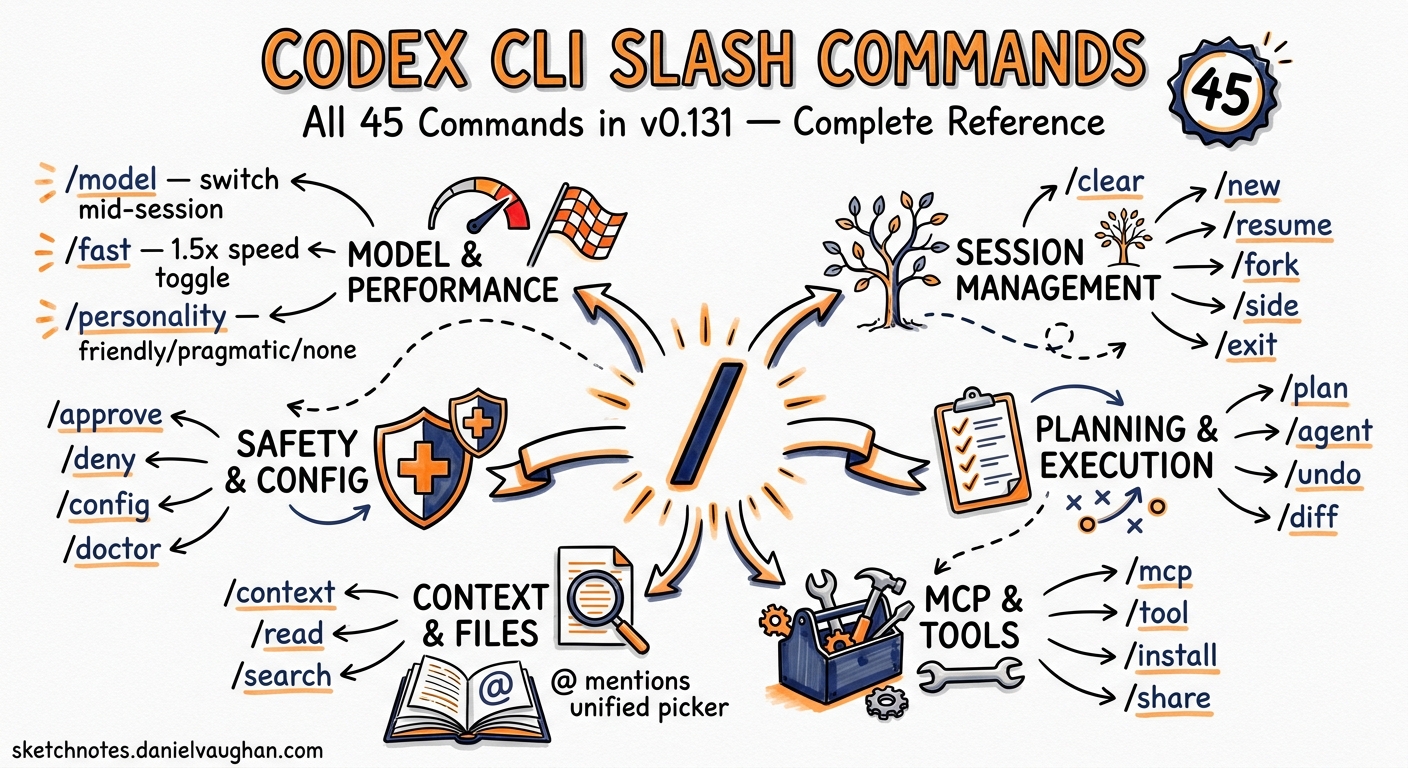
Codex CLI v0.131.0 ships with 45 slash commands — more than triple the count from early 20261. Most guides still reference the original dozen. This article catalogues every command available in the TUI as of May 2026, organised by function, with usage patterns that senior developers actually need.
How Slash Commands Work
Type / in the Codex CLI composer to open the command picker. Tab-completion filters the list as you type. Most commands accept inline arguments (e.g. /plan refactor the auth module) and execute immediately2.
Slash commands are distinct from CLI subcommands like codex exec or codex mcp. They operate inside an active interactive session, not from the shell.
Model and Performance Control
These commands govern which model processes your prompts and how fast it responds.
| Command | Purpose | Example |
|---|---|---|
/model |
Switch the active model mid-session | /model gpt-5.4-mini |
/fast |
Toggle the Fast service tier (1.5× speed, higher credit burn) | /fast on |
/personality |
Choose a communication style: friendly, pragmatic, or none |
/personality pragmatic |
/fast works with GPT-5.5 (2.5× credit consumption) and GPT-5.4 (2× consumption)3. API key users cannot access Fast mode — it requires a ChatGPT subscription. Use /personality none to strip all personality instructions and reclaim token budget for task context.
# Persist these in ~/.codex/config.toml instead of setting per-session
model = "gpt-5.4-mini"
service_tier = "fast"

[features]
fast_mode = true
Session Management
Commands for controlling conversation flow, branching, and resuming prior work.
| Command | Purpose |
|---|---|
/clear |
Wipe the terminal and start a fresh chat within the same CLI process |
/new |
Start a new conversation thread without leaving the CLI |
/resume |
Reload a previous saved conversation from the session list |
/fork |
Clone the current conversation into a new thread, preserving the original |
/side |
Open an ephemeral side conversation without derailing the main thread |
/exit |
Close the interactive session |
/quit |
Alias for /exit |
Branching Patterns
/fork creates a persistent branch — the original transcript survives, and you can /resume either branch later. Use it when you want to try an alternative architectural approach without losing progress4.
/side creates a throwaway branch. Ask a quick question, then return to the main thread with no transcript pollution. Useful for ad-hoc queries mid-refactor:
/side what's the maximum connection pool size for pg 16?
The side conversation’s output stays visible for reference but does not enter the main thread’s context window.
Workflow and Mode Switching
These commands change how Codex interacts with your codebase.
| Command | Purpose |
|---|---|
/plan |
Switch to plan mode — Codex reads files and proposes a plan without writing anything |
/goal |
Set a persistent objective that survives across turns (experimental) |
/review |
Ask Codex to review your working tree, focusing on behaviour changes and missing tests |
/diff |
Display the Git diff, including staged changes, unstaged changes, and untracked files |
/compact |
Summarise earlier conversation to free context tokens |
flowchart LR
    A["/plan"] --> B["Codex proposes<br/>implementation plan"]
    B --> C{"Approve?"}
    C -- Yes --> D["Shift+Tab to<br/>Execute mode"]
    D --> E["Codex implements"]
    E --> F["/review"]
    F --> G["/diff"]
    C -- No --> H["Refine prompt"]
    H --> B
Plan-Execute-Review Cycle
The canonical workflow is /plan → review the proposal → Shift+Tab to switch to Execute mode → /review to validate → /diff to inspect changes5. This keeps the agent from racing ahead on an approach you haven’t sanctioned.
Context Compaction
/compact is essential for long sessions. When context pressure rises, Codex replaces earlier turns with a compressed summary. The model preserves task-critical details — file paths, decisions made, error signatures — whilst discarding conversational boilerplate6.
Persistent Goals
/goal sets an objective that persists across turns:
/goal raise test coverage in src/auth to 90% without mocking external calls
/goal          # view the current goal
/goal pause    # temporarily suspend
/goal resume   # reactivate
/goal clear    # remove entirely
This is an experimental feature requiring the goals feature flag7.
Permissions and Security
Commands for adjusting the agent’s autonomy boundary during a session.
| Command | Purpose |
|---|---|
/permissions |
Switch approval mode: auto-approve, on-request, or manual |
/approve |
Retry a specific action that the auto-reviewer denied |
/hooks |
Review, trust, or disable lifecycle hooks |
/permissions maps to the --ask-for-approval CLI flag. Tightening mid-session (e.g. from never to on-request) takes effect immediately without restarting8.
/approve is narrow by design: it retries only the most recently denied action, not a blanket override. This prevents accidental escalation when the auto-reviewer blocks a sandbox boundary crossing or a side-effecting MCP call9.
Context and File Attachment
Commands for injecting additional context into the conversation.
| Command | Purpose |
|---|---|
/ide |
Include open files, current selection, and other IDE context |
/mention |
Attach a specific file to the conversation |
/memories |
Configure whether threads use or generate persistent memories |
/mention is equivalent to the @ mention syntax in the composer. Both support tab-completion across files, directories, plugins, and skills as of v0.131.0’s unified mentions system10.
/memories controls two dimensions independently:
/memories generate off    # this thread won't create new memories
/memories use on          # this thread will consume existing memories
Agent and Extension Management
Commands for working with subagents, plugins, skills, apps, and MCP tools.
| Command | Purpose |
|---|---|
/agent |
Switch the active agent thread when running parallel subagents |
/skills |
Browse and invoke task-specific skills |
/apps |
Browse connectors (apps) and insert them as $app-slug mentions |
/plugins |
Browse installed and marketplace plugins |
/mcp |
List configured MCP tools and their status |
Subagent Switching
When you’ve delegated work to subagents, /agent lets you switch focus between threads. Each thread maintains its own context, approval state, and model configuration11.
Skill Invocation
/skills opens a picker showing all available skills. Select one and Codex loads its SKILL.md into context. You can also invoke skills implicitly by starting a prompt with $skill-name12.
TUI Customisation
Commands for tailoring the terminal interface to your preferences.
| Command | Purpose |
|---|---|
/vim |
Toggle Vim modal editing in the composer |
/raw |
Toggle raw scrollback mode for cleaner copy-paste |
/keymap |
Remap TUI keyboard shortcuts |
/statusline |
Configure which fields appear in the TUI footer |
/title |
Customise terminal window or tab title fields |
/theme |
Choose a syntax-highlighting theme with live preview |
/vim was added in v0.131.0 and supports normal, insert, and visual modes within the composer. You can set it as the default:
[tui]
default_mode = "vim"
/raw is useful when you need to copy a large block of output without TUI chrome interfering. Toggle it on, select and copy, then toggle it off to return to the rich display13.
Reasoning Controls
Whilst not slash commands, the keyboard shortcuts Alt+, (lower reasoning effort) and Alt+. (raise reasoning effort) pair naturally with /model for fine-grained control over response quality and speed14.
Diagnostics and System
Commands for inspecting configuration, reporting issues, and managing authentication.
| Command | Purpose |
|---|---|
/status |
Display session configuration, model, approval mode, and token usage |
/debug-config |
Print the full configuration layer stack and requirements diagnostics |
/experimental |
Toggle experimental feature flags |
/feedback |
Submit session logs to the Codex maintainers |
/init |
Generate an AGENTS.md scaffold in the current directory |
/logout |
Clear stored authentication credentials |
/debug-config is the session equivalent of codex doctor. It shows which configuration layers are active, their precedence, any requirements.toml constraints from enterprise governance, and flag overrides. Invaluable when a setting isn’t behaving as expected15.
Background Process Management
Commands for monitoring and controlling background work.
| Command | Purpose |
|---|---|
/ps |
Show experimental background terminals and their status |
/stop |
Cancel all running background terminals |
/copy |
Copy the latest completed Codex output to the clipboard |
/ps lists any background processes spawned by Codex during the session — useful when the agent kicks off a long-running build or test suite in the background and you need to check progress16.
Quick Reference Card
For rapid lookup, here are all 45 commands in alphabetical order:
/agent       /approve     /apps        /clear       /compact
/copy        /debug-config /diff       /exit        /experimental
/fast        /feedback    /fork        /goal        /hooks
/ide         /init        /keymap      /logout      /mcp
/memories    /mention     /model       /new         /permissions
/personality /plan        /plugins     /ps          /quit
/raw         /resume      /review      /sandbox-add-read-dir
/side        /skills      /status      /statusline  /stop
/theme       /title       /vim
Note: /sandbox-add-read-dir is Windows-only and grants read access to additional directories at runtime17.
Building Custom Slash Commands
Codex does not currently support user-defined slash commands directly. However, you can achieve similar effects through:
- Skills — Package a workflow as a skill with a
SKILL.mdfile, then invoke it via/skillsor$skill-name12 - Hooks — Attach scripts to lifecycle events (pre-tool-use, post-tool-use, on-turn-end) for automated validation18
- Plugins — Bundle skills, hooks, and MCP servers together and distribute via the marketplace19
What Changed in v0.131.0
The following commands were added or significantly enhanced in the v0.131.0 release cycle1:
/vim— New. Modal Vim editing in the composer with configurable default mode/approve— New. Retry auto-review denials without restarting/agent— Enhanced. Now supports the multi-environment session architecture/apps— Enhanced. Backed by app-server plugin metadata with unified search/statusline— New. Interactive footer configuration with blended token usage display/title— New. Terminal title customisation/debug-config— New. Configuration layer diagnostics
The unified @ mentions system also changed how /mention works — it now searches files, directories, plugins, and skills through a single picker10.
Citations
-
Codex CLI v0.131.0 Release Notes — GitHub, May 2026 ↩ ↩2
-
Slash Commands in Codex CLI — OpenAI Developer Documentation ↩
-
Codex Speed Configuration — OpenAI Developer Documentation ↩
-
Features — Codex CLI — OpenAI Developer Documentation ↩
-
Best Practices — Codex — OpenAI Developer Documentation ↩
-
Codex Prompting Guide — OpenAI Cookbook ↩
-
Codex /goal Command — OpenAI Developer Documentation ↩
-
Agent Approvals and Security — OpenAI Developer Documentation ↩
-
Auto-Review Documentation — OpenAI Developer Documentation, May 2026 ↩
-
Codex Changelog — v0.131.0 — OpenAI, May 18, 2026 ↩ ↩2
-
Subagents — Codex — OpenAI Developer Documentation ↩
-
Agent Skills — Codex — OpenAI Developer Documentation ↩ ↩2
-
Codex CLI Features — Raw Scrollback — OpenAI Developer Documentation ↩
-
Codex Changelog — TUI Reasoning Controls — OpenAI, May 2026 ↩
-
Config Reference — Codex — OpenAI Developer Documentation ↩
-
Codex CLI Features — Background Terminals — OpenAI Developer Documentation ↩
-
Command Line Options — Codex CLI — OpenAI Developer Documentation ↩
-
Hooks — Codex — OpenAI Developer Documentation ↩
-
Plugins — Codex — OpenAI Developer Documentation ↩