Slash Command Queueing: Fire-and-Forget Workflows in Codex CLI
Slash Command Queueing: Fire-and-Forget Workflows in Codex CLI
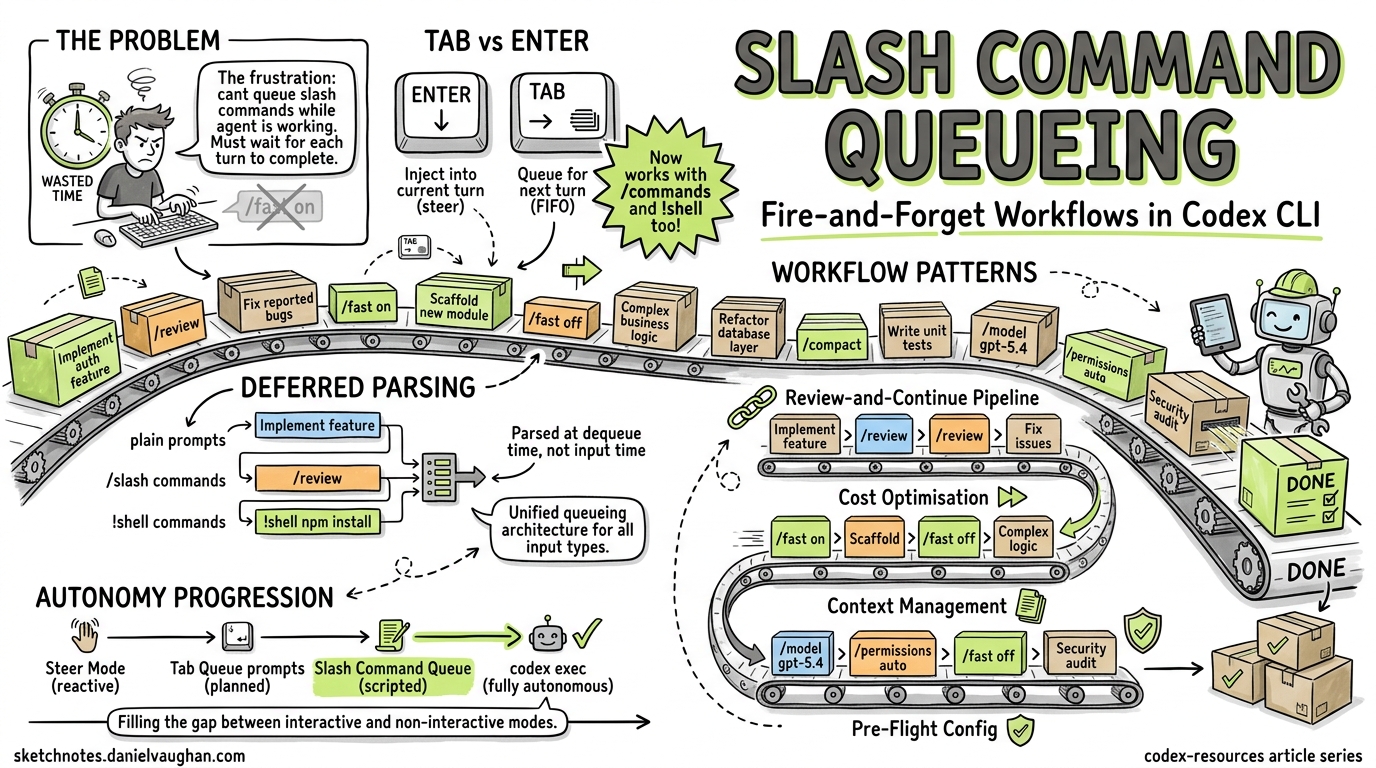
The single most frustrating friction point in any interactive coding agent is waiting. You know exactly what you want to do next — toggle fast mode, compact the context, run a review — but the agent is mid-turn, and the TUI ignores your slash command until it finishes. PR #185421, currently under review in the Codex CLI repository, eliminates this friction by extending the Tab-key queueing mechanism to slash commands and shell commands, enabling genuine fire-and-forget workflows in the TUI.
The Problem: Idle Hands During Agent Execution
Codex CLI’s TUI has supported two input modes during agent execution since v0.98.02:
- Enter — injects new instructions into the current turn (steer mode)
- Tab — queues a follow-up plain-text prompt for the next turn
This works beautifully for conversational prompts. But slash commands — /fast, /compact, /review, /model, /permissions — were excluded from the queueing mechanism3. If you wanted to toggle fast mode for the next turn, you had to wait for the current turn to complete, type /fast on, and only then submit your next prompt. The community flagged this repeatedly:
- Issue #14081 requested the ability to queue
/fastwhile a task was running4 - Issue #14588 asked for queueable
/compact, noting “it doesn’t make sense that I have to wait until the return completes”5 - Issue #13779 highlighted the inconsistency: Tab worked for messages but not for
/compact6 - Issue #14286 broadened the request to “allow queueing all
/commands”5
What PR #18542 Changes
The pull request, authored by etraut-openai, introduces a unified queueing architecture for the TUI input system1. The core changes are:
A New Queued-Input Action Enum
Rather than treating slash commands as a special case requiring immediate parsing, the PR introduces a queued-input action type that supports three variants1:
- Plain prompts — standard text instructions (existing behaviour)
- Slash commands — any
/-prefixed command - Shell commands —
!-prefixed shell invocations
Deferred Parsing
Previously, slash commands were validated and parsed at input time, which meant they couldn’t be queued while the agent was busy. The PR moves slash command parsing to dequeue time, enabling consistent FIFO (first-in, first-out) behaviour across all input types1. This is a subtle but important architectural decision — it means the queue doesn’t need to know what a command does, only that it exists.
Queue Draining Behaviour
The queue continues draining after local-only actions (commands that don’t require an API call, like /fast or /permissions), ensuring that a sequence of queued commands executes without manual intervention1.
How It Works in Practice
Basic Slash Command Queueing
While Codex is processing a task, press Tab and type your slash command:
# Agent is currently working on a refactor...
# Press Tab, then type:
/fast on
# Press Tab again, then type:
Now add unit tests for the refactored module
Both the /fast on toggle and the follow-up prompt are queued in FIFO order. When the current turn completes, Codex first enables fast mode, then immediately processes your test-writing prompt in fast mode1.
Shell Command Queueing
The ! prefix allows queueing shell commands via Tab1:
# Agent is working...
# Press Tab, then type:
!git stash
# Press Tab, then type:
Review the clean working tree for any missed changes
Chaining Configuration Changes
This is where queueing becomes genuinely powerful. You can reconfigure the session between agent turns without touching the keyboard again:
# Queue a full workflow pivot:
/model gpt-5.4          # Switch to the most capable model
/permissions auto        # Grant full autonomy
/fast off                # Disable fast mode for thorough reasoning
Refactor the authentication module to use OAuth 2.1
/review                  # Auto-review when done
/compact                 # Compact context after review
Each command queues via Tab and executes in sequence. You’ve effectively scripted six turns of interaction in advance.
The Interaction Model
Understanding the distinction between Enter, Tab, and the slash popup is critical for effective use:
flowchart TD
    A[User types input while agent is running] --> B{Input method?}
    B -->|Enter| C[Inject into current turn<br/>Steer mode]
    B -->|Tab| D[Queue for next turn<br/>FIFO order]
    B -->|Slash popup selection| E[Immediate execution<br/>when idle]

    D --> F{Input type?}
    F -->|Plain text| G[Queued as prompt]
    F -->|/command| H[Queued as slash command<br/>Parsed at dequeue time]
    F -->|!shell| I[Queued as shell command]

    H --> J[Local-only command?]
    J -->|Yes /fast, /permissions| K[Execute and continue<br/>draining queue]
    J -->|No /review, /compact| L[Execute as agent turn]
Slash Popup Completion Is Preserved
A key design detail: the existing /mo<Tab> completion behaviour (where Tab completes /model from the slash popup menu) is preserved1. Tab only queues when you’re in the standard input mode during an active turn, not when you’re navigating the slash popup. This prevents the muscle-memory conflict that would otherwise make the feature unusable.
Practical Workflow Patterns
Pattern 1: The Review-and-Continue Pipeline
# Start a feature implementation
Implement the user profile API endpoint with validation

# While it's working, queue the review and next step:
/review                          # Tab-queued
Fix any issues found in the review   # Tab-queued
This creates a three-step pipeline: implement → review → fix, all from a single burst of input.
Pattern 2: Model Switching for Cost Optimisation
# Use fast mode for the scaffolding
/fast on
Generate the boilerplate for the new service module

# Queue the switch to full reasoning for the complex logic
/fast off
Now implement the rate limiting algorithm with sliding window
Toggle between fast mode (lower cost, lower latency) and full reasoning (higher accuracy) without interrupting the flow7.
Pattern 3: Context Management
Long sessions accumulate context. Queue compaction between logical phases:
Refactor the database layer to use connection pooling
/compact                         # Free up context window
Now update the integration tests to match the new DB layer
Pattern 4: Pre-Flight Configuration
Before a complex task, queue all your configuration changes:
/model gpt-5.4
/permissions auto
/fast off
Perform a comprehensive security audit of the authentication module, \
fix any vulnerabilities found, and add regression tests
Connection to the Broader Autonomy Trajectory
Slash command queueing fits into a broader trend in Codex CLI’s evolution towards user-side autonomy — the ability for you to automate your interaction with the agent, not just the agent’s interaction with your codebase.
Consider the progression:
| Feature | Version | User Autonomy Level |
|---|---|---|
| Steer mode (Enter injection) | v0.98.02 | Reactive — redirect mid-turn |
| Tab queueing (plain prompts) | v0.98.0+2 | Planned — one step ahead |
| Slash command queueing | PR #185421 | Scripted — multi-step pipeline |
codex exec (non-interactive) |
v0.110.0+8 | Fully autonomous — fire and forget |
The gap between “Tab queue a single prompt” and “run a fully non-interactive codex exec pipeline” was significant. Slash command queueing fills that gap: you get the flexibility of interactive mode with the workflow scripting of non-interactive mode.
This also complements the Realtime V2 streaming introduced in v0.120.0, which can stream background agent progress while work is still running9. Combined with queueing, you can monitor agent progress and pre-load the next steps without waiting.
Limitations and Caveats
⚠️ PR status: As of 19 April 2026, PR #18542 is open but not yet merged. The feature is under review and may change before release1.
⚠️ Queue visibility: The PR updates the pending-input preview snapshots1, but there’s no dedicated queue inspector yet. If you’ve queued five commands, there’s no /queue list to review them. You rely on the preview area in the TUI.
⚠️ Error handling in queued chains: If a queued slash command fails (e.g., /model nonexistent-model), the behaviour during queue draining is not yet fully documented. Test carefully with critical workflows.
⚠️ No conditional logic: The queue is strictly FIFO. You cannot express “run /review, and if it finds issues, run this fix prompt, otherwise skip.” For conditional workflows, codex exec with external scripting remains the better tool8.
Getting Started
Once PR #18542 merges and ships (likely in a forthcoming 0.122.x release), no configuration is needed — the feature extends existing Tab behaviour. To prepare:
- Ensure you’re on the latest CLI version:
npm update -g @anthropic-ai/codexor check your package manager - Practice the Tab rhythm: Get comfortable with Tab-to-queue for plain prompts first
- Start with simple chains: Queue
/fast onfollowed by a prompt before attempting longer pipelines - Watch the preview area: The TUI shows pending queued input — use it to verify your queue before the current turn completes
Citations
-
PR #18542 “Queue slash and shell prompts in the TUI” by etraut-openai, openai/codex, April 19, 2026. https://github.com/openai/codex/pull/18542 ↩ ↩2 ↩3 ↩4 ↩5 ↩6 ↩7 ↩8 ↩9 ↩10 ↩11
-
“Features – Codex CLI”, OpenAI Developers documentation, 2026. https://developers.openai.com/codex/cli/features ↩ ↩2 ↩3
-
“Slash commands in Codex CLI”, OpenAI Developers documentation, 2026. https://developers.openai.com/codex/cli/slash-commands ↩
-
Issue #14081 “Queue /fast while running” by dat-lequoc, openai/codex. https://github.com/openai/codex/issues/14081 ↩
-
Issue #14588 “Allow queuing a /compact request” by saulrichardson, openai/codex. https://github.com/openai/codex/issues/14588 ↩ ↩2
-
Issue #13779 “use tab for /compact” — openai/codex. https://github.com/openai/codex/issues/13779 ↩
-
“Codex CLI Token Usage and Cost by Reasoning Effort Level”, danielvaughan/codex-resources, April 2026. https://github.com/danielvaughan/codex-resources ↩
-
“Non-interactive mode – Codex”, OpenAI Developers documentation, 2026. https://developers.openai.com/codex/noninteractive ↩ ↩2
-
“Changelog – Codex”, OpenAI Developers documentation — Codex CLI 0.120.0, April 11, 2026. https://developers.openai.com/codex/changelog ↩