Codex CLI for R and Statistical Computing: mcptools, ClaudeR, and Reproducible Research Workflows
Codex CLI for R and Statistical Computing: mcptools, ClaudeR, and Reproducible Research Workflows
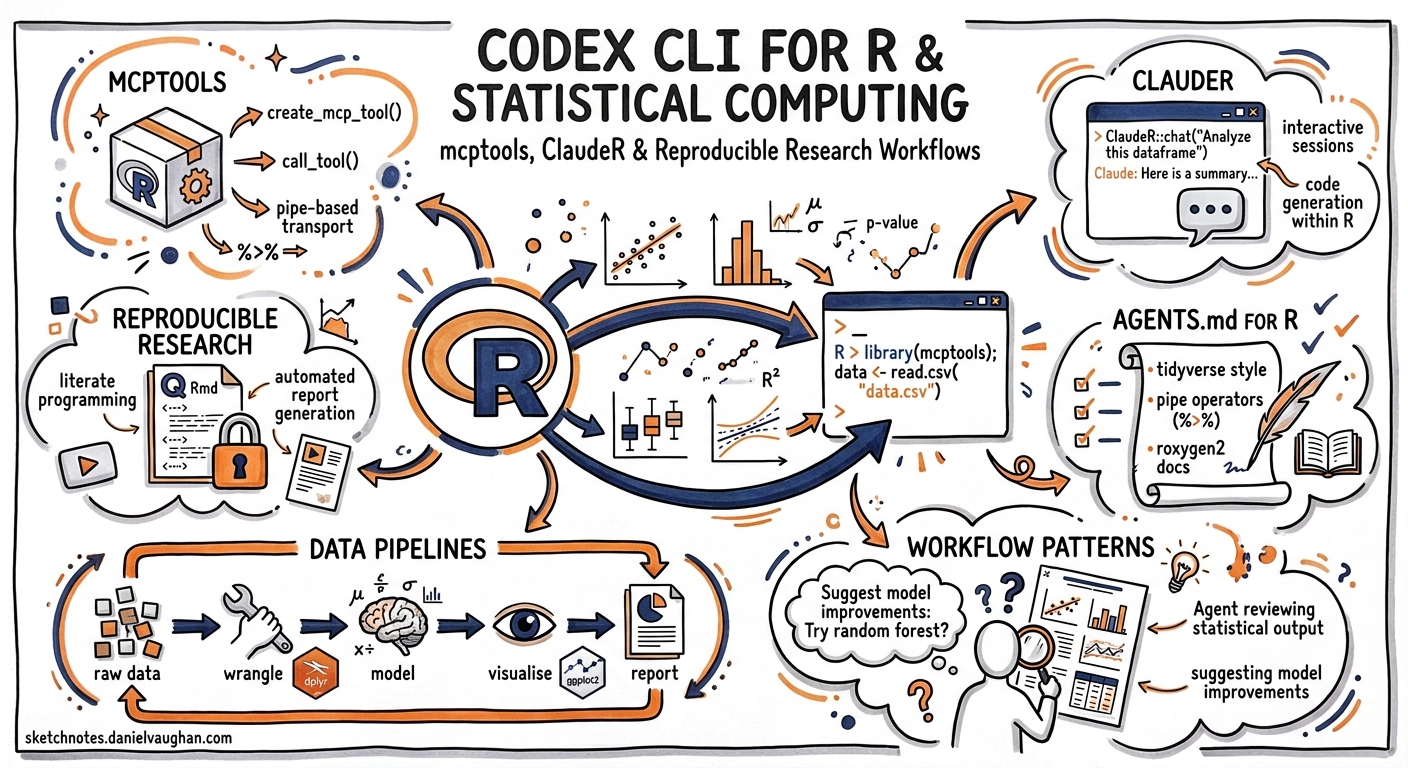
R remains the lingua franca of statistical computing, biostatistics, and quantitative social science. Yet most AI coding-agent content targets Python, TypeScript, or Go. This article bridges the gap: it shows how to configure Codex CLI for serious R work, connect it to your live RStudio session via MCP, and enforce the reproducibility discipline that reviewers and journals demand.
The R MCP Landscape
Two MCP servers matter for R teams in mid-2026. They solve different problems and compose well together.
Posit mcptools (CRAN)
Posit’s official mcptools package 1 implements both an MCP server and client in R. Install it from CRAN:
install.packages("mcptools")
Start a server that exposes your running R session to any MCP-compatible agent:
library(mcptools)
mcp_server()
For Codex CLI, register it in ~/.codex/config.toml:
[mcp_servers.r-session]
command = "Rscript"
args = ["-e", "mcptools::mcp_server()"]
The server exposes your session’s objects, functions, and environment to the agent. On the client side, mcp_tools() lets R code call out to other MCP servers — GitHub, Google Drive, Confluence — directly from your analysis scripts 1.
ClaudeR (uvx)
ClaudeR 2 takes a different approach: it bridges RStudio Desktop to MCP-configured agents including Codex CLI. Where mcptools is a library-level integration, ClaudeR provides a full interactive bridge with a Shiny dashboard, multi-agent orchestration, and specialised protocols for statistical analysis and manuscript auditing.
Key tools it exposes:
| Tool | Purpose |
|---|---|
execute_r |
Run arbitrary R code, return output |
execute_r_with_plot |
Execute code that generates plots the agent can inspect |
execute_r_async |
Handle long-running analyses (>25 s) without blocking |
read_file |
Access text files from disk |
Install for Codex CLI:
library(ClaudeR)
install_cli(tools = "codex")
This writes the MCP server configuration directly into your Codex CLI config. ClaudeR defaults to uvx for zero-config setup 2.
AGENTS.md for R Projects
A well-structured AGENTS.md is the single highest-impact investment for any R project using Codex CLI 3. Here is a production-tested template:
# AGENTS.md

## Build and Check
- Run `R CMD check .` for package projects
- Run `renv::status()` before making dependency changes
- Never modify `renv.lock` directly; use `renv::snapshot()`

## Testing
- Run tests with `testthat::test_local()`
- New functions require tests in `tests/testthat/`
- Use `withr::local_*()` for temporary state, never raw `on.exit()`

## Coding Conventions
- Tidyverse style guide (snake_case, pipe operator)
- Prefer `dplyr` verbs over base R subsetting for data manipulation
- Use `rlang::.data` pronoun inside `dplyr` pipelines to avoid R CMD check NOTEs
- All exported functions require roxygen2 documentation with `@examples`

## Data Discipline
- Raw data lives in `data/raw/` and is never overwritten
- Processed data goes to `data/processed/`
- Document every transformation step in R Markdown or Quarto

## Reproducibility
- This project uses `renv` for dependency management
- Pin R version in `.Rprofile` or Dockerfile
- Set `set.seed()` before any stochastic operation
- Never use `install.packages()` directly; use `renv::install()`
Place additional AGENTS.md files in subdirectories to scope rules. For example, a shiny/AGENTS.md might add:
## Shiny Conventions
- Prefer Shiny modules over monolithic `app.R`
- Use `bslib` for theming, not raw Bootstrap CSS
- Test with `shinytest2::test_app()`
Reproducibility: renv, Quarto, and the Agent
Reproducibility is non-negotiable in statistical computing. The interaction between Codex CLI’s sandbox, renv, and your project structure requires deliberate configuration.
renv Integration
When Codex runs inside an renv project, renv hijacks install.packages() so that the agent’s installs go into the project-local library rather than the global one 4. This is exactly what you want: every dependency the agent adds is captured in renv.lock.
Add this to your AGENTS.md:
## Dependency Management
- After installing any package, run `renv::snapshot()` to update the lockfile
- Before committing, verify `renv::status()` shows no drift
- Never install packages into the global library
Quarto and R Markdown
For reproducible reports, instruct the agent to work with Quarto or R Markdown documents rather than loose scripts:
## Reports
- Analyses go in `analysis/*.qmd` (Quarto) files
- Each document must render cleanly with `quarto render`
- Inline R code must reference named objects, not magic numbers
- Include a `sessionInfo()` call at the end of every document
Sandbox Configuration
R projects often need network access for CRAN downloads during package installation. Configure your Codex CLI sandbox accordingly:
[sandbox]
mode = "semi-restricted"
network_access = true
For tighter control, use permission profiles that allow network access only to CRAN mirrors:
[permissions]
approval_policy = "on-request"
Practical Workflow Patterns
Pattern 1: Exploratory Data Analysis
Start an interactive session and let the agent explore a dataset through your live R session:
codex --model gpt-5.5 \
  "Load data/raw/survey_2026.csv, run EDA: check dimensions, \
   missing values, distributions of numeric columns. \
   Write findings to analysis/eda-survey.qmd"
With ClaudeR connected, the agent executes R code in your RStudio session, inspects the output, and iterates. It can generate plots via execute_r_with_plot and inspect them before deciding what to analyse next 2.
Pattern 2: Statistical Model Development
codex --model gpt-5.5 \
  "Fit a mixed-effects model predicting response_time from \
   condition and participant as random intercept. Use lme4. \
   Check assumptions: residual normality, homoscedasticity, \
   influential observations. Write results to analysis/model-results.qmd"
ClaudeR’s built-in statistical analysis protocol covers EDA, assumption checking, model building, diagnostics, multiple-corrections adjustments, and reporting — guiding the agent through the full statistical workflow 2.
Pattern 3: Automated Package Development
For R package maintainers, codex exec integrates into CI workflows:
codex exec \
  --model gpt-5.4-mini \
  --output-schema '{"type":"object","properties":{"check_status":{"type":"string"},"warnings":{"type":"array","items":{"type":"string"}},"notes":{"type":"array","items":{"type":"string"}}}}' \
  "Run R CMD check on this package. Report status, warnings, and notes."
This produces structured JSON output suitable for CI pipeline gates 5.
Pattern 4: Manuscript Verification
ClaudeR’s Reviewer Zero protocol automates manuscript auditing in four passes 2:
- Extract — identify every statistical and methodological claim
- Verify extraction — confirm claims match source text
- Recompute — run the author’s R code against claimed values
- Check references — validate citations via CrossRef
codex "Use the Reviewer Zero protocol to audit manuscript.qmd \
  against the analysis scripts in analysis/"
This is particularly valuable for pre-submission checks where numerical accuracy is critical.
Model Selection for R Workflows
| Task | Recommended Model | Reasoning |
|---|---|---|
| Complex statistical modelling | GPT-5.5 | Best reasoning for mixed models, Bayesian workflows 6 |
| Package development, R CMD check fixes | GPT-5.5 | Needs understanding of R package structure |
| EDA, data wrangling | GPT-5.4-mini | Faster, cost-effective for routine tidyverse work |
| CI pipeline checks | GPT-5.4-mini | Structured output, lower cost |
| Shiny app development | GPT-5.5 | Complex reactive logic benefits from stronger model |
Composing Both MCP Servers
For teams that want both library-level integration and RStudio bridging, run both servers:
[mcp_servers.r-mcptools]
command = "Rscript"
args = ["-e", "mcptools::mcp_server()"]

[mcp_servers.clauder]
command = "uvx"
args = ["clauder-mcp"]
mcptools gives the agent access to CRAN package metadata, documentation lookups, and programmatic R session control. ClaudeR adds RStudio-specific features: plot inspection, async job management, and the statistical analysis protocols 1 2.
Limitations
- Training data lag: GPT-5.5 training data may not include the latest CRAN package versions or breaking API changes in packages released after late 2025 6. Always specify package versions in your prompts when precision matters.
- Plot inspection: ClaudeR’s
execute_r_with_plotworks via base64-encoded images. Complexggplot2outputs with many facets may exceed context limits. - No REPL integration: Codex CLI cannot maintain a persistent R REPL across turns. Each
execute_rcall starts fresh unless routed through ClaudeR’s session bridge. - renv cold starts: First-time
renv::restore()in a sandboxed environment can be slow due to package compilation. Consider pre-building a Docker image with yourrenvcache. - Sandbox conflicts: R’s
.libPaths()mechanism can conflict with Codex CLI’s filesystem sandbox on macOS (Seatbelt). If package installation fails, check that the project library path is within the sandbox’s write-allowed directories.
Citations
-
Posit, “Model Context Protocol Servers and Clients - mcptools”, CRAN / Posit, 2026. https://posit-dev.github.io/mcptools/ ↩ ↩2 ↩3
-
IMNMV, “ClaudeR: Connect RStudio to Claude Code, Codex, Gemini, and other LLM agents via MCP”, GitHub, 2026. https://github.com/IMNMV/ClaudeR ↩ ↩2 ↩3 ↩4 ↩5 ↩6
-
OpenAI, “Custom instructions with AGENTS.md”, OpenAI Developers, 2026. https://developers.openai.com/codex/guides/agents-md ↩
-
Posit, “Introduction to renv”, renv documentation, 2026. https://rstudio.github.io/renv/articles/renv.html ↩
-
OpenAI, “Non-interactive mode - Codex”, OpenAI Developers, 2026. https://developers.openai.com/codex/noninteractive ↩
-
OpenAI, “Models - Codex”, OpenAI Developers, 2026. https://developers.openai.com/codex/models ↩ ↩2