Codex Enterprise Analytics and Compliance APIs: Usage Dashboards, Code Review Metrics, and Audit Integration
Codex Enterprise Analytics and Compliance APIs: Usage Dashboards, Code Review Metrics, and Audit Integration
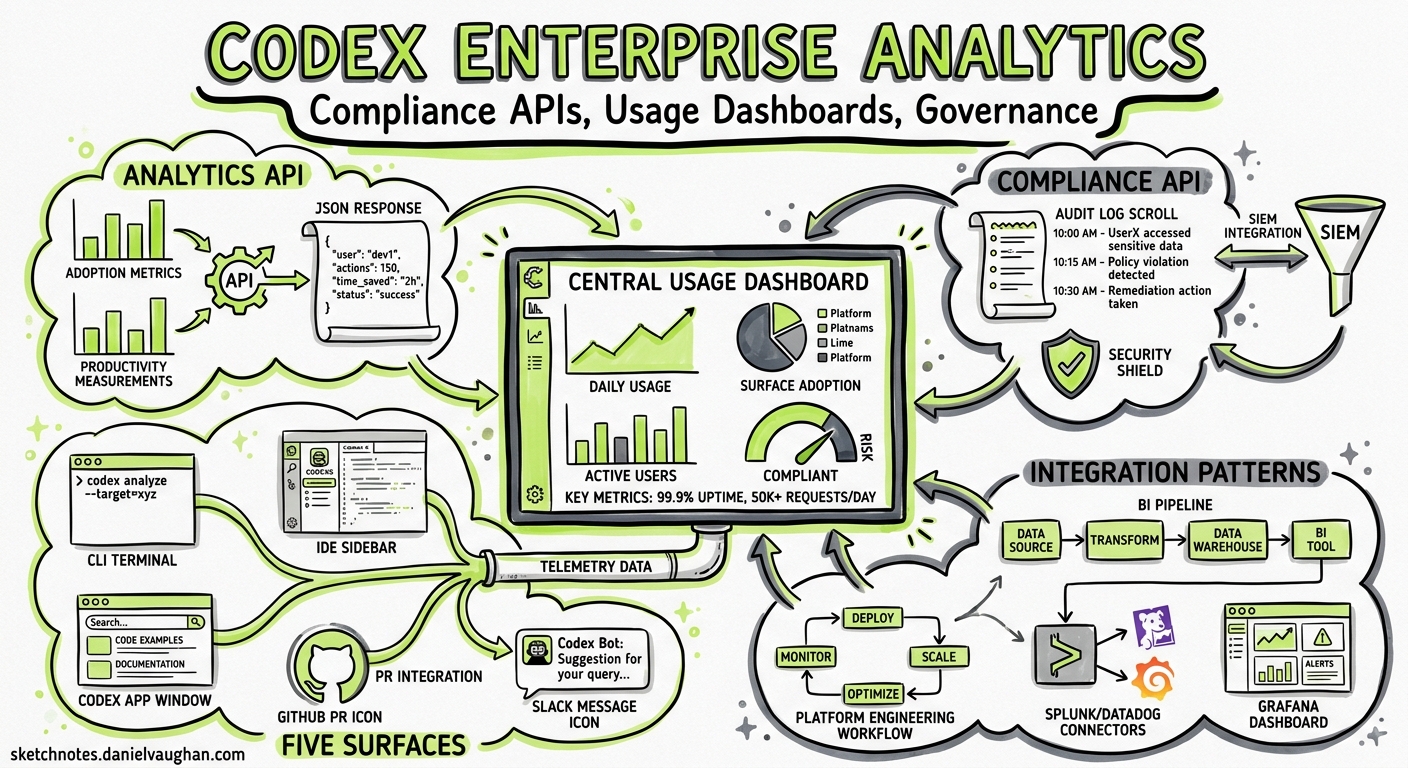
With Codex now generally available across CLI, IDE extension, App, GitHub, and Slack surfaces 1, enterprise teams face a familiar question: how do we measure and govern what our agents are actually doing? OpenAI’s answer ships as two complementary APIs — the Analytics API for adoption and productivity metrics, and the Compliance API for auditable records — backed by a self-serve dashboard in the ChatGPT workspace admin panel 2.
This article covers the API endpoints, authentication, data shapes, and practical integration patterns that platform engineers need to wire Codex telemetry into existing BI pipelines and security tooling.
Architecture Overview
flowchart LR
    subgraph Codex Surfaces
        CLI[CLI]
        IDE[IDE Extension]
        APP[Codex App]
        GH[GitHub Integration]
        SL[Slack Integration]
    end

    subgraph OpenAI Platform
        TP[Telemetry Pipeline]
        AL[Activity Logs]
    end

    subgraph Enterprise Governance
        DASH[Analytics Dashboard]
        AAPI[Analytics API]
        CAPI[Compliance API]
    end

    subgraph Your Infrastructure
        BI[BI / Data Warehouse]
        SIEM[SIEM / DLP]
        ED[eDiscovery]
    end

    CLI --> TP
    IDE --> TP
    APP --> TP
    GH --> TP
    SL --> TP
    TP --> AL
    AL --> DASH
    AL --> AAPI
    AL --> CAPI
    AAPI --> BI
    CAPI --> SIEM
    CAPI --> ED
All five Codex surfaces feed a unified telemetry pipeline. The Analytics API exposes aggregated metrics; the Compliance API provides per-interaction audit logs. Both sit behind the same api.chatgpt.com base URL and use workspace-scoped API keys 2.
Prerequisites: Admin Roles
OpenAI recommends three ownership roles for a governance rollout 3:
| Role | Responsibilities |
|---|---|
| Workspace Owner | Enables Codex surfaces, manages RBAC groups |
| Security Owner | Configures approval policies, managed requirements.toml |
| Analytics Owner | Integrates Analytics and Compliance APIs into data pipelines |
Create a dedicated Codex Admin group rather than granting broad access — the admin setup guide explicitly warns against giving governance permissions to a wide audience 3.
The Analytics Dashboard
Before writing any code, the self-serve dashboard in the ChatGPT workspace admin panel provides immediate visibility 2:
- Active users by surface — CLI, IDE extension, cloud, desktop, and Code Review, each broken out separately
- Credit and token consumption — per-workspace and per-user, with daily trending
- Product activity — threads and turns by client type
- User ranking tables — sortable by credits consumed, threads opened, text tokens used, and streak length
- Code Review metrics — PRs reviewed, issues by priority level (P0/P1/P2), and developer sentiment on review comments
Data export is available in CSV or JSON. Dashboard data can lag by up to 12 hours 2.
Analytics API Reference
Base URL and Authentication
https://api.chatgpt.com/v1/analytics/codex
All requests require an API key scoped to codex.enterprise.analytics.read 2. Pass it as a Bearer token:
curl -H "Authorization: Bearer $CODEX_ANALYTICS_KEY" \
  "https://api.chatgpt.com/v1/analytics/codex/workspaces/$WORKSPACE_ID/usage?start_time=2026-05-01T00:00:00Z&end_time=2026-05-11T00:00:00Z&group_by=day"
Endpoints
The API exposes three primary endpoints, each returning daily or weekly UTC-aligned buckets 2:
GET /workspaces/{workspace_id}/usage
Returns threads, turns, credits, and per-client breakdowns.
Parameters:
| Parameter | Type | Description |
|---|---|---|
start_time |
ISO 8601 | Window start (required) |
end_time |
ISO 8601 | Window end (required) |
group_by |
day | week |
Bucket granularity |
limit |
integer | Page size |
page |
string | Cursor for pagination |
This endpoint is your primary adoption signal. Track threads and turns per surface to understand where developers are spending time — CLI versus IDE versus cloud.
GET /workspaces/{workspace_id}/code_reviews
Returns PR review throughput and issue classification by priority 2.
Issues are bucketed into three priority levels:
- P0 — Critical issues (security vulnerabilities, data loss risks)
- P1 — Important issues (missing tests, documentation gaps)
- P2 — Advisory issues (style, minor refactoring suggestions)
Track the P0-to-P2 ratio over time to gauge whether Codex reviews are producing actionable signal or noise.
GET /workspaces/{workspace_id}/code_review_responses
Returns developer engagement with review comments — reactions (positive, negative, other), replies, and overall engagement rates 2.
This is the feedback loop that matters. A high negative-reaction rate on P1 issues suggests your AGENTS.md review guidelines need tuning; a low engagement rate suggests developers are ignoring reviews entirely.
Pagination
Results are time-ordered with cursor-based pagination. The lookback window supports up to 90 days 2.
Compliance API Reference
The Compliance API serves a fundamentally different purpose: auditable, per-interaction records for security, legal, and governance workflows 2 4.
What Gets Exported
Each compliance record includes:
- Prompt text and generated responses
- Workspace ID, user ID, and timestamp
- Model identifier (e.g.
gpt-5.5,gpt-5.4,codex-auto-review) - Token usage and request metadata
- Session and thread identifiers
Access Patterns
The Compliance Platform supports two complementary access patterns 4:
- Compliance Logs Platform — immutable, append-only log events for auditing. This is the primary pattern for SIEM integration.
- Stateful Compliance API — query state at the time of request. ⚠️ Note: the legacy stateful route was deprecated on 5 March 2026 and will be removed on 5 June 2026 4. Migrate to the new conversation logs system before this deadline.
Data Retention
Activity logs are retained for 30 days 4. If your compliance requirements mandate longer retention, you must export and store logs in your own infrastructure.
Scope
The Compliance API covers ChatGPT-authenticated Codex usage only. API-key-authenticated usage (e.g. direct Responses API calls) follows your organisation’s separate API data settings 2.
Integration Patterns
Pattern 1: BI Pipeline with the Analytics API
Pull daily usage into your data warehouse for engineering productivity dashboards:
#!/usr/bin/env bash
# daily-codex-metrics.sh — run via cron at 06:00 UTC

WORKSPACE_ID="ws_abc123"
YESTERDAY=$(date -u -d "yesterday" +%Y-%m-%dT00:00:00Z)
TODAY=$(date -u +%Y-%m-%dT00:00:00Z)

# Fetch usage metrics
curl -s -H "Authorization: Bearer $CODEX_ANALYTICS_KEY" \
  "https://api.chatgpt.com/v1/analytics/codex/workspaces/$WORKSPACE_ID/usage?start_time=$YESTERDAY&end_time=$TODAY&group_by=day" \
  -o /tmp/codex-usage.json

# Fetch code review metrics
curl -s -H "Authorization: Bearer $CODEX_ANALYTICS_KEY" \
  "https://api.chatgpt.com/v1/analytics/codex/workspaces/$WORKSPACE_ID/code_reviews?start_time=$YESTERDAY&end_time=$TODAY&group_by=day" \
  -o /tmp/codex-reviews.json

# Load into warehouse (example: BigQuery)
bq load --source_format=NEWLINE_DELIMITED_JSON \
  engineering.codex_usage /tmp/codex-usage.json
bq load --source_format=NEWLINE_DELIMITED_JSON \
  engineering.codex_reviews /tmp/codex-reviews.json
Pattern 2: SIEM Integration with the Compliance API
Forward compliance logs to your security platform for threat detection and policy enforcement:
flowchart TD
    CAPI[Compliance API] -->|Poll every 5 min| COLLECTOR[Log Collector]
    COLLECTOR -->|Normalise| TRANSFORM[Transform Pipeline]
    TRANSFORM -->|Forward| SIEM[Splunk / Elastic / Sentinel]
    SIEM -->|Alert| SOC[Security Operations]
    SIEM -->|Archive| COLD[Cold Storage > 30 days]
OpenAI lists 13 pre-built Compliance API integrations from leading eDiscovery and DLP vendors 4. Before building a custom connector, check whether your existing tooling already supports the OpenAI Compliance Platform natively.
Pattern 3: Codex CLI OpenTelemetry + Analytics API
The CLI’s built-in OpenTelemetry exporter 5 sends per-session traces to your own collector, whilst the Analytics API provides the workspace-level aggregate view. Combine both for full-stack observability:
# ~/.codex/config.toml — CLI-side telemetry
[otel]
environment = "production"
exporter = "otlp-http"
# config.toml — disable analytics collection on specific machines
[analytics]
enabled = false
The analytics.enabled flag in config.toml controls whether a specific machine contributes to the workspace analytics pipeline 5. This is useful for CI runners or shared environments where you want OTel traces but not inflated user counts.
Enterprise Governance Checklist
For teams rolling out Codex governance, here is a recommended sequence:
- Assign the three admin roles — workspace owner, security owner, analytics owner 3
- Enable the Analytics Dashboard — immediate visibility, no code required 2
- Scope an API key to
codex.enterprise.analytics.read2 - Wire the Analytics API into your existing BI pipeline (daily cron is sufficient for most teams)
- Connect the Compliance API to your SIEM/DLP platform — use a vendor integration if available 4
- Set retention policy — export and archive compliance logs beyond the 30-day window 4
- Deploy managed
requirements.tomlto enforce sandbox modes, command restrictions, and model constraints 6 - Review Code Review engagement weekly — tune
AGENTS.mdreview guidelines based on reaction data from thecode_review_responsesendpoint 2 - Migrate off the legacy stateful Compliance route before the 5 June 2026 deprecation deadline 4
Limitations and Caveats
- Dashboard lag: analytics data can trail real-time by up to 12 hours 2.
- Compliance scope: only ChatGPT-authenticated sessions are captured. Direct API-key usage is governed separately 2.
- Retention: 30-day compliance log retention is non-negotiable on the platform side 4. Plan your archival strategy accordingly.
- Lookback window: the Analytics API supports a maximum 90-day lookback 2. Historical analysis beyond that requires your own data store.
- ⚠️ Deprecation deadline: the legacy stateful Compliance API route is removed on 5 June 2026 4. If you are still using it, migrate immediately.
What This Means for CLI Users
For individual developers, the governance layer is invisible — the CLI works exactly as before. But the analytics.enabled and otel.* configuration keys in config.toml 5 give you control over what telemetry your machine emits. In enterprise environments with managed requirements.toml policies 6, these settings may be enforced centrally, and the codex features subcommand will reflect any governance constraints applied to your profile.
The Analytics API’s per-surface breakdown is particularly useful for platform teams evaluating CLI adoption against the App and IDE extension. If your organisation is investing in AGENTS.md conventions and hooks, the Code Review engagement endpoint tells you whether those investments are producing measurable quality improvements.
Citations
-
OpenAI, “Codex is now generally available,” openai.com, May 2026. https://openai.com/index/codex-now-generally-available/ ↩
-
OpenAI, “Governance – Codex,” OpenAI Developers, 2026. https://developers.openai.com/codex/enterprise/governance ↩ ↩2 ↩3 ↩4 ↩5 ↩6 ↩7 ↩8 ↩9 ↩10 ↩11 ↩12 ↩13 ↩14 ↩15 ↩16 ↩17
-
OpenAI, “Admin Setup – Codex,” OpenAI Developers, 2026. https://developers.openai.com/codex/enterprise/admin-setup ↩ ↩2 ↩3
-
OpenAI, “Compliance APIs for Enterprise Customers,” OpenAI Help Center, 2026. https://help.openai.com/en/articles/9261474-compliance-apis-for-enterprise-customers ↩ ↩2 ↩3 ↩4 ↩5 ↩6 ↩7 ↩8 ↩9 ↩10
-
OpenAI, “Configuration Reference – Codex,” OpenAI Developers, 2026. https://developers.openai.com/codex/config-reference ↩ ↩2 ↩3
-
OpenAI, “Managed Configuration – Codex,” OpenAI Developers, 2026. https://developers.openai.com/codex/enterprise/managed-configuration ↩ ↩2