Codex CLI for Knowledge Work: Data Analysis, Report Generation, and Slide Deck Automation Beyond Code
Codex CLI for Knowledge Work: Data Analysis, Report Generation, and Slide Deck Automation Beyond Code
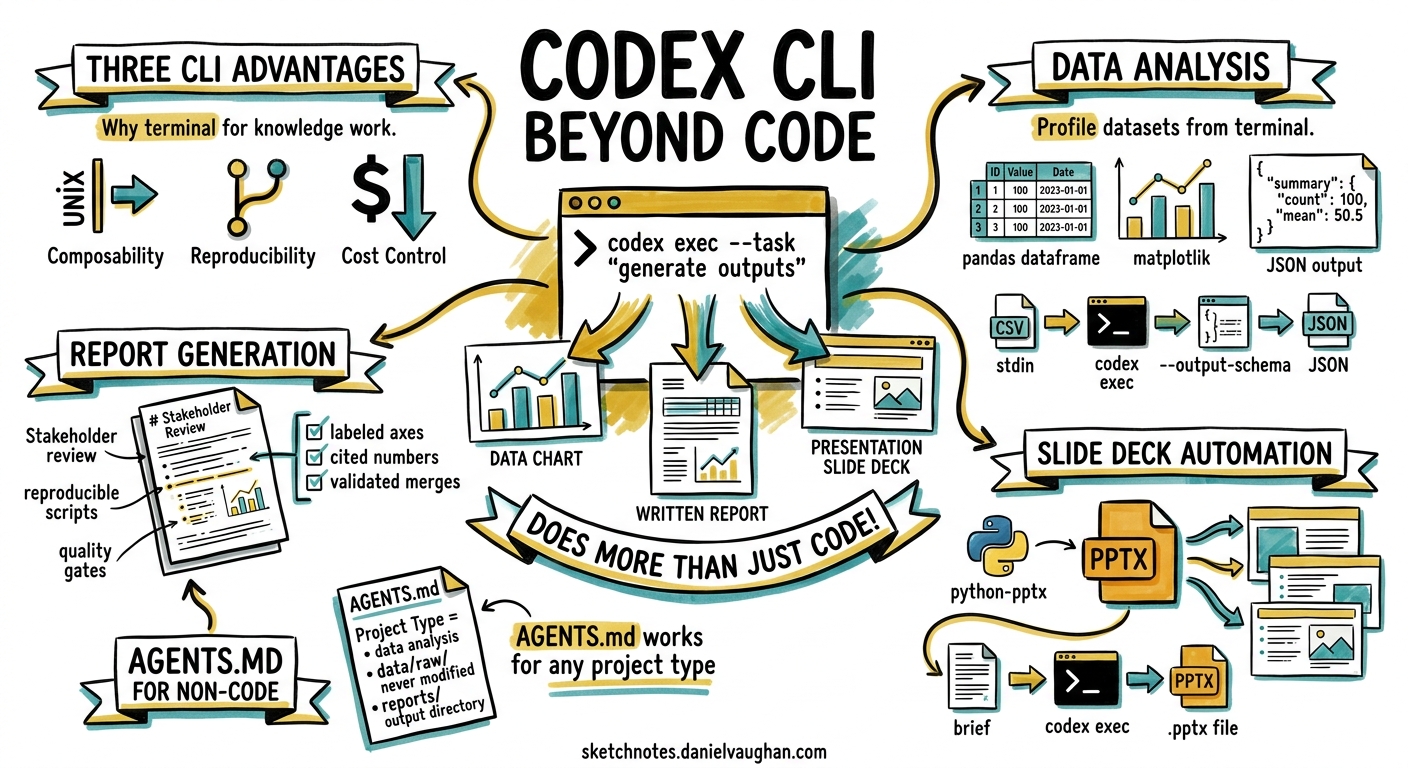
When OpenAI repositioned Codex as a tool for “(almost) everything” in April 2026, the message was clear: the same codex exec primitive that ships pull requests can also profile datasets, generate financial reports, and build presentation decks1. Yet most Codex CLI practitioners still treat it as a pure coding assistant. This article bridges that gap with concrete workflows for three categories of knowledge work — data analysis, document generation, and slide deck automation — all driven from the terminal.
Why the CLI for Knowledge Work?
The Codex desktop app handles many of these tasks through its GUI and plugin ecosystem. The CLI offers three advantages for practitioners who already live in the terminal:
- Composability —
codex execparticipates in Unix pipelines. Pipe CSV data in via stdin, extract structured JSON via--output-schema, and feed it into downstream scripts2. - Reproducibility — every invocation is a command you can version-control, schedule in cron, or embed in CI/CD.
- Cost control — non-interactive runs skip the overhead of persistent app-server sessions and can target cheaper models like
gpt-5.4-minifor routine tasks3.
graph LR
    A[Raw Data / Brief] -->|codex exec| B[Codex Agent]
    B -->|--output-schema| C[Structured JSON]
    B -->|-o report.md| D[Markdown Report]
    B -->|python-pptx / PptxGenJS| E[Slide Deck .pptx]
    C --> F[Downstream Pipeline]
    D --> G[Stakeholder Review]
    E --> G
Setting Up AGENTS.md for Non-Coding Projects
AGENTS.md is not limited to source code repositories. For knowledge work, create a project directory with conventions that steer the agent towards reproducible artefacts4:
# AGENTS.md

## Project Type
This is a data analysis project, not a software engineering project.

## Conventions
- Use `uv run` or the project's existing Python environment.
- Keep source data in `data/raw/` — never modify raw files.
- Write cleaned data to `data/processed/`.
- Write reports to `reports/`.
- Use pandas with matplotlib or seaborn for visualisation.
- Output all analysis as reproducible Python scripts, not one-off commands.

## Quality Gates
- Every chart must have labelled axes and a descriptive title.
- Every numeric claim must cite the specific row count or aggregation.
- Validate merged datasets for unexpected nulls or row-count changes.
Workflow 1: Data Analysis with Structured Output
Profiling a Dataset
The simplest starting point is a one-shot profile of a CSV file. The $spreadsheet skill — bundled with Codex by default — teaches the agent to handle CSV, TSV, and Excel files with awareness of common pitfalls like encoding issues and mixed data types5.
codex exec \
  "Profile data/raw/transactions.csv. Show shape, dtypes, \
   missing-value percentages, and summary statistics. \
   Output a markdown table." \
  --sandbox workspace-write \
  -o reports/profile.md
Structured JSON for Pipelines
When the output feeds into another system, use --output-schema to enforce a contract:
cat > schema/analysis-summary.json << 'EOF'
{
  "type": "object",
  "properties": {
    "row_count": { "type": "integer" },
    "columns": { "type": "integer" },
    "missing_pct": { "type": "object" },
    "top_correlations": {
      "type": "array",
      "items": {
        "type": "object",
        "properties": {
          "pair": { "type": "string" },
          "r_value": { "type": "number" }
        }
      }
    },
    "recommendations": { "type": "array", "items": { "type": "string" } }
  },
  "required": ["row_count", "columns", "missing_pct", "recommendations"]
}
EOF

codex exec \
  "Analyse data/raw/transactions.csv. Compute correlations \
   between numeric columns. Identify the top 5 correlations \
   and recommend next analysis steps." \
  --output-schema schema/analysis-summary.json \
  -o reports/summary.json \
  --sandbox workspace-write
The resulting reports/summary.json conforms exactly to the schema, making it safe to parse downstream without defensive try/catch blocks6.
Multi-Step Analysis with codex exec resume
For complex analyses that build on previous findings, chain sessions using codex exec resume:
# Step 1: clean and merge
codex exec \
  "Clean data/raw/transactions.csv and data/raw/customers.csv. \
   Merge on customer_id. Write the result to data/processed/merged.csv." \
  --sandbox workspace-write

# Step 2: resume the session, adding analysis
codex exec resume --last \
  "Using the merged dataset from the previous step, \
   run a cohort analysis by signup_month. \
   Generate a matplotlib chart saved to reports/cohort.png \
   and a summary table in reports/cohort.md."
⚠️ Note: codex exec resume does not currently accept --output-schema — this is a known CLI limitation tracked in the issue tracker7. If you need structured output from resumed sessions, write the schema enforcement into the prompt itself.
Workflow 2: Document and Report Generation
Markdown Reports from Data
The $doc skill handles formatted document generation, while $jupyter-notebook suits exploratory walkthroughs5. For a weekly report pipeline:
codex exec \
  "Read data/processed/weekly-metrics.csv. \
   Generate a markdown report with: \
   - Executive summary (3 bullet points) \
   - Key metrics table \
   - Week-over-week change analysis \
   - Seaborn trend charts saved to reports/charts/ \
   Write the report to reports/weekly-$(date +%Y-%m-%d).md." \
  --sandbox workspace-write \
  --model gpt-5.4-mini
Using gpt-5.4-mini for routine report generation cuts costs significantly — it is fast, efficient, and sufficient for tasks that do not require frontier reasoning3.
Financial Analysis Patterns
Codex’s official use cases include DCF valuation modelling and cash-flow forecasting8. The CLI approach works well for recurring financial analysis:
codex exec \
  "Read data/raw/quarterly-financials.xlsx. \
   Build a three-statement financial model. \
   Project revenue growth at 12% CAGR for 5 years. \
   Calculate free cash flow and a DCF valuation \
   using a 10% discount rate. \
   Output the model as an editable Excel workbook \
   at reports/dcf-model.xlsx using openpyxl. \
   Include formulas, not hardcoded values." \
  --sandbox workspace-write
The key instruction here is “include formulas, not hardcoded values” — without it, the agent tends to pre-compute cells, producing a snapshot rather than a living model.
Workflow 3: Slide Deck Automation
Using the Built-in Slides Skill
The $slides system skill ships with Codex and uses PptxGenJS to create and manipulate .pptx files9. Combined with the $imagegen skill for generating illustrations, the CLI can produce complete presentation decks:
codex exec \
  "Using the \$slides and \$imagegen skills: \
   Read reports/quarterly-review.md. \
   Create a 10-slide presentation deck at reports/quarterly.pptx. \
   - Slide 1: Title slide with company name and quarter \
   - Slides 2-4: Key metrics with charts \
   - Slides 5-7: Strategic initiatives (one per slide) \
   - Slide 8: Financial outlook \
   - Slide 9: Risks and mitigations \
   - Slide 10: Q&A placeholder \
   Match the branding from assets/brand-guide.pptx. \
   Generate one illustration per strategic initiative slide. \
   Run overflow and font validation before saving." \
  --sandbox workspace-write
Validation Before Delivery
The slides skill bundles validation scripts that detect text overflow, font substitution, and layout drift9. Always request validation explicitly in your prompt — the agent will render per-slide images and flag issues before the final save.
Batch Deck Generation
For teams that produce regular client decks, combine codex exec with shell iteration:
for client in $(cat clients.txt); do
  codex exec \
    "Read data/clients/${client}/metrics.json. \
     Generate a branded 5-slide deck at \
     reports/decks/${client}-$(date +%Y-%m).pptx \
     using the template at assets/client-template.pptx." \
    --sandbox workspace-write \
    --model gpt-5.4-mini \
    --ephemeral
  done
The --ephemeral flag prevents session rollout files from accumulating when running batch jobs2.
Choosing the Right Model
Model selection matters more for knowledge work than for typical coding tasks because the outputs are often read directly by stakeholders rather than compiled.
| Task | Recommended Model | Reasoning Effort | Rationale |
|---|---|---|---|
| Data profiling | gpt-5.4-mini |
medium | Routine; speed matters |
| Complex analysis | gpt-5.5 |
high | Multi-step reasoning, large context |
| Report drafting | gpt-5.4 |
medium | Good prose quality, cost-effective |
| Financial modelling | gpt-5.5 |
high | Formula accuracy critical |
| Slide generation | gpt-5.4 |
medium | Layout logic well within capability |
| Batch operations | gpt-5.4-mini |
low | Volume over depth |
GPT-5.5, released April 2026, offers a dramatic improvement in long-context performance — scoring 74.0% on MRCR v2 at 512K–1M tokens versus GPT-5.4’s 36.6%10. This makes it the clear choice when analysing large datasets or long documents that push context boundaries.
Scheduling Recurring Knowledge Work
For pipelines that run on a schedule, wire codex exec into cron or GitHub Actions:
# crontab entry: weekly Monday 06:00 UTC
0 6 * * 1 cd /data/project && \
  CODEX_API_KEY=$KEY codex exec \
  "Run the weekly analysis pipeline. \
   Profile new data in data/raw/, merge with existing processed data, \
   generate the weekly report, and update the slide deck." \
  --sandbox workspace-write \
  --model gpt-5.4-mini \
  --ephemeral \
  -o reports/weekly-$(date +\%Y-\%m-\%d).md
For more sophisticated scheduling, the Codex app’s thread automations can run recurring tasks with context preservation across sessions11. But for teams that prefer infrastructure-as-code, the CLI plus cron approach keeps everything auditable and version-controlled.
Current Limitations
- No runtime library installation — the sandbox does not install Python packages on the fly. Pre-install
pandas,openpyxl,matplotlib, andpython-pptxin your project environment before runningcodex exec12. --output-schemaandcodex exec resumecannot be combined — plan your pipeline steps to use structured output on fresh invocations7.- Slide skill uses PptxGenJS (JavaScript) — if your project environment is Python-only, instruct the agent to use
python-pptxdirectly instead of relying on the bundled skill. - Image generation requires the
$imagegenskill — slide illustrations are not generated by default; explicitly request them. - Financial formulas need validation — always open generated Excel workbooks and spot-check formula references before sharing with stakeholders.
Conclusion
Codex CLI’s codex exec is not just for shipping code. With the right AGENTS.md conventions, curated skills, and structured output schemas, it becomes a composable engine for data analysis, report generation, and presentation automation. The terminal-first approach offers reproducibility and cost control that GUI-based workflows cannot match — particularly for recurring pipelines that run on schedules.
The key insight is treating knowledge work artefacts the same way you treat source code: version-controlled, schema-validated, and built through reproducible commands.
Citations
-
OpenAI, “Codex for (almost) everything,” openai.com, April 2026. https://openai.com/index/codex-for-almost-everything/ ↩
-
OpenAI, “Non-interactive mode – Codex,” developers.openai.com, 2026. https://developers.openai.com/codex/noninteractive ↩ ↩2
-
OpenAI, “Models – Codex,” developers.openai.com, 2026. https://developers.openai.com/codex/models ↩ ↩2
-
OpenAI, “Analyze datasets and ship reports – Codex use cases,” developers.openai.com, 2026. https://developers.openai.com/codex/use-cases/datasets-and-reports ↩
-
OpenAI, “Agent Skills – Codex,” developers.openai.com, 2026. https://developers.openai.com/codex/skills ↩ ↩2
-
OpenAI, “Command line options – Codex CLI,” developers.openai.com, 2026. https://developers.openai.com/codex/cli/reference ↩
-
GitHub, “Add –output-schema support to codex exec resume · Issue #14343,” github.com/openai/codex, 2026. https://github.com/openai/codex/issues/14343 ↩ ↩2
-
OpenAI, “Codex use cases,” developers.openai.com, 2026. https://developers.openai.com/codex/use-cases ↩
-
OpenAI, “Generate slide decks – Codex use cases,” developers.openai.com, 2026. https://developers.openai.com/codex/use-cases/generate-slide-decks ↩ ↩2
-
OpenAI, “Introducing GPT-5.5,” openai.com, April 2026. https://openai.com/index/introducing-gpt-5-5/ ↩
-
OpenAI, “Automations – Codex app,” developers.openai.com, 2026. https://developers.openai.com/codex/app/automations ↩
-
OpenAI, “Best practices – Codex,” developers.openai.com, 2026. https://developers.openai.com/codex/learn/best-practices ↩