Codex CLI for Day-Two Operations: Runbooks, Drift Detection, and Platform Engineering Automation
Codex CLI for Day-Two Operations: Runbooks, Drift Detection, and Platform Engineering Automation
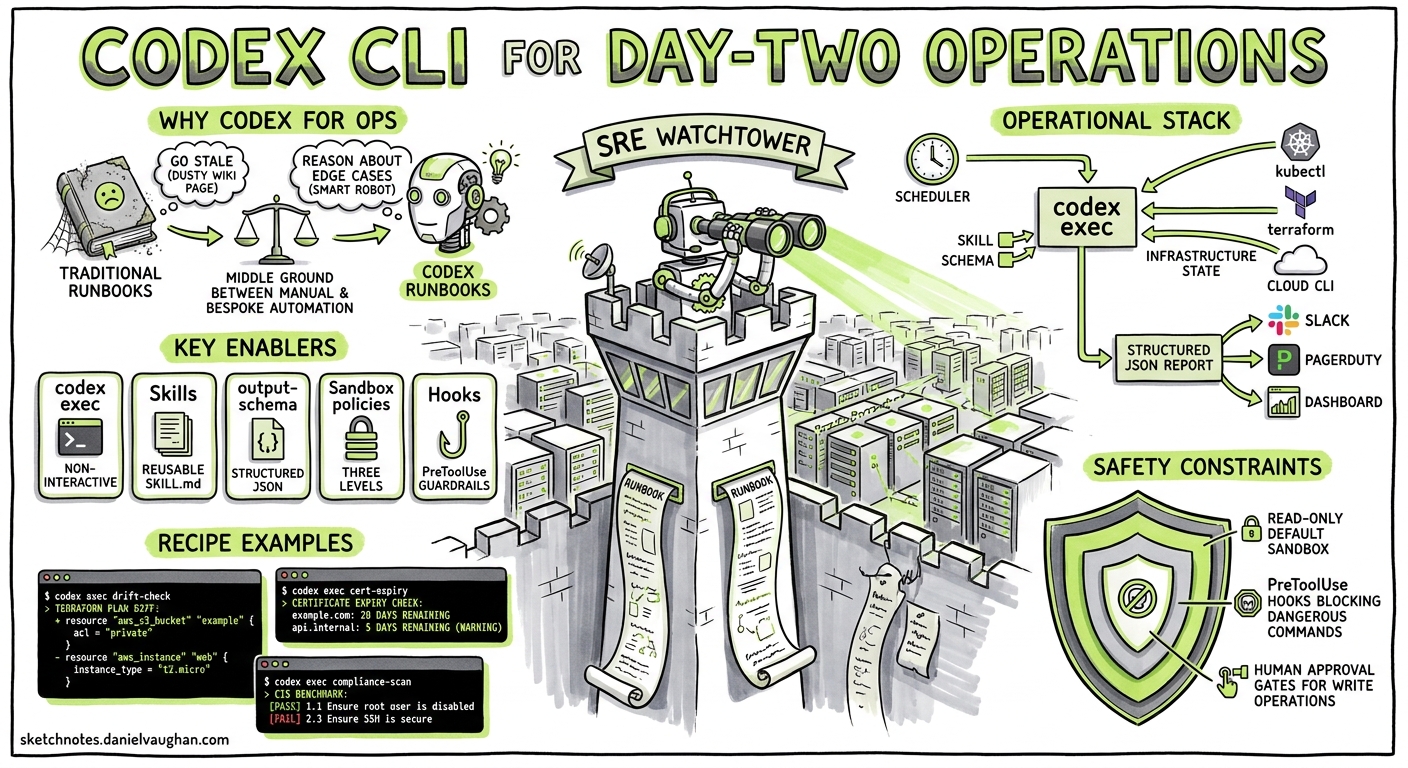
Most Codex CLI coverage focuses on writing and reviewing code. But senior platform engineers and SREs have a different problem: the grind of day-two operations — health checks, configuration drift detection, certificate renewals, compliance scans, and the hundred other tasks that keep production running. Codex CLI’s non-interactive codex exec mode, combined with the skills system and structured output, turns these operational workflows into reproducible, auditable agent-driven pipelines.
This article maps out the patterns, safety constraints, and practical recipes for using Codex CLI as an operational runbook engine.
Why Codex CLI for Operations?
Traditional runbooks — whether wiki pages or Ansible playbooks — suffer from two problems: they go stale, and they lack the judgement to handle edge cases. Codex CLI sits in a useful middle ground. It can execute shell commands, interpret their output, reason about anomalies, and produce structured reports — all without the overhead of building and maintaining a bespoke automation framework.
The key enablers, all stable as of Codex CLI v0.130.0 1, are:
codex exec— non-interactive, single-shot execution with meaningful exit codes 2- Skills — reusable SKILL.md instruction packs discovered automatically 3
--output-schema— structured JSON output conforming to a schema 2- Sandbox policies —
read-only(default),workspace-write, anddanger-full-access2 - Hooks — PreToolUse and PostToolUse lifecycle events for guardrails 4
Architecture: The Operational Runbook Stack
flowchart TD
    A[Scheduler<br/>cron / GitHub Actions] -->|triggers| B[codex exec<br/>with skill + schema]
    B -->|reads| C[Infrastructure State<br/>kubectl / terraform / cloud CLI]
    B -->|produces| D[Structured JSON Report]
    D -->|parsed by| E[Downstream Pipeline<br/>Slack / PagerDuty / Dashboard]
    B -->|guarded by| F[Sandbox Policy<br/>+ PreToolUse Hooks]
The scheduler fires codex exec with a specific skill and output schema. The agent reads infrastructure state through whichever CLI tools are available inside the sandbox, reasons about what it finds, and emits a structured report. Downstream tooling parses the JSON and routes alerts, updates dashboards, or files tickets.
Writing Operational Skills
An operational skill follows the same SKILL.md conventions as any other 3, but the description must make the operational context explicit so Codex loads it for the right tasks.
Example: Infrastructure Drift Detection
.agents/skills/drift-check/
├── SKILL.md
├── scripts/
│   └── validate-report.sh
└── references/
    └── baseline-state.json
The SKILL.md:
---
name: drift-check
description: >
  Detect infrastructure drift. Trigger when asked to check
  Terraform state, Kubernetes resource spec divergence,
  or cloud configuration baseline compliance.
---

## Objective

Compare live infrastructure state against the declared baseline
and report every deviation.

## Procedure

1. Run `terraform plan -detailed-exitcode -no-color` in the
   infrastructure directory. Exit code 2 means drift exists.
2. For each resource showing drift, extract the resource address,
   the expected value, and the actual value.
3. Run `kubectl diff -f k8s/` to detect Kubernetes manifest
   divergence.
4. Classify each deviation as CRITICAL (security group changes,
   IAM policy changes, storage encryption), WARNING (tag drift,
   scaling parameter changes), or INFO (annotation-only changes).
5. Produce the report as structured JSON matching the provided
   output schema.

## Constraints

- NEVER run `terraform apply` or `kubectl apply`.
- NEVER modify any infrastructure state.
- If a command fails, include the error in the report rather
  than retrying with elevated permissions.
Example: Certificate Expiry Check
---
name: cert-check
description: >
  Check TLS certificate expiry dates across domains and
  Kubernetes secrets. Trigger when asked about certificate
  health, expiry, or renewal status.
---

## Procedure

1. For each domain in the provided list, run
   `openssl s_client -connect <domain>:443 -servername <domain>`
   and extract the `notAfter` date.
2. For Kubernetes TLS secrets, run
   `kubectl get secrets -A -o json` filtered to type
   `kubernetes.io/tls`, decode the certificate, and extract
   expiry dates.
3. Flag any certificate expiring within 30 days as CRITICAL,
   within 90 days as WARNING.
4. Output the structured report.
Output Schemas for Machine-Parseable Reports
The --output-schema flag constrains the agent’s final response to a JSON Schema 2. This is essential for operational workflows where downstream tooling must parse the output reliably.
{
  "$schema": "https://json-schema.org/draft/2020-12/schema",
  "title": "DriftReport",
  "type": "object",
  "required": ["timestamp", "status", "deviations"],
  "properties": {
    "timestamp": { "type": "string", "format": "date-time" },
    "status": { "enum": ["clean", "drifted", "error"] },
    "deviations": {
      "type": "array",
      "items": {
        "type": "object",
        "required": ["resource", "severity", "expected", "actual"],
        "properties": {
          "resource": { "type": "string" },
          "severity": { "enum": ["CRITICAL", "WARNING", "INFO"] },
          "expected": { "type": "string" },
          "actual": { "type": "string" },
          "detail": { "type": "string" }
        }
      }
    },
    "summary": { "type": "string" }
  }
}
Invoke it:
codex exec \
  --sandbox read-only \
  --output-schema ./schemas/drift-report.json \
  -o /tmp/drift-report.json \
  "Run the drift-check skill against the staging environment"
The read-only sandbox is deliberate — operational read tasks should never mutate state 5.
Sandbox Safety for Production Environments
The single most important decision for operational Codex workflows is the sandbox policy. The defaults are conservative by design 5:
| Sandbox Mode | Use Case | Risk |
|---|---|---|
read-only (default) |
Drift detection, health checks, compliance scans | Minimal — no writes possible |
workspace-write |
Generating reports, updating status files | Low — writes limited to repo |
danger-full-access |
⚠️ Remediation actions, service restarts | High — full filesystem and network |
For day-two operations, start with read-only and stay there unless you have a compelling reason to escalate. When remediation is needed, split the workflow: the detection skill runs read-only and produces a report; a separate, human-approved step runs the fix.
PreToolUse Hooks as Guardrails
Hooks provide an additional safety layer. A PreToolUse hook can deny specific commands before they execute 4:
[[hooks]]
event = "PreToolUse"
tool_name = "Bash"
command = "./.agents/hooks/deny-destructive-ops.sh"
timeout_ms = 5000
The hook script inspects the proposed command and returns a deny decision for anything destructive:
#!/bin/bash
# deny-destructive-ops.sh
COMMAND="$CODEX_TOOL_INPUT"
if echo "$COMMAND" | grep -qiE '(terraform apply|kubectl delete|kubectl apply|rm -rf)'; then
  echo '{"decision":"deny","permissionDecisionReason":"Destructive operation blocked by operational policy"}'
  exit 0
fi
echo '{"decision":"allow"}'
⚠️ Note: as of v0.130.0, PreToolUse hooks reliably fire for Bash tool calls but coverage for apply_patch and MCP tools remains incomplete (tracked at openai/codex#16732) 6.
Scheduling Patterns
Cron with codex exec
For teams running Codex on a build server or operations host:
# /etc/cron.d/codex-drift-check
0 6 * * * ops-user cd /opt/infra-repo && \
  CODEX_TOKEN="$(cat /run/secrets/codex-key)" \
  codex exec \
    --sandbox read-only \
    --output-schema ./schemas/drift-report.json \
    --ephemeral \
    -o /tmp/drift-$(date +\%F).json \
    "Run drift-check against production" 2>>/var/log/codex-ops.log
The --ephemeral flag prevents session files accumulating on disk 2.
GitHub Actions
name: Daily Infrastructure Drift Check
on:
  schedule:
    - cron: '0 6 * * 1-5'  # Weekday mornings

jobs:
  drift-check:
    runs-on: ubuntu-latest
    steps:
      - uses: actions/checkout@v4
      - uses: openai/codex-action@v1
        with:
          codex_token: ${{ secrets.CODEX_TOKEN }}
          prompt: "Run drift-check against staging"
          sandbox: read-only
          output_schema: ./schemas/drift-report.json
      - name: Parse and alert
        run: |
          STATUS=$(jq -r '.status' output.json)
          if [ "$STATUS" = "drifted" ]; then
            CRITICAL=$(jq '[.deviations[] | select(.severity=="CRITICAL")] | length' output.json)
            echo "::warning::Drift detected: $CRITICAL critical deviations"
          fi
The codex-action 7 installs the CLI, starts the Responses API proxy, and runs codex exec with the specified permissions.
Practical Runbook Catalogue
Here are operational skills that map well to the codex exec + structured output pattern:
1. Kubernetes Health Check
codex exec --sandbox read-only \
  --output-schema ./schemas/k8s-health.json \
  "Check all namespaces for pods in CrashLoopBackOff, \
   pending PVCs, and certificate-manager issuers with \
   errors. Classify by severity."
2. Dependency Vulnerability Audit
codex exec --sandbox workspace-write \
  --output-schema ./schemas/vuln-report.json \
  "Run Syft to generate an SBOM, then Grype to scan for \
   vulnerabilities. Report critical and high findings with \
   CVE IDs and affected packages."
Workspace-write is needed here because Syft generates an SBOM file 8.
3. DNS and Endpoint Verification
codex exec --sandbox read-only \
  --output-schema ./schemas/endpoint-check.json \
  "For each domain in config/domains.txt, verify DNS \
   resolution, check HTTP response codes, measure \
   response times, and flag any anomalies."
4. Cloud Cost Anomaly Detection
codex exec --sandbox read-only \
  --output-schema ./schemas/cost-anomaly.json \
  "Using the AWS Cost Explorer CLI, compare today's \
   spend against the 7-day rolling average. Flag any \
   service where spend exceeds 150% of the average."
Configuration Profiles for Operations
Named profiles in config.toml let you switch between development and operational configurations 9:
[profiles.ops-read]
model = "gpt-5.4"
model_reasoning_effort = "medium"
sandbox = "read-only"

[profiles.ops-audit]
model = "gpt-5.5"
model_reasoning_effort = "high"
sandbox = "read-only"
Invoke with:
codex exec --profile ops-read "Run the cert-check skill"
GPT-5.4 at medium reasoning is sufficient for most operational checks and keeps token costs low 10. Reserve GPT-5.5 at high reasoning for complex audit tasks that require deeper analysis.
Exit Code Semantics for Pipeline Integration
codex exec returns meaningful exit codes 2:
- 0 — task completed successfully
- Non-zero — failure (timeout, model error, MCP initialisation failure, or agent-reported failure)
This makes it straightforward to gate downstream steps:
codex exec --sandbox read-only "Run drift-check" \
  --output-schema ./schemas/drift-report.json \
  -o /tmp/report.json

if [ $? -ne 0 ]; then
  echo "Drift check failed — escalating to on-call"
  pagerduty-cli trigger --severity critical
fi
Limitations and Caveats
--output-schemaand--jsonare silently ignored when MCP servers are active in some configurations (tracked at openai/codex#15451) 11. Test your exact pipeline configuration before relying on it in production.- PreToolUse hooks do not fire for all tool types — patches and some MCP calls bypass the hook engine 6. Do not treat hooks as a security boundary; use the sandbox policy as the primary enforcement layer.
- Token costs accumulate for scheduled runs. A typical drift check consumes 5,000–15,000 tokens per run. At GPT-5.4 rates, that is roughly $0.10–$0.30 per execution — negligible for daily runs, but it adds up with hourly schedules across multiple environments 10.
- Context window limits apply. If your infrastructure state output is large (hundreds of resources), consider pre-filtering with shell commands in the skill instructions rather than passing everything to the model.
Conclusion
Day-two operations are repetitive, judgemental, and high-stakes — exactly the workload profile where Codex CLI excels. The combination of codex exec for non-interactive execution, skills for reusable operational knowledge, --output-schema for machine-parseable reporting, and sandbox policies for safety constraints creates a practical operational runbook engine that senior platform engineers can adopt incrementally, starting with read-only health checks and expanding to more complex workflows as confidence grows.
Citations
-
Codex CLI v0.130.0 Changelog — OpenAI Developers — May 2026 release notes confirming stable features. ↩
-
Non-interactive mode — Codex CLI — OpenAI Developers — Official documentation for
codex exec, flags, sandbox options, and output formats. ↩ ↩2 ↩3 ↩4 ↩5 ↩6 -
Agent Skills — Codex — OpenAI Developers — Skills discovery, SKILL.md format, and directory structure reference. ↩ ↩2
-
Hooks — Codex — OpenAI Developers — PreToolUse and PostToolUse hook events, configuration, and lifecycle. ↩ ↩2
-
Agent Approvals & Security — Codex — OpenAI Developers — Sandbox policies and approval modes. ↩ ↩2
-
ApplyPatchHandler doesn’t emit PreToolUse/PostToolUse hook event — GitHub Issue #16732 — Tracking hook coverage gaps for non-Bash tools. ↩ ↩2
-
GitHub Action — Codex — OpenAI Developers — Official
openai/codex-action@v1for CI/CD integration. ↩ -
Codex CLI for Automated Dependency Auditing — Codex Blog — Syft as recommended SBOM generator with Codex CLI. ↩
-
Configuration Reference — Codex — OpenAI Developers — Named profiles, model selection, and sandbox configuration. ↩
-
Pricing — Codex — OpenAI Developers — Token pricing by model tier. ↩ ↩2
-
–json and –output-schema silently ignored when tools/MCP servers are active — GitHub Issue #15451 — Known limitation with structured output and MCP. ↩