Planning for Token Meltdown: How to Route Local to Paid Automatically
Planning for Token Meltdown: How to Route Local to Paid Automatically
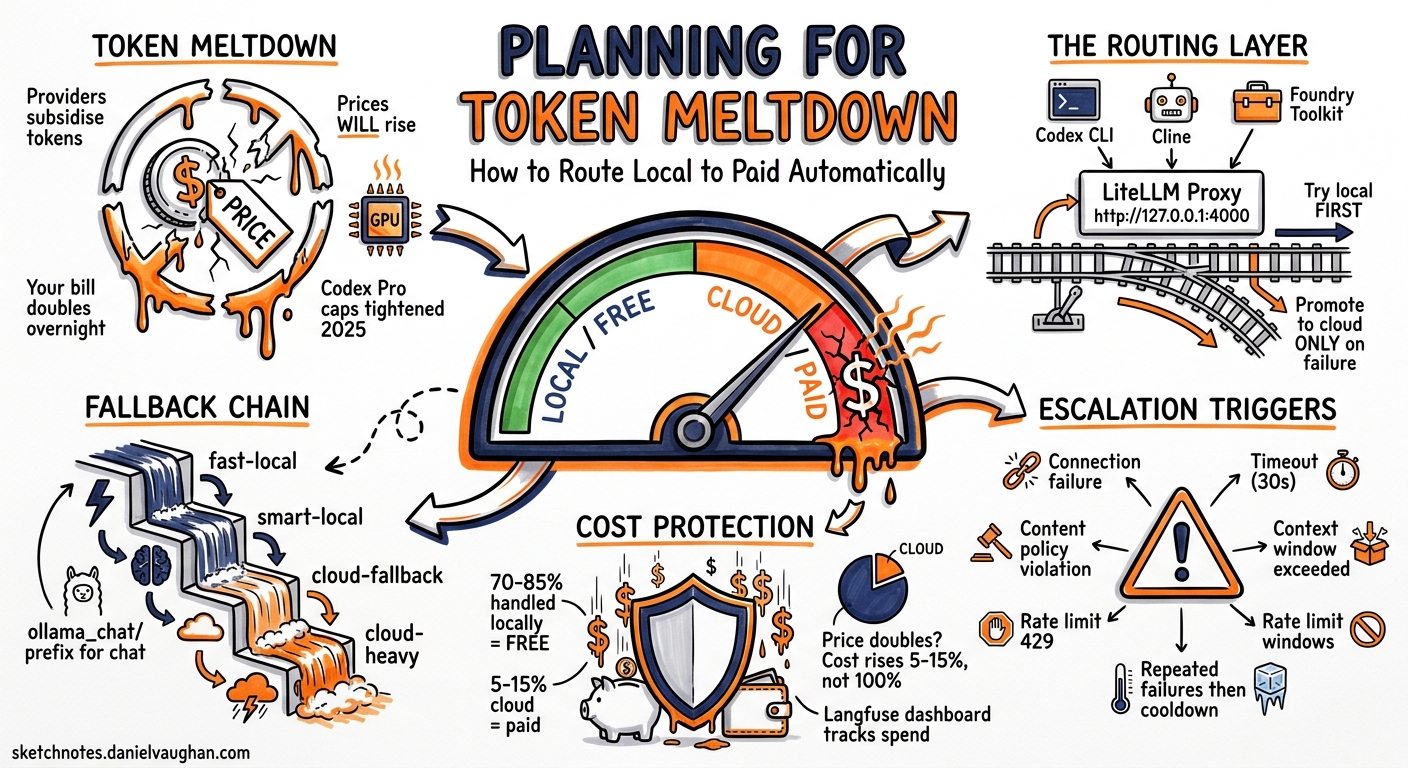
Token meltdown: when subsidies end
Cloud model providers subsidise token costs to win market share. OpenAI lost an estimated $5 billion in 2025 while generating $3.7 billion in revenue, spending $1.35 for every dollar earned, largely on inference serving1. That subsidy is unwinding. When a provider raises prices, removes a bundled tier, or shifts to usage-based billing, your costs spike overnight. That is token meltdown.
It is already happening. In April 2026, Anthropic eliminated bundled token allowances from enterprise seat plans, moving every customer to metered API billing on top of the base fee2. GitHub announced that all Copilot plans transition to usage-based AI Credits on 1 June 2026, replacing flat-rate premium requests with token billing. Uber burned through its entire 2026 AI budget in four months after Claude Code adoption jumped from 32 per cent to 84 per cent of its 5,000 engineers, with monthly API costs per engineer reaching $500–$2,0001. Per-token prices have fallen 280 times over two years, yet enterprise AI bills have risen 320 per cent in the same period because agentic workflows trigger 10–20 LLM calls per task.
The mitigation is straightforward: run a local model for the majority of your requests and promote to cloud only when the local model genuinely cannot handle the task. You pay nothing for local inference, and you control when cloud spend happens. The routing layer that makes this automatic is LiteLLM3 running as a local proxy.
The problem: local models cannot escalate themselves
You run a local model for speed and cost. It handles 80 per cent of requests well. Then it hits a task that exceeds its context window, or requires reasoning it cannot produce, or simply times out under load. The request fails. You notice 20 minutes later.
Local models have no native mechanism to say ‘this is beyond me, send it to something better.’ They either produce an answer (possibly wrong) or fail silently. The user experience degrades without warning.
The fix is a routing layer that sits between your tools and your models, tries the fast local option first, and automatically promotes to a cloud model when the local one fails. When token meltdown arrives and cloud prices double, your exposure is limited to the 10–20 per cent of requests that genuinely need cloud capability.
The architecture
graph TD
    A["Codex CLI<br/>--provider"] --> D
    B["Cline"] --> D
    C["Foundry Toolkit"] --> D

    D["LiteLLM Proxy<br/>http://127.0.0.1:4000<br/>Router: fast → smart → cloud"]

    D --> E["Ollama (local)<br/>gpt-oss:120b<br/>qwen3:32b"]
    D --> F["OpenAI / Anthropic<br/>gpt-5.4-mini<br/>claude-sonnet"]
Every tool that speaks the OpenAI-compatible API — Codex CLI, Cline, Foundry Toolkit — points to a single URL: http://127.0.0.1:4000/v1. The router handles everything else.
Setting up LiteLLM as the routing layer
Install and start
pip install 'litellm[proxy]'
litellm --config config.yaml --port 4000
The configuration file
This config defines four tiers: fast local, smart local, cloud fallback, and cloud heavy. The router tries them in order via the fallback chain.
# config.yaml
model_list:
  # Tier 1: Fast local (Ollama)
  - model_name: fast-local
    litellm_params:
      model: ollama_chat/qwen3:8b
      api_base: http://localhost:11434
      rpm: 120

  # Tier 2: Smart local (larger Ollama model)
  - model_name: smart-local
    litellm_params:
      model: ollama_chat/qwen3:32b
      api_base: http://localhost:11434
      rpm: 30

  # Tier 3: Cloud fallback (OpenAI)
  - model_name: cloud-fallback
    litellm_params:
      model: openai/gpt-5.4-mini
      api_key: os.environ/OPENAI_API_KEY
      rpm: 200

  # Tier 4: Cloud heavy (for complex reasoning)
  - model_name: cloud-heavy
    litellm_params:
      model: openai/gpt-5.5
      api_key: os.environ/OPENAI_API_KEY
      rpm: 60

router_settings:
  routing_strategy: simple-shuffle
  num_retries: 2
  timeout: 30
  allowed_fails: 3
  cooldown_time: 60

litellm_settings:
  # If fast-local fails, try smart-local, then cloud
  fallbacks:
    - fast-local: ["smart-local", "cloud-fallback"]
    - smart-local: ["cloud-fallback"]
    - cloud-fallback: ["cloud-heavy"]

  # If context window exceeded, jump straight to cloud
  context_window_fallbacks:
    - fast-local: ["smart-local", "cloud-heavy"]
    - smart-local: ["cloud-heavy"]

  request_timeout: 30
What triggers escalation
The router promotes to the next tier when:
-
Connection failure. The local model is not running, has crashed, or is out of memory. LiteLLM gets a connection error and immediately tries the next tier.
-
Timeout. The local model takes longer than
timeoutseconds. For a fast 8B model, 30 seconds is generous. If it is not done, something is wrong. -
Context window exceeded. The input exceeds the model’s context limit. LiteLLM catches the
ContextWindowExceededErrorand usescontext_window_fallbacksto jump to a model with a larger window, skipping intermediate tiers that would also fail. -
Rate limit (429). If a cloud model in the chain returns a 429, the router falls through to the next deployment. Ollama itself queues requests rather than rate-limiting, so this trigger applies primarily to cloud tiers.
-
Repeated failures. After
allowed_failsconsecutive failures, the deployment enters cooldown forcooldown_timeseconds (60 here). During cooldown, all requests route to the next tier automatically. -
Content policy violation. If a model refuses a legitimate request due to overly conservative filtering,
content_policy_fallbackscan route to a model with different policies.
Pointing your tools at the proxy
Codex CLI
# ~/.codex/config.toml
[model_providers.litellm-local]
name = "LiteLLM Local Router"
base_url = "http://127.0.0.1:4000/v1"
# ~/.codex/routed.config.toml
model = "fast-local"
model_provider = "litellm-local"
codex --profile routed "Refactor the authentication module"
Codex sends the request to LiteLLM at port 4000. LiteLLM tries the fast local model first. If it fails or times out, the response comes from the cloud, and Codex never knows the difference. Your cloud spend stays near zero until a request genuinely needs it.
Cline
In Cline’s settings, set the custom API endpoint to http://127.0.0.1:4000/v1 and the model to fast-local. Cline speaks the standard OpenAI chat completions API, so it works without modification.
Foundry Toolkit
Configure the custom endpoint in Foundry Toolkit to http://127.0.0.1:4000/v1. Any tool that accepts a custom OpenAI-compatible base URL works with this pattern.
Any OpenAI-compatible tool
The proxy exposes the standard /v1/chat/completions, /v1/completions, and /v1/embeddings endpoints. Anything that can point at an OpenAI base URL can use this routing layer without code changes.
Latency-based routing
The simple-shuffle strategy above routes on failures. Latency-based routing goes further, promoting to cloud when the local model becomes slow under load, not just when it fails:
router_settings:
  routing_strategy: latency-based-routing
  # Route to lowest-latency deployment
  # Local models are faster when idle, cloud is faster under load
With latency-based routing, the proxy measures response times across all tiers. When your local GPU is saturated and response times spike from two seconds to 15 seconds, the router automatically shifts traffic to the cloud tier, which is responding in three seconds. When the local model recovers, traffic shifts back. This means you pay for cloud tokens only during genuine load spikes.
Cost tracking
LiteLLM tracks spend per model and per virtual key. Use this to verify the routing works and to monitor your cloud exposure before meltdown arrives:
litellm_settings:
  success_callback: ["langfuse"]  # or "datadog"
  callbacks: ["prometheus"]       # for /metrics endpoint

general_settings:
  master_key: sk-local-proxy-key
  database_url: postgresql://user:pass@localhost:5432/litellm
After a week of running, check the dashboard. You want to see:
- 70–85 per cent of requests handled locally (cost: zero)
- 10–20 per cent promoted to smart-local (cost: zero, but slower)
- 5–15 per cent falling through to cloud (cost: per-token pricing)
If cloud usage exceeds 20 per cent consistently, either your local model is too small for your workload, or your timeout thresholds are too aggressive. When token prices rise, this ratio is your cost multiplier.
The meltdown scenario
Token meltdown has two forms.
Price meltdown: Your provider doubles token prices or removes a tier. If 100 per cent of your traffic hits the cloud, your bill doubles overnight. With routing, only 5–15 per cent of requests use cloud tokens, so a price doubling increases your total cost by 5–15 per cent, not 100 per cent.
Context meltdown: You start a large refactoring task that generates prompts exceeding 40,000 tokens. A smaller local model with a 32,000-token context window cannot handle the request. Without routing, you manually switch profiles or restart with a different model. With routing, context_window_fallbacks catches the error and promotes to cloud within the same request, no interruption.
Thermal meltdown: Your GPU hits thermal limits under sustained load, the local model starts producing garbage or timing out, and the router quietly moves traffic to the cloud until the hardware recovers.
In all three cases, the routing layer absorbs the shock automatically. You keep working, and you review the cost dashboard later.
What this does not solve
- Quality routing. LiteLLM routes on failures, timeouts and latency. It does not route on output quality. If the local model produces a wrong answer confidently, the router has no way to know.
- Cost budgets. You can set spend limits per virtual key, but the router does not stop promoting to cloud when your budget is exhausted. It fails the request instead. You need external alerting on spend thresholds.
- Model selection intelligence. The complexity router4 adds rule-based task classification, scoring requests across seven dimensions (token count, code presence, reasoning markers) to route to appropriate tiers. It adds zero latency (no external API calls) but is not production-proven for coding workloads yet.
- Subscription changes. If your OpenAI API key loses access to a model entirely (tier removal, not just price increase), the fallback chain breaks at that tier. Monitor provider announcements and update your config before deprecation dates.
The configuration in practice
For a developer running Codex CLI with a local Ollama instance on a machine with 32GB of RAM and a 3090:
model_list:
  - model_name: coding-local
    litellm_params:
      model: ollama_chat/gpt-oss:120b
      api_base: http://localhost:11434

  - model_name: coding-cloud
    litellm_params:
      model: openai/gpt-5.4-mini
      api_key: os.environ/OPENAI_API_KEY

router_settings:
  timeout: 45

litellm_settings:
  fallbacks:
    - coding-local: ["coding-cloud"]
  context_window_fallbacks:
    - coding-local: ["coding-cloud"]
  request_timeout: 45
Two models. One local, one cloud. If local fails for any reason, cloud takes over. If the context window is too small, cloud takes over. Total configuration: 17 lines of YAML.
Point Codex CLI, Cline, and Foundry Toolkit at http://127.0.0.1:4000/v1. Done. When token prices rise, you are already protected.