GitHub Agent HQ Model Selection: Choosing GPT-5.4 vs GPT-5.3-Codex, Custom Agents, and the Multi-Agent GitHub Workflow
GitHub Agent HQ Model Selection: Choosing GPT-5.4 vs GPT-5.3-Codex, Custom Agents, and the Multi-Agent GitHub Workflow
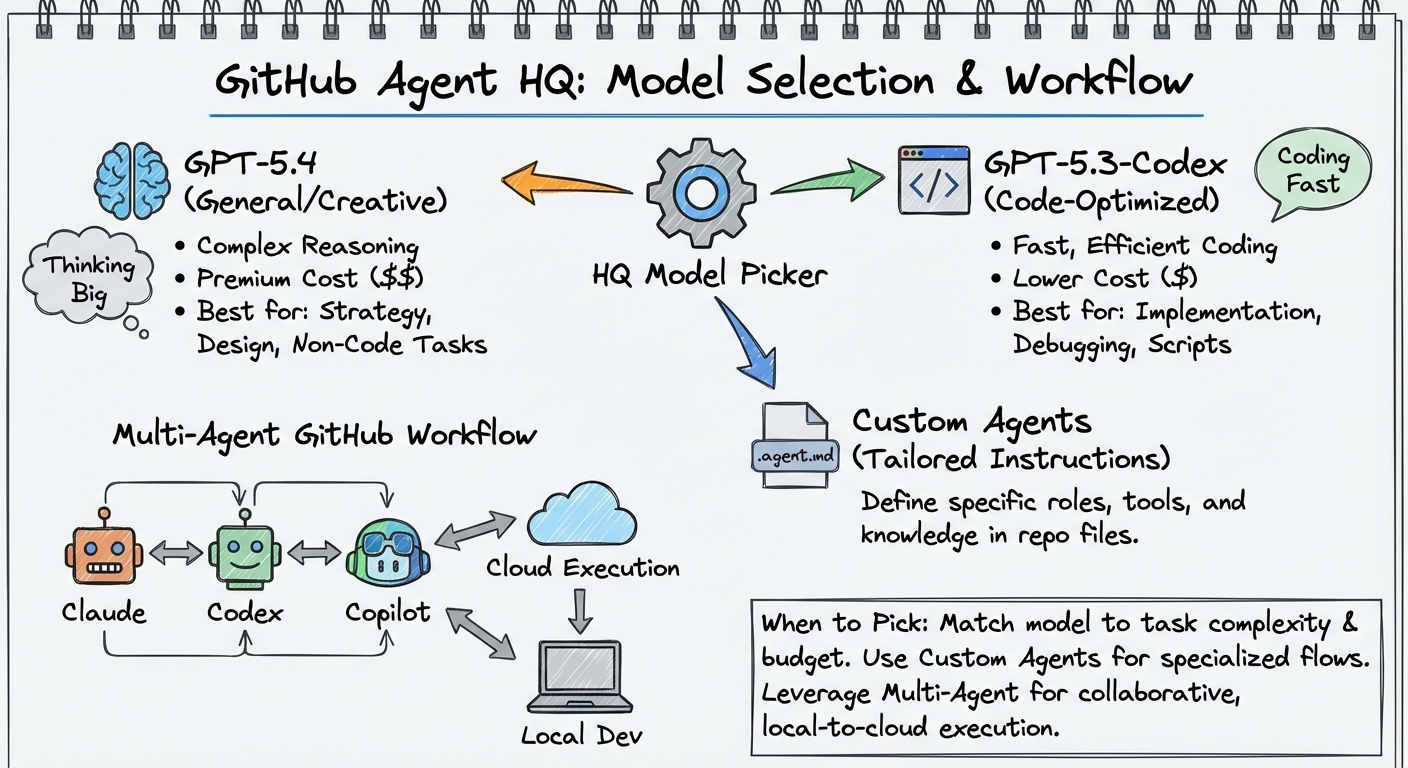
GitHub’s Agent HQ — the platform that lets developers assign coding tasks to Copilot, Claude, and Codex directly from issues, pull requests, and the Agents tab — gained model selection for third-party agents on 14 April 20261. Previously, the Codex agent on GitHub ran with a fixed model. Now you can choose between GPT-5.2-Codex, GPT-5.3-Codex, and GPT-5.4 when kicking off a task1. This article covers how model selection works, when to pick each model, how custom .agent.md files extend the system, and how all of this relates to your local Codex CLI workflows.
The Agent HQ Timeline
Agent HQ launched in public preview on 4 February 2026, bringing Claude and Codex alongside GitHub’s own Copilot cloud agent2. At launch, each third-party agent ran on a single default model — there was no model picker. Over the following weeks, GitHub expanded the surface:
- February 2026: Copilot Business and Pro users gained access to Claude and Codex agents3.
- March 2026: GPT-5.3-Codex received long-term support status for GitHub Copilot, guaranteed available through February 20274. GPT-5.4 became generally available for Copilot on 5 March5.
- 14 April 2026: Model selection shipped for Claude and Codex third-party agents, matching the existing Copilot model picker1.
timeline
    title Agent HQ Evolution
    4 Feb 2026 : Agent HQ public preview
                : Claude + Codex agents (fixed models)
    26 Feb 2026 : Business/Pro access
    5 Mar 2026 : GPT-5.4 GA in Copilot
    18 Mar 2026 : GPT-5.3-Codex LTS
    14 Apr 2026 : Model selection for third-party agents
How Model Selection Works
When you open the Agents tab on an enabled repository, or assign a Codex task from an issue or PR, you now see a model picker dropdown. The available models for the Codex agent are1:
| Model | Strengths | Best For |
|---|---|---|
| GPT-5.4 | Latest flagship, highest benchmark scores, strongest reasoning | Complex refactoring, architecture decisions, multi-file changes |
| GPT-5.3-Codex | Purpose-built for coding, 25% faster than GPT-5.2, LTS until Feb 2027 | Bread-and-butter feature work, reliable daily driver |
| GPT-5.2-Codex | Legacy, being deprecated for ChatGPT sign-in | Only if you need reproducibility with existing workflows |
There is also an Auto option that lets GitHub select the model based on task characteristics6.
For the Claude agent, the picker offers Claude Opus 4.6, Claude Sonnet 4.6, Claude Opus 4.5, and Claude Sonnet 4.51.
The Premium Request Cost Model
Every agent session on GitHub consumes premium requests from your Copilot subscription allowance7. The cost varies by model:
- A standard chat interaction with the default model costs 1 premium request7.
- More capable models like GPT-5.4 or Claude Opus 4.6 consume more premium requests per interaction7.
- Complex multi-step agent tasks may consume several premium requests in a single session7.
This creates a direct cost-quality trade-off. Running every issue through GPT-5.4 burns through your monthly allowance faster than routing routine tasks to GPT-5.3-Codex.
GitHub Agent HQ vs Local Codex CLI
Understanding the architectural differences between GitHub’s hosted Codex agent and your local Codex CLI is essential for choosing the right surface for each task.
flowchart LR
    subgraph GitHub["GitHub Agent HQ"]
        I[Issue / PR / Agents Tab] --> CS[Cloud Sandbox]
        CS --> DR[Draft PR]
        DR --> R[Human Review]
    end
    subgraph Local["Local Codex CLI"]
        P[Terminal Prompt] --> LS[Local Sandbox]
        LS --> FC[File Changes]
        FC --> C[Commit / Push]
    end
    style GitHub fill:#e8f4f8,stroke:#0366d6
    style Local fill:#f0f8e8,stroke:#28a745
| Dimension | GitHub Agent HQ | Local Codex CLI |
|---|---|---|
| Execution | Asynchronous, cloud sandbox | Interactive or codex exec, local sandbox |
| Internet | Disabled during execution8 | Configurable (sandbox network policy) |
| Model choice | GPT-5.2/5.3/5.4 via picker | Any model via config.toml + custom providers |
| Context | Repository clone + setup script | Full filesystem, MCP servers, skills, subagents |
| Output | Draft PR for review | Direct file modifications |
| Multi-agent | Assign same issue to Copilot + Claude + Codex | TOML subagents, path-based addressing, up to 6 threads |
| Cost | Premium requests (Copilot subscription) | ChatGPT subscription or API key billing |
| Customisation | .agent.md files, AGENTS.md |
config.toml, AGENTS.md, skills, hooks, plugins |
When to Use Each
Use GitHub Agent HQ when:
- You want fire-and-forget task execution on an existing issue
- The task is self-contained within the repository (no external services needed)
- You want to compare how Copilot, Claude, and Codex each approach the same problem
- You are on mobile or away from your development machine
Use local Codex CLI when:
- You need MCP server access (Jira, databases, monitoring tools)
- The task requires interactive steering or mid-turn correction
- You need subagent orchestration with more than one parallel thread
- You want full control over sandbox policy, hooks, and approval modes
Custom Agents: The .agent.md Format
Alongside the third-party agent model picker, GitHub’s custom agent system lets you define specialised agents as .agent.md files in your repository9. These are not Codex CLI skills or plugins — they are GitHub Copilot cloud agents with their own instructions, tool access, and MCP server configurations.
File Structure
Custom agents live in .github/agents/ at the repository level, or in .github-private/agents/ for organisation-wide availability9:
.github/
  agents/
    security-reviewer.agent.md
    migration-helper.agent.md
    test-writer.agent.md
YAML Front Matter
Each .agent.md file combines YAML front matter with Markdown instructions9:
---
name: "security-reviewer"
description: "Reviews code changes for security vulnerabilities, OWASP Top 10, and dependency risks"
tools:
  - "github_api"
  - "code_search"
model: "gpt-5.4"
target: "github-copilot"
mcp-servers:
  snyk:
    command: "npx"
    args: ["-y", "@snyk/mcp-server"]
---

# Security Reviewer

You are a security-focused code reviewer. For every PR assigned to you:

1. Check for OWASP Top 10 vulnerabilities
2. Verify dependency versions against known CVEs
3. Flag any secrets or credentials in the diff
4. Provide a risk assessment (Low/Medium/High/Critical)
Key constraints: the prompt body has a maximum of 30,000 characters, and filenames may only contain periods, hyphens, underscores, and alphanumerics9.
How Custom Agents Relate to Codex CLI Skills
Custom .agent.md files and Codex CLI SKILL.md files solve similar problems — specialised agent behaviour for specific tasks — but they operate on different surfaces:
| Aspect | .agent.md (GitHub) |
SKILL.md (Codex CLI) |
|---|---|---|
| Runtime | GitHub Copilot cloud agent | Local Codex CLI session |
| Discovery | Agents tab picker | Automatic via directory walk |
| MCP | Configured per-agent in YAML | Configured in config.toml |
| Model | Set in front matter (model: key) |
Inherited from session or profile |
| Invocation | Manual selection or @mention |
Implicit (description match) or explicit |
| Max size | 30,000 characters | No hard limit (32 KiB AGENTS.md ceiling applies separately) |
For teams running both GitHub Agent HQ and local Codex CLI, the practical pattern is to maintain .agent.md files for cloud-executed workflows (CI review, issue triage) and SKILL.md files for interactive development tasks.
The Multi-Agent Bake-Off Pattern
One of Agent HQ’s most distinctive capabilities is assigning the same issue to multiple agents simultaneously2. You can assign an issue to Copilot, Claude, and Codex, then compare the three draft PRs they produce.
This is architecturally different from Codex CLI’s multi-agent model. On GitHub, each agent runs independently with no inter-agent communication — they are parallel, isolated attempts at the same problem. In Codex CLI, subagents communicate via structured messaging, share context through the parent agent, and can be orchestrated as a coordinated team.
Practical Workflow
flowchart TD
    IS[GitHub Issue: 'Refactor auth module'] --> A1["Assign @Copilot (GPT-5.4)"]
    IS --> A2["Assign @Claude (Opus 4.6)"]
    IS --> A3["Assign @Codex (GPT-5.3-Codex)"]
    A1 --> PR1[Draft PR #1]
    A2 --> PR2[Draft PR #2]
    A3 --> PR3[Draft PR #3]
    PR1 --> REVIEW[Compare approaches]
    PR2 --> REVIEW
    PR3 --> REVIEW
    REVIEW --> MERGE[Merge best solution]
This pattern works well for:
- Architecture decisions — see how different models approach the same structural problem
- Evaluating model upgrades — compare GPT-5.3-Codex vs GPT-5.4 on your actual codebase
- Critical changes — get independent verification from different AI providers
The cost is three sessions’ worth of premium requests per issue, so reserve this for high-value decisions rather than routine work.
Model Selection Strategy for GitHub Agent Tasks
With three Codex models now available on GitHub, a deliberate selection strategy prevents both wasted premium requests and suboptimal results.
Decision Framework
flowchart TD
    T[New GitHub Agent Task] --> C{Task complexity?}
    C -->|Simple bug fix, docs update| M1["GPT-5.3-Codex<br/>(reliable, lower cost)"]
    C -->|Multi-file refactor, architecture| M2["GPT-5.4<br/>(strongest reasoning)"]
    C -->|Reproducing existing behaviour| M3["GPT-5.2-Codex<br/>(legacy compatibility)"]
    C -->|Unsure| M4["Auto<br/>(GitHub selects)"]
GPT-5.4 is the right choice when the task requires reasoning across multiple files, understanding architectural constraints, or making non-obvious design decisions. It consumes more premium requests but produces better results on complex tasks5.
GPT-5.3-Codex remains the workhorse for standard feature implementation. Its LTS status until February 2027 means your team can standardise on it without worrying about imminent deprecation4. It is 25% faster than GPT-5.2-Codex and purpose-built for coding tasks.
GPT-5.2-Codex is deprecated for ChatGPT sign-in users as of 14 April 202610, but remains available on GitHub. Use it only if you have existing workflows that depend on its specific behaviour and you need time to migrate.
Connecting GitHub Agent Work to Local Codex CLI
The most effective teams use both surfaces. A common pattern:
- Triage on GitHub: assign routine issues to the Codex agent with GPT-5.3-Codex
- Complex work locally: pull down the branch for architectural changes, use Codex CLI with MCP servers and subagents
- Review on GitHub: use custom
.agent.mdreviewers or assign review to Claude for cross-model verification - CI validation: run
codex execin GitHub Actions viaopenai/codex-actionfor automated checks
The AGENTS.md file in your repository root serves both surfaces — GitHub’s Codex agent reads it when cloning the repo, and your local Codex CLI reads it during interactive sessions. This shared context file is the bridge between cloud and local workflows.
Enterprise Considerations
For Copilot Business and Enterprise subscribers, administrators must explicitly enable the Claude and Codex agent policies before team members can use them1. This provides organisational control over which AI providers are permitted.
Enterprise teams should consider:
- Model governance: standardise on GPT-5.3-Codex LTS for predictability, allow GPT-5.4 for senior engineers working on complex tasks
- Premium request budgets: monitor consumption via the Copilot billing dashboard, set alerts at budget thresholds7
- Custom agent libraries: build a shared
.github-private/agents/directory with organisation-specific review agents, security checkers, and compliance validators9 - Audit trails: agent sessions produce PR comments and draft PRs, creating a natural audit log of AI-assisted work
What Is Still Missing
Despite the model selection addition, several gaps remain:
- No subagent orchestration on GitHub: unlike Codex CLI’s TOML-defined subagents with path-based addressing, GitHub agents run as isolated sessions with no inter-agent coordination
- No MCP server persistence: custom agents can define MCP servers, but the cloud sandbox’s internet restrictions limit what external services can be reached during execution8
- No mid-session model switching: once a task starts with a selected model, you cannot change models mid-session (unlike Codex CLI’s
/modelcommand) - No Spark model: GPT-5.3-Codex-Spark (1,000+ tokens/second on Cerebras WSE-3) is not available on GitHub — it requires a ChatGPT Pro subscription and runs only through the local CLI or Codex App ⚠️
Looking Ahead
GitHub is actively working with Google, Cognition (Devin), and xAI to bring more agents into Agent HQ2. The custom agent .agent.md format is evolving toward a richer configuration surface. The model picker is likely to expand as new models launch — when GPT-5.4-mini or future Codex-specific models arrive, they should appear in the picker automatically.
For Codex CLI practitioners, the key insight is that GitHub Agent HQ is not a replacement for local CLI workflows — it is a complementary surface optimised for asynchronous, issue-driven work within the GitHub ecosystem. The model selection feature closes a significant gap, giving you the same model routing flexibility on GitHub that you already have locally via config.toml profiles.
Citations
-
GitHub Blog, “Model selection for Claude and Codex agents on github.com,” GitHub Changelog, 14 April 2026. https://github.blog/changelog/2026-04-14-model-selection-for-claude-and-codex-agents-on-github-com/ ↩ ↩2 ↩3 ↩4 ↩5 ↩6
-
GitHub Blog, “Pick your agent: Use Claude and Codex on Agent HQ,” 4 February 2026. https://github.blog/news-insights/company-news/pick-your-agent-use-claude-and-codex-on-agent-hq/ ↩ ↩2 ↩3
-
GitHub Blog, “Claude and Codex now available for Copilot Business & Pro users,” GitHub Changelog, 26 February 2026. https://github.blog/changelog/2026-02-26-claude-and-codex-now-available-for-copilot-business-pro-users/ ↩
-
GitHub Blog, “GPT-5.3-Codex long-term support in GitHub Copilot,” GitHub Changelog, 18 March 2026. https://github.blog/changelog/2026-03-18-gpt-5-3-codex-long-term-support-in-github-copilot/ ↩ ↩2
-
GitHub Blog, “GPT-5.4 is generally available in GitHub Copilot,” GitHub Changelog, 5 March 2026. https://github.blog/changelog/2026-03-05-gpt-5-4-is-generally-available-in-github-copilot/ ↩ ↩2
-
GitHub Docs, “About third-party agents,” 2026. https://docs.github.com/en/copilot/concepts/agents/about-third-party-agents ↩
-
GitHub Docs, “Requests in GitHub Copilot,” 2026. https://docs.github.com/en/copilot/concepts/billing/copilot-requests ↩ ↩2 ↩3 ↩4 ↩5
-
OpenAI, “Introducing Codex,” 2026. https://openai.com/index/introducing-codex/ ↩ ↩2
-
GitHub Docs, “Creating custom agents for Copilot cloud agent,” 2026. https://docs.github.com/en/copilot/how-tos/use-copilot-agents/cloud-agent/create-custom-agents ↩ ↩2 ↩3 ↩4 ↩5
-
OpenAI Developers, “Changelog — Codex,” April 2026. https://developers.openai.com/codex/changelog ↩