Transferring ChatGPT Conversations to Codex CLI
Transferring ChatGPT Conversations to Codex CLI
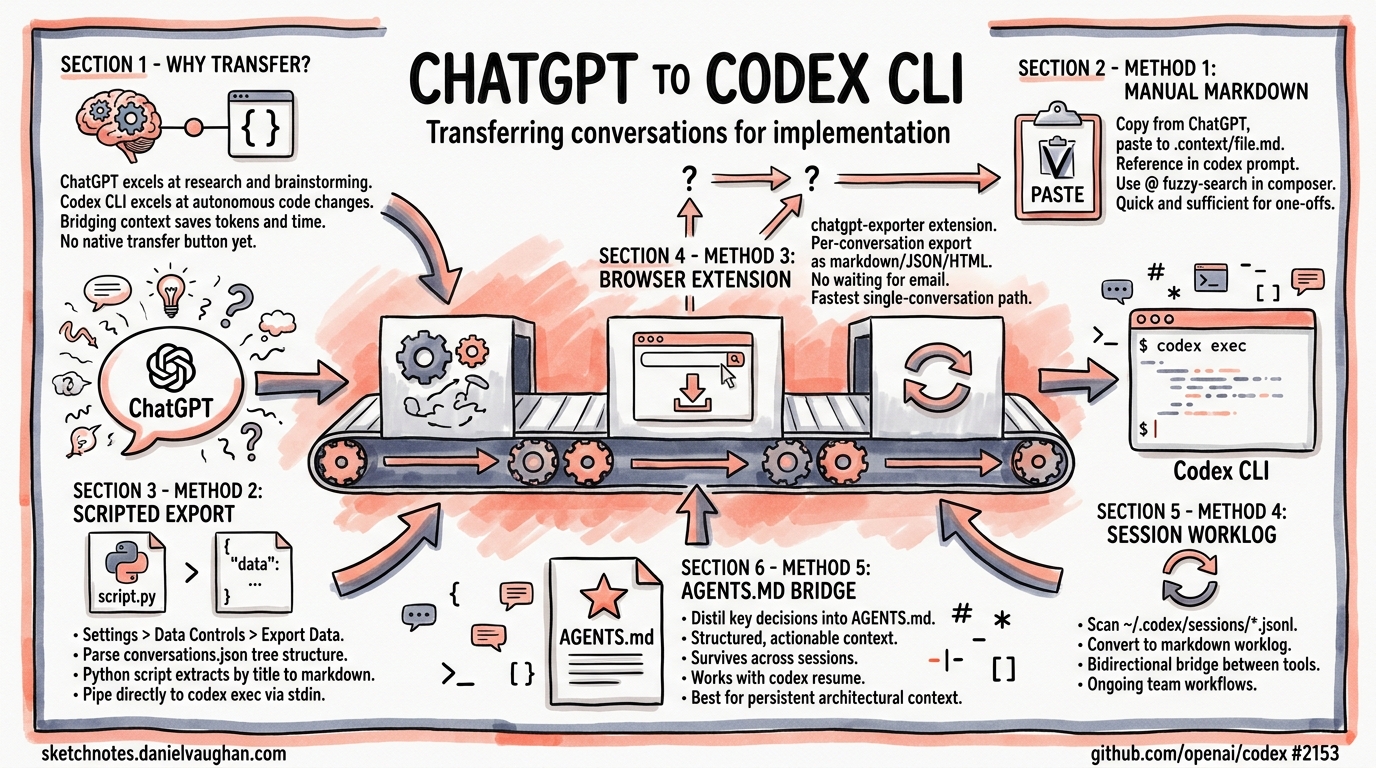
Many developers start their thinking in ChatGPT — brainstorming architecture, researching APIs, sketching out approaches with web search — then need to hand that context to Codex CLI for actual implementation. There is no native “transfer conversation” button yet1, but several practical patterns exist today to bridge the gap effectively. This article covers every viable method, from quick-and-dirty clipboard workflows to scripted pipelines that slot into your daily routine.
Why Transfer Context at All?
ChatGPT and Codex CLI serve different roles in a development workflow. ChatGPT excels at open-ended research, brainstorming, and leveraging web search2. Codex CLI excels at autonomous code changes within your actual repository, with sandboxed execution, approval modes, and git-aware tooling3. The problem is that context built up in one tool doesn’t automatically flow to the other — and rebuilding that context from scratch wastes tokens and time.
flowchart LR
    A[ChatGPT Web] -->|Research & Design| B[Export Context]
    B --> C{Transfer Method}
    C -->|Manual| D[Clipboard / Markdown File]
    C -->|Scripted| E[JSON Parser Pipeline]
    C -->|Piped| F[codex exec stdin]
    D --> G[Codex CLI Session]
    E --> G
    F --> G
    G -->|Implementation| H[Code Changes & Commits]
Method 1: Manual Markdown Handoff
The simplest approach — and often sufficient for one-off transfers.
Steps
- In ChatGPT, select the conversation content you need (or use the “Copy” button on individual responses).
- Paste into a markdown file in your project directory:
cat > .context/chatgpt-design-notes.md << 'EOF'
# Architecture Discussion from ChatGPT

## Key Decisions
- Use event-driven architecture for the notification service
- PostgreSQL for persistence, Redis for pub/sub
- Rate limiting at the API gateway level

## Proposed API Schema
...
EOF
- Reference the file when launching Codex CLI:
codex "Read .context/chatgpt-design-notes.md and implement the notification service as described"
Codex’s file-reading tools will ingest the markdown as part of its context window. The @ fuzzy-search in the interactive composer also lets you drop file paths directly into your prompt4.
When to Use This
Single conversations. Quick design-to-implementation handoffs. When you need to curate which parts of the conversation to transfer.
Method 2: ChatGPT Data Export and Scripted Extraction
For transferring multiple conversations or building repeatable workflows, use ChatGPT’s built-in data export.
Exporting from ChatGPT
Navigate to Settings → Data Controls → Export Data in ChatGPT5. OpenAI will email you a ZIP file containing conversations.json — a complete archive of every conversation in your account.
Understanding the Export Format
The conversations.json file uses a tree structure with a mapping field linking messages by UUID6:
{
  "title": "Notification Service Design",
  "create_time": 1713398400.0,
  "mapping": {
    "uuid-1": {
      "message": {
        "author": { "role": "user" },
        "content": { "content_type": "text", "parts": ["Design a notification..."] },
        "create_time": 1713398401.0
      },
      "parent": null,
      "children": ["uuid-2"]
    },
    "uuid-2": {
      "message": {
        "author": { "role": "assistant" },
        "content": { "content_type": "text", "parts": ["Here's my suggested..."] },
        "create_time": 1713398410.0
      },
      "parent": "uuid-1",
      "children": []
    }
  }
}
Conversion Script
This Python script extracts a named conversation into clean markdown suitable for Codex CLI:
#!/usr/bin/env python3
"""Extract a ChatGPT conversation to markdown for Codex CLI."""

import json
import sys
from pathlib import Path


def extract_conversation(export_path: str, title_search: str) -> str:
    data = json.loads(Path(export_path).read_text())

    # Find conversation by title substring
    conv = next(
        (c for c in data if title_search.lower() in c["title"].lower()),
        None,
    )
    if not conv:
        print(f"No conversation matching '{title_search}'", file=sys.stderr)
        sys.exit(1)

    # Extract messages sorted by timestamp
    messages = []
    for node in conv["mapping"].values():
        msg = node.get("message")
        if not msg or not msg.get("content", {}).get("parts"):
            continue
        role = msg["author"]["role"]
        text = "\n".join(msg["content"]["parts"])
        ts = msg.get("create_time", 0)
        if role in ("user", "assistant") and text.strip():
            messages.append((ts, role, text))

    messages.sort(key=lambda x: x[0])

    # Format as markdown
    lines = [f"# {conv['title']}\n"]
    for _, role, text in messages:
        prefix = "**User:**" if role == "user" else "**ChatGPT:**"
        lines.append(f"\n{prefix}\n\n{text}\n")

    return "\n".join(lines)


if __name__ == "__main__":
    if len(sys.argv) != 3:
        print("Usage: chatgpt2md.py <conversations.json> <title-search>")
        sys.exit(1)
    print(extract_conversation(sys.argv[1], sys.argv[2]))
Usage:
python3 chatgpt2md.py ~/Downloads/conversations.json "notification service" \
  > .context/chatgpt-notification-design.md
Piping Directly to Codex
The extracted markdown can be piped straight into codex exec using the prompt-plus-stdin pattern7:
python3 chatgpt2md.py conversations.json "notification service" \
  | codex exec "Implement the design described in this ChatGPT conversation"
When stdin is piped alongside a prompt argument, Codex treats the prompt as the instruction and the piped content as additional context8. This avoids creating intermediate files entirely.
Method 3: Browser Extension Export
The chatgpt-exporter browser extension provides per-conversation export in markdown, JSON, or HTML format directly from the ChatGPT interface9 — no need to wait for the full data export email.
# After exporting a single conversation as markdown
codex "Read .context/exported-chat.md and implement the suggested refactoring"
This is the fastest path for transferring a single conversation without scripting.
Method 4: Session Worklog Sync
For developers who work across both tools regularly, a session-scanning approach keeps a running worklog. One community pattern scans ~/.codex/sessions/ and converts each session to markdown10:
#!/usr/bin/env bash
# Sync Codex sessions to a worklog directory
SESSIONS_DIR="$HOME/.codex/sessions"
WORKLOG_DIR="./worklog"
mkdir -p "$WORKLOG_DIR"

for session in "$SESSIONS_DIR"/*.jsonl; do
  name=$(basename "$session" .jsonl)
  target="$WORKLOG_DIR/${name}.md"
  [ -f "$target" ] && continue

  echo "# Session: $name" > "$target"
  echo "" >> "$target"
  jq -r 'select(.type == "message") |
    "## " + .message.role + "\n\n" + .message.content + "\n"' \
    "$session" >> "$target" 2>/dev/null
done
This creates a bidirectional bridge: ChatGPT context comes in via the methods above, and Codex session history becomes available for reference back in ChatGPT.
Method 5: AGENTS.md as a Persistent Context Bridge
Rather than transferring raw conversation history, distil the key decisions into your project’s AGENTS.md file11. This is often more effective than dumping an entire conversation, because it gives Codex structured, actionable context:
# AGENTS.md

## Architecture Decisions (from ChatGPT research session 2026-04-18)

- Event-driven notification service using PostgreSQL + Redis pub/sub
- Rate limiting handled at API gateway, not service level
- Use OpenAPI 3.1 spec-first approach for API design
- Error responses follow RFC 9457 Problem Details format

## Implementation Constraints

- Target 99.9% uptime SLA — circuit breakers on all external calls
- Max notification latency: 500ms p99
- Must support webhook, email, and push notification channels
This approach survives across sessions, works with codex resume12, and benefits every future Codex invocation in the repository — not just the immediate one.
Choosing the Right Method
flowchart TD
    A[Need to transfer ChatGPT context?] --> B{How many conversations?}
    B -->|One| C{Need it quickly?}
    C -->|Yes| D[Method 1: Manual Copy]
    C -->|No| E[Method 3: Browser Extension]
    B -->|Multiple| F[Method 2: Scripted Export]
    A --> G{Ongoing workflow?}
    G -->|Yes| H[Method 5: AGENTS.md Bridge]
    G -->|One-off| B
    A --> I{Need bidirectional sync?}
    I -->|Yes| J[Method 4: Session Worklog]
| Method | Speed | Automation | Best For |
|---|---|---|---|
| Manual markdown | Fast | None | Quick one-off transfers |
| Scripted export | Medium | Full | Batch processing, CI pipelines |
| Browser extension | Fast | None | Single conversation, no scripting |
| Session worklog | Slow setup | Ongoing | Bidirectional team workflows |
| AGENTS.md bridge | Medium | None | Persistent architectural context |
What’s Coming: Native Integration
This is one of the most-requested features in the Codex CLI repository. Issue #2153 has over 111 upvotes and is the canonical tracking issue for ChatGPT–Codex integration1. OpenAI’s team has acknowledged the demand, and the recent additions of plugin support and sub-agent messaging in the April 2026 changelog13 suggest the infrastructure for cross-product context sharing is being built. Until then, the patterns above will keep your workflow moving.
Citations
-
ChatGPT integration · Issue #2153 · openai/codex — 111+ upvotes, canonical feature request for ChatGPT–Codex integration. ↩ ↩2
-
[Using Codex with your ChatGPT plan OpenAI Help Center](https://help.openai.com/en/articles/11369540-using-codex-with-your-chatgpt-plan) — Official guidance on ChatGPT and Codex relationship. -
[CLI – Codex OpenAI Developers](https://developers.openai.com/codex/cli) — Official Codex CLI documentation and capabilities overview. -
[Features – Codex CLI OpenAI Developers](https://developers.openai.com/codex/cli/features) — Interactive composer features including @file fuzzy-search. -
How to Export ChatGPT Conversations: Every Method Compared (2026) — Comprehensive guide to ChatGPT export methods. ↩
-
Decoding Exported Data by Parsing conversations.json — OpenAI Developer Community — Community analysis of the conversations.json tree structure. ↩
-
[Non-interactive mode – Codex OpenAI Developers](https://developers.openai.com/codex/noninteractive) — Official documentation for codex execstdin piping. -
Support Codex CLI stdin piping for
codex exec· PR #15917 · openai/codex — Implementation of prompt-plus-stdin support. ↩ -
chatgpt-exporter — GitHub — Browser extension for per-conversation ChatGPT export. ↩
-
Sync my chats, conversation history between ChatGPT website, Codex in VScode · Issue #5609 · openai/codex — Community workaround scanning
~/.codex/sessions/. ↩ -
Codex CLI Features — AGENTS.md — Documentation for AGENTS.md project configuration. ↩
-
[Command line options – Codex CLI OpenAI Developers](https://developers.openai.com/codex/cli/reference) — codex resumesubcommand reference. -
[Changelog – Codex OpenAI Developers](https://developers.openai.com/codex/changelog) — April 2026 changelog entries for plugin support and sub-agent messaging.