Codex CLI as a Unix Citizen: Prompt-Plus-Stdin, Shell Pipelines, and Composable Agent Workflows
Codex CLI as a Unix Citizen: Prompt-Plus-Stdin, Shell Pipelines, and Composable Agent Workflows
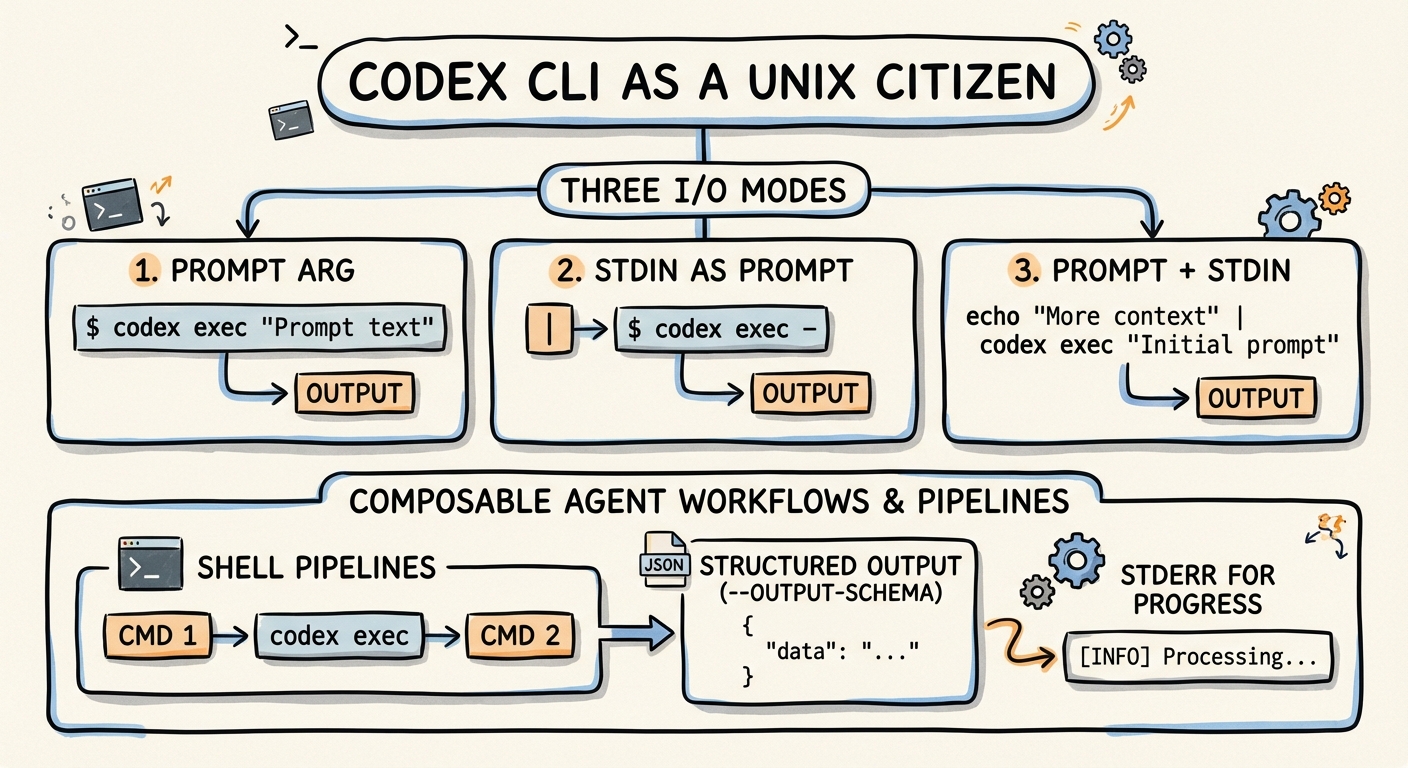
The Unix philosophy — small tools, text streams, composable pipelines — has survived every paradigm shift in computing for half a century. With the prompt-plus-stdin feature (PR #159171), codex exec now participates fully in that tradition. This article covers how Codex CLI handles standard input, how it separates human-readable progress from machine-parseable output, and how to compose it with the rest of your shell toolkit to build workflows that would have been science fiction two years ago.
The Three I/O Modes of codex exec
codex exec supports three distinct input patterns, each mapping to a different Unix use case2:
1. Prompt Argument Only
The simplest form — pass the instruction as a positional argument:
codex exec "list all TODO comments in this repo"
2. Stdin as Full Prompt (codex exec -)
When another tool generates the entire instruction dynamically, use - to read the prompt from stdin2:
cat prompt.txt | codex exec -
This is useful when prompts are templated, version-controlled, or generated by upstream processes.
3. Prompt-Plus-Stdin (Combined Mode)
The newest and most powerful pattern: provide an explicit prompt argument and pipe data via stdin. Codex appends the piped content as a <stdin> block after the prompt1:
npm test 2>&1 | codex exec "summarise the failing tests and propose the smallest likely fix"
The instruction ("summarise the failing tests...") is yours; the context (test output) comes from the pipe. This separation of intent from data is what makes the pattern composable.
flowchart LR
    A[upstream command] -->|stdout| B["codex exec 'instruction'"]
    B -->|stdout: final message| C[downstream consumer]
    B -->|stderr: progress| D[terminal / /dev/null]
Stream Separation: stdout vs stderr
codex exec follows the Unix convention rigorously23:
| Stream | Content | Machine-parseable |
|---|---|---|
| stdout | Final agent message (or JSONL events with --json) |
Yes |
| stderr | Progress indicators, spinner, status updates | No |
This means you can pipe Codex output directly into another tool without progress noise contaminating the stream:
git diff HEAD~3 | codex exec "write release notes for these changes" > RELEASE_NOTES.md
Progress still appears on your terminal (stderr), but RELEASE_NOTES.md contains only the agent’s final response.
The Pipeline Cookbook
Log Triage
Pipe application logs into Codex for root-cause analysis:
tail -n 500 /var/log/app/error.log \
  | codex exec "identify the root cause, cite the most important errors, and suggest the next three debugging steps" \
  | tee triage-report.md
The tee preserves a copy for audit while passing the output onwards4.
TLS and HTTP Debugging
curl -vv https://api.example.com/health 2>&1 \
  | codex exec "explain the TLS or HTTP failure and suggest the most likely fix"
The 2>&1 redirect is critical here — curl -vv writes verbose output to stderr, which must be redirected to stdout before piping to Codex4.
Diff Review in a Pre-Push Hook
#!/usr/bin/env bash
# .git/hooks/pre-push
git diff origin/main...HEAD \
  | codex exec --ephemeral "review this diff for security issues, credential leaks, and obvious bugs. Output PASS or FAIL on the first line, then details." \
  | { read verdict; if [ "$verdict" = "FAIL" ]; then cat; exit 1; fi; }
The --ephemeral flag prevents session files from persisting, keeping hook execution clean2.
Data Transformation
curl -s https://api.github.com/repos/openai/codex/releases \
  | codex exec "format the 10 most recent releases as a markdown table with columns: tag, date, highlights"
Batch Processing with xargs
Process multiple files through Codex in parallel:
find src/ -name "*.ts" -newer .last-review \
  | xargs -P4 -I{} sh -c \
    'cat "{}" | codex exec --ephemeral "review this TypeScript file for type-safety issues" -o "reviews/$(basename {}).md"'
The -P4 flag runs four Codex instances concurrently. Each writes its review to a separate file via -o2.
Structured Output with --output-schema
For pipelines that need machine-parseable responses (not just human-readable text), --output-schema constrains the agent’s final output to a JSON Schema25:
{
  "type": "object",
  "properties": {
    "verdict": { "type": "string", "enum": ["pass", "fail", "warning"] },
    "issues": {
      "type": "array",
      "items": {
        "type": "object",
        "properties": {
          "file": { "type": "string" },
          "line": { "type": "integer" },
          "severity": { "type": "string" },
          "description": { "type": "string" }
        },
        "required": ["file", "severity", "description"]
      }
    },
    "summary": { "type": "string" }
  },
  "required": ["verdict", "issues", "summary"]
}
Save this as review-schema.json, then:
git diff --staged \
  | codex exec "review this diff for bugs and security issues" \
    --output-schema review-schema.json \
    -o review.json

# Downstream: fail CI if verdict is not pass
jq -e '.verdict == "pass"' review.json || exit 1
The schema acts as a contract between Codex and your pipeline. Combined with jq, you get type-safe agent output that integrates cleanly with existing shell scripts and CI systems5.
The JSONL Event Stream
For full observability, --json emits newline-delimited JSON events covering the entire execution lifecycle36:
codex exec --json "refactor the auth module" 2>/dev/null \
  | jq -c 'select(.type == "item.completed" and .item.type == "command")'
This filters the JSONL stream to show only completed command executions — useful for auditing exactly which shell commands the agent ran. Key event types include thread.started, turn.started, item.started, item.completed, turn.completed, and turn.failed6.
Model and Profile Selection in Pipelines
Different pipeline stages may warrant different models. Use --model and --profile to switch per-invocation27:
# Fast triage with mini model
cat error.log \
  | codex exec -m gpt-5.4-mini "classify this error as critical/warning/info" \
    --output-schema severity-schema.json \
    -o severity.json

# Deep analysis with flagship only for critical errors
if jq -e '.severity == "critical"' severity.json > /dev/null; then
  cat error.log \
    | codex exec -m gpt-5.4 "perform root-cause analysis and suggest a fix" \
      -o analysis.md
fi
This tiered approach routes cheap classification to gpt-5.4-mini (~30% the cost of gpt-5.48) and reserves the flagship model for cases that need deeper reasoning.
Chaining Multiple Codex Calls
The prompt-plus-stdin pattern composes naturally into multi-stage pipelines:
# Stage 1: Extract failing test names
npm test 2>&1 \
  | codex exec --ephemeral "list only the failing test names, one per line" \
  | while read test_name; do
      # Stage 2: Generate fix for each failing test
      codex exec --ephemeral "fix the failing test: $test_name" -o "fixes/${test_name}.md"
    done
Each stage is stateless (--ephemeral) and produces clean text output suitable for the next stage. This is the Unix pipeline pattern applied to agent reasoning.
Environment Variables
codex exec respects several environment variables for CI/CD integration2:
| Variable | Purpose |
|---|---|
CODEX_API_KEY |
API key (avoids stored auth) |
CODEX_QUIET_MODE |
Suppresses stderr progress output |
CODEX_HOME |
Overrides default config directory |
In CI environments where no interactive auth is available, inline the key:
CODEX_API_KEY=$OPENAI_KEY codex exec --json "generate changelog" -o changelog.md
Design Principles
The prompt-plus-stdin pattern succeeds because it respects constraints that Unix veterans expect12:
- Separation of concerns: instruction (argument) vs data (stdin) vs progress (stderr) vs result (stdout)
- Statelessness:
--ephemeralensures no side effects between pipeline stages - Composability: text in, text out — or structured JSON with
--output-schema - Fail-fast: non-zero exit codes on failures; required MCP servers that fail to initialise cause immediate exit
- Idempotency: the same prompt with the same stdin produces deterministic-enough output for scripting (within the bounds of LLM stochasticity)
Known Limitations
- Token limits on stdin: piping very large files (>100K tokens) may exceed the model’s context window. Pre-filter with
head,grep, orawkbefore piping to Codex2. - Binary content: stdin must be valid UTF-8. Binary data will cause a read error (issue #87339).
- No streaming stdin: Codex reads stdin to completion before starting inference. It cannot process an ongoing stream incrementally.
- Rate limits: parallel
xargspatterns can hit API rate limits quickly. Use the backoff strategies documented in the rate-limiting guide10, or route through an AI gateway such as Bifrost or Portkey11.
Citations
-
Support Codex CLI stdin piping for
codex exec— PR #15917 ↩ ↩2 ↩3 -
[Non-interactive mode — Codex OpenAI Developers](https://developers.openai.com/codex/noninteractive) -
[Command line options — Codex CLI OpenAI Developers](https://developers.openai.com/codex/cli/reference) -
[Configuration Reference — Codex OpenAI Developers](https://developers.openai.com/codex/config-reference) -
GPT-5.4 vs GPT-5.3-Codex: Benchmark and Pricing Comparison — AI Free API ↩
-
Failed to read prompt from stdin: stream did not contain valid UTF-8 — Issue #8733 ↩
-
Codex CLI Rate Limiting, Backoff, and Retry — danielvaughan.com ↩
-
CliGate and Bifrost: The Multi-Harness AI Gateway — danielvaughan.com ↩